
You check Google, see one location showing up in [City], another disappearing in [Neighborhood], and you still can't tell what changed or what to fix first. A serp position api solves that by pulling search results into structured data so you can track where each location appears and connect those changes to calls, messages, bookings, and tours.
For a local business, this matters because visibility isn't just “are we ranking?” It's which location ranks, for which service, in which area, on which device, and whether that visibility is strong enough to earn the click or call.
Table of Contents
- Your Starting Point for Automated Rank Tracking
- Understanding What a SERP Position API Delivers
- Core API Concepts for Business Operators
- How to Interpret the API Response Data
- Practical Integration with Code Examples
- Sample Workflows for Multi-Location Businesses
- Templates and Checklists to Fuel Your Growth
- Measuring Your ROI from Local Rank Tracking
- Frequently Asked Questions
Your Starting Point for Automated Rank Tracking
A SERP is a search engine results page. An API is an application programming interface, which is just a way for software to request data from another system without a person doing the work manually.
That matters because a serp position api has moved far beyond old rank checkers. Authoritas describes its Rank Tracker API as a REST API that returns JSON of the SERP on-demand so teams can retrieve ranking URLs and SERP features in an easy-to-consume format through its rank tracker API documentation. For a local operator, that means you're no longer stuck with screenshots, one-off searches, and “I think we dropped.”
If you run a dental practice, med spa, HVAC company, vet clinic, or senior living community, the key question isn't just whether you rank for “near me” searches. It's whether the right location shows up in the organic results, the map results, or another search feature where customers make fast decisions.
Key Facts
- A serp position api returns structured search data instead of making your team check rankings by hand.
- Local visibility is context-dependent because location and device change what people actually see.
- Rank alone can mislead if the page is pushed down by maps, ads, featured snippets, or AI-generated search features.
- Multi-location teams get the most value when they treat rank tracking as location intelligence, not a vanity report.
- Google Business Profile work and review management often explain rank movement more clearly than broad SEO theory.
If you want a practical example of how businesses use this in local search, this overview of a Google position checker API shows how rank monitoring can help verify local pack presence and compare performance against nearby competitors.
A useful companion read is this breakdown of local search ranking factors, especially if you want to connect ranking data back to what usually drives local visibility in the first place.
Practical rule: If a report can't tell you what changed by location, device, and result type, it won't help you protect calls and bookings.
Understanding What a SERP Position API Delivers
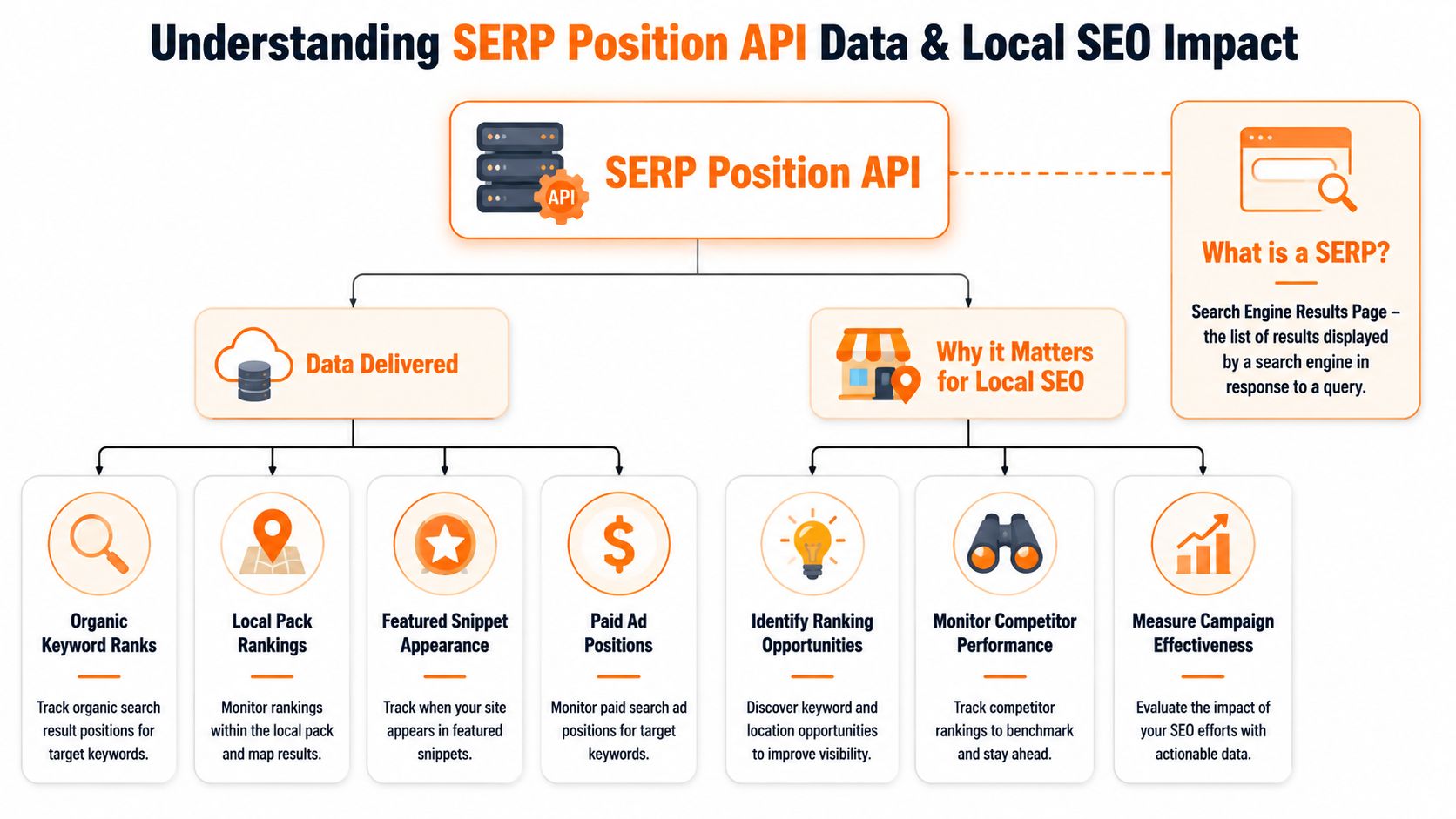
A good serp position api gives you more than a ranking number. It returns the search result in normalized JSON, typically with fields like title, URL, snippet, position, and result type such as organic, local, or ads, which is why Crustdata's SERP API overview is useful for understanding what practical output should look like.
For local marketing, that structure matters because different result types affect customer behavior in different ways. A practice might rank organically for “cosmetic dentist [City]” but lose calls if the map pack dominates the screen and the Google Business Profile is missing there.
The terms that matter
Here are the only technical terms most operators need to know:
| Term | Plain-English meaning | Why you should care |
|---|---|---|
| SERP | The page Google shows after a search | That's where customers choose who to contact |
| API | A system that delivers the SERP data automatically | It removes manual checking |
| JSON | A structured data format | It makes reporting and dashboards possible |
| Organic result | A standard website listing | Useful for service pages and location pages |
| Local pack | The map-based local business results | Often the highest-intent area for “near me” searches |
| Featured snippet | A highlighted answer box | Can win visibility above standard results |
If you want another plain-English look at the category, this guide to keyword position tracking APIs gives helpful context on how these tools are used for monitoring search positions.
How Google local rankings should shape your tracking
Google local rankings are usually understood through proximity, relevance, and prominence.
- Proximity means how close the searcher is to your business or service area.
- Relevance means how closely your profile, pages, and categories match the search.
- Prominence reflects how established and trusted your business appears, often influenced by reviews, citations, and overall visibility.
That model explains why a business can rank well in [City] Center but poorly in [Neighborhood] West. It also explains why desktop and mobile rank checks can tell different stories. A local pack may be more visually dominant on mobile, while organic listings may carry more weight on another layout.
If your report only tracks one keyword from one ZIP code on one device, it's not local SEO reporting. It's a snapshot.
Core API Concepts for Business Operators
You don't need to write software to use a serp position api well. You do need to understand the settings that control what data you get back.
The business-side glossary
Endpoint
This is the place you send the request. Think of it as the doorway to the provider's data.
Parameters
These are the instructions attached to the request. For local rank tracking, the important ones usually include the keyword, city, device, language, search engine, and sometimes date or result count.
Authentication
This is how the provider confirms your account can make the request. In most tools, that means an API key.
Rate limits
These control how many requests you can make in a period. They matter if you're checking many services across many locations.
Pagination
This is how larger result sets are split across pages or batches. It matters when you want more than the first screen of results.
For operators managing many profiles, location accuracy matters as much as technical access. If your listings themselves are inconsistent, rank tracking turns noisy fast. That's why maintaining local listings on Google should sit alongside your tracking setup.
What actually matters when choosing a provider
Provider comparisons often focus on volume and flashy features. In practice, the smarter filter is reliability.
Bright Data's documentation frames the main technical best practice clearly: prioritize reliability and consistency, not raw scraping throughput. It also notes that SERP APIs are meant to abstract proxy rotation, CAPTCHA handling, and HTML parsing, with some providers advertising structured results in under 1–2 seconds per request in its SERP API introduction.
For a business operator, that turns into a short checklist:
- Stable fields: Your dashboard shouldn't break because a provider changes output structure.
- Location controls: You need city or local targeting, not just country-level checks.
- Device controls: Mobile and desktop should be separate.
- Feature extraction: Organic-only data misses too much local context.
- Repeatability: The same query should behave consistently enough to support reporting.
A tool that returns fast but inconsistent data creates busywork. A tool that returns slightly slower but cleaner data usually creates better decisions.
How to Interpret the API Response Data
Most responses arrive in JSON. That can look intimidating at first, but for local rank tracking you're usually hunting for a short list of fields.
A plain-English example
Say you run a veterinary clinic and search “vet clinic near me” from [City]. A typical response may contain sections such as:
organic_resultsfor website listingslocal_packfor map-style business listingsadsif paid placements appearserp_featuresfor things like featured snippets or related modules
If your clinic website appears in organic_results, the fields that matter most are the ranking position, the exact URL, and the snippet text. If your Google Business Profile appears in local_pack, you care about whether it shows up at all, where it appears relative to nearby competitors, and whether the listing details look complete and current.
Here's the practical reading order:
Find the query context first
Confirm the keyword, location, device, and language. If those are wrong, the rest of the response won't help.Check local pack visibility next
For “near me” and service-intent queries, the map area often drives the highest-intent actions.Check the ranking URL
Make sure the page Google shows is the one you want. Sometimes the wrong page ranks, which creates conversion leakage.Review snippets and result type
Messaging on the search result itself can affect clicks before a user ever reaches your site.
What to check first when rankings move
When a location drops, don't assume the website is the problem.
Check these items in order:
- GBP accuracy: Hours, primary category, phone, and service details
- Review recency: Has recent feedback slowed or turned negative?
- Competitor movement: Did a nearby business improve, or did you decline?
- Device split: Is the drop only on mobile?
- Result layout: Did Google insert a feature that pushed you down visually?
A lot of false alarms happen because people compare different search contexts without realizing it.
A rank change only matters if you know the location, device, result type, and business page involved.
Practical Integration with Code Examples
You don't need a full engineering team to test a serp position api. A simple script can pull one keyword for one location and give you enough data to validate the workflow.
A simple Python request
import requests

API_KEY = "YOUR_API_KEY"
ENDPOINT = "YOUR_PROVIDER_ENDPOINT"

params = {
    "q": "med spa [City]",
    "location": "[City]",
    "device": "mobile",
    "language": "en"
}

headers = {
    "Authorization": f"Bearer {API_KEY}"
}

response = requests.get(ENDPOINT, params=params, headers=headers)
data = response.json()

print(data)
What each part does:
API_KEYholds your account credential.ENDPOINTis the provider URL for the search request.qis the keyword you want to track.locationtells the tool where the search should be simulated.devicelets you separate mobile from desktop visibility.response.json()converts the result into structured data you can inspect.
If you're evaluating nearby competitors at the same time, pair this with a disciplined process for competitor analysis in SEO so the output leads to action instead of just more rows in a spreadsheet.
How to adapt it for your locations
Once the basic request works, the next step is batching.
For example:
- A dental group tracks “emergency dentist [City]”
- An HVAC brand tracks “ac repair near me”
- A senior living operator tracks “assisted living [Neighborhood]”
- A vet network tracks “same day vet [City]”
Then you swap the keyword and location values by row from a CSV or dashboard export. Even a lightweight script can cycle through each location every morning and send the output to a sheet, database, or reporting tool.
The mistake to avoid is overbuilding too early. Start with a small set of money keywords tied to real business actions, then expand once the results are reliable.
Sample Workflows for Multi-Location Businesses
Many teams stop at “we rank here” and “we dropped there.” That's where the value gets lost.
The stronger use case is operational. Nimbleway's local SEO guidance points toward the bigger opportunity: use the API as a location intelligence system tied to business outcomes like calls and bookings, not just as a rank leaderboard, which is the key takeaway from its article on using a SERP API to boost rankings and explore markets.
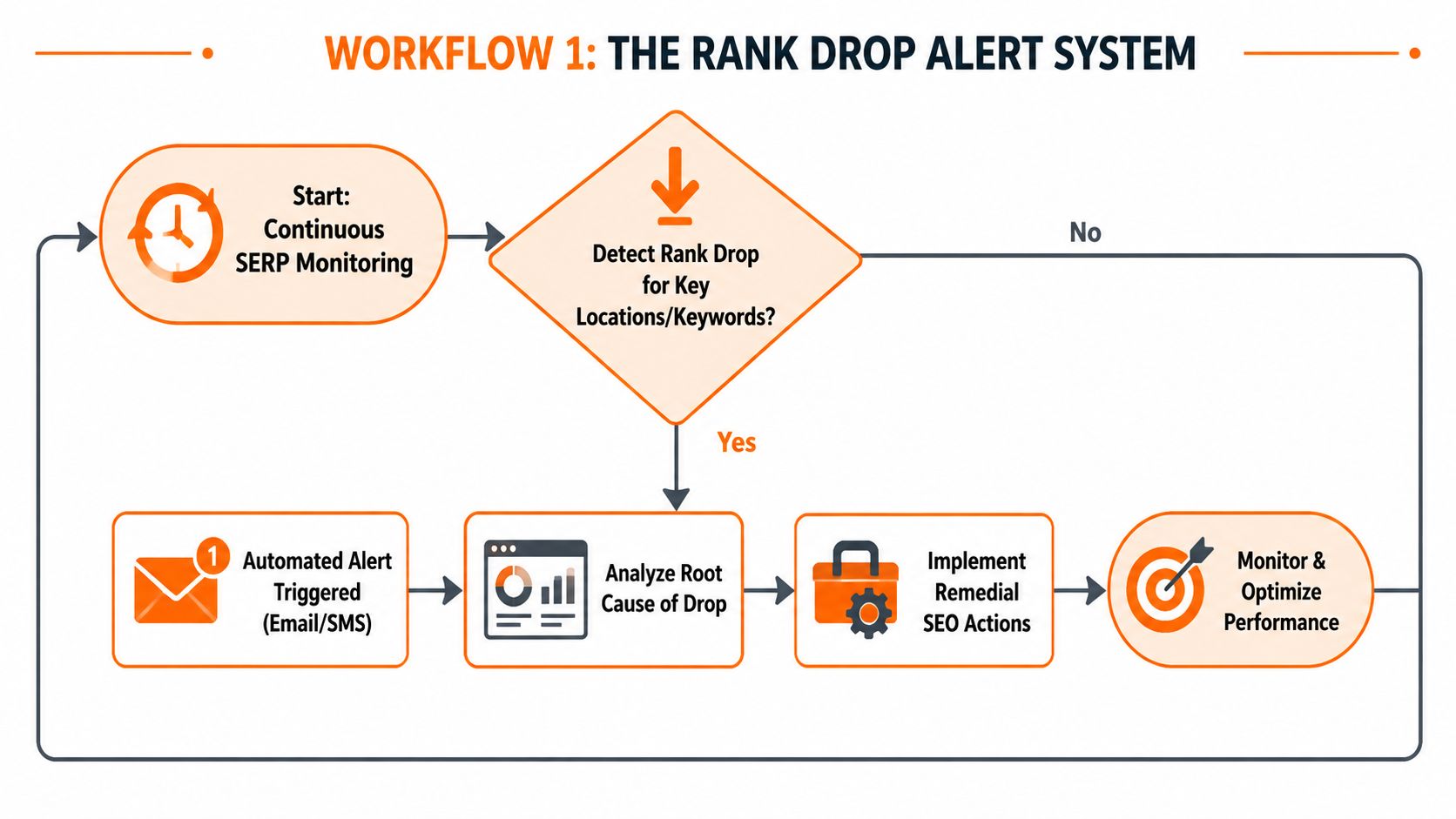
Workflow one for rank drop alerts
This is the simplest high-value workflow for a regional operator.
Set the system to check your most important keywords by location each day. If a location falls outside your acceptable visibility zone, trigger an alert to the person who can fix the issue.
A practical version looks like this:
- Choose service keywords: “24/7 plumber [Neighborhood]”, “emergency dentist near me”, “vet clinic [City]”
- Define the important result type: local pack, organic, or both
- Set an alert rule: for example, alert when the location disappears from the local pack or loses visibility against named competitors
- Assign ownership: regional manager, location manager, or agency contact
- Audit the likely causes: profile accuracy, recent reviews, category drift, competitor review spikes, weak landing page relevance
This workflow works because it shortens the gap between rank loss and action.
Workflow two for competitor and GBP monitoring
The second workflow is a local market dashboard.
Track each location beside a small set of nearby competitors for your priority terms. Don't turn this into a national share-of-voice exercise. Keep it local and practical.
A useful dashboard view includes:
| Location | Keyword | Device | Your visibility | Competitor visibility | Likely action |
|---|---|---|---|---|---|
| [City] North | emergency dentist near me | Mobile | Local pack only | Strong local pack and organic | Improve GBP categories and review flow |
| [Neighborhood] West | ac repair [City] | Mobile | Organic only | Local pack lead | Audit reviews, hours, and service area |
| [City] Center | med spa near me | Desktop | Weak presence | Competitor owns multiple features | Refresh services, photos, FAQs, and landing page relevance |
For teams scaling across branches, this article on managing local SEO across multiple locations is a helpful outside reference because it matches the governance problem.
If you need support turning this into a managed process, local SEO for multiple locations is one example of how this can be operationalized. Reviews To The Top also offers review workflows, profile management, and response governance that fit naturally into this kind of reporting setup.
Field note: The businesses that protect local visibility fastest usually aren't the ones with the fanciest dashboards. They're the ones with clear ownership and a fix process.
Templates and Checklists to Fuel Your Growth
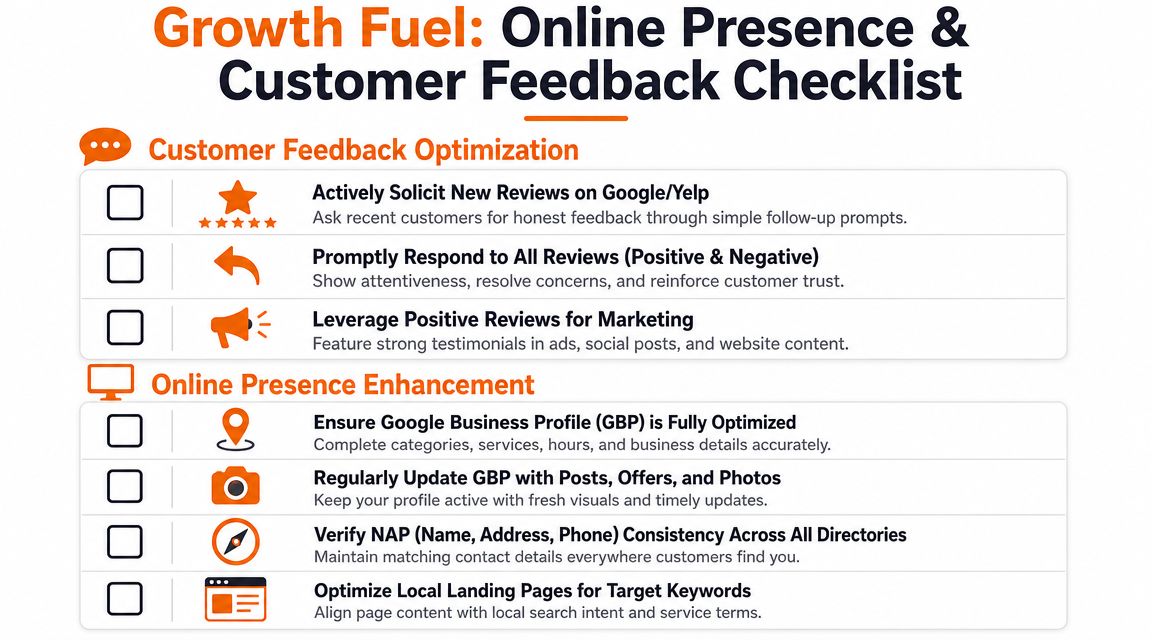
Tracking doesn't improve rankings by itself. Local visibility usually improves when the business fixes the assets that Google and customers both rely on, especially the Google Business Profile, landing pages, and review flow.
Google Business Profile checklist
Use this short checklist for each location:
- Primary category: Make sure it matches the core service customers search for.
- Secondary categories: Add relevant supporting categories, but avoid category stuffing.
- Hours and special hours: Keep them current.
- Services: List actual services people search for in [City] and [Neighborhood].
- Photos: Add recent, accurate images that reflect the current location.
- Business description: Keep it clear, location-relevant, and customer-focused.
- Phone and website links: Verify they route to the correct location.
- Q&A and posts: Answer common questions and keep content current.
- Reviews and replies: Respond consistently and professionally.
Review request and response templates
SMS review request for a dental practice
Hi [First Name], thanks for visiting [Practice Name] today. If you're open to it, would you share a quick review about your experience? Your feedback helps other patients in [City] find the right care. [Review Link]
Email review request for an HVAC company
Subject: Thanks for choosing [Company Name]
Hi [First Name],
Thank you for trusting [Company Name] for your service visit in [City]. If you have a minute, we'd appreciate a review about your experience with our team. Your feedback helps other homeowners looking for reliable help nearby.
[Review Link]
Thank you,
[Name]
Positive review response template
Thank you, [First Name]. We appreciate you taking the time to share your experience with [Business Name]. We're glad our team could help, and we look forward to serving you again in [City].
Negative review response template
Thank you for your feedback, [First Name]. We're sorry your experience didn't meet expectations. We take concerns seriously and would like the chance to learn more and address the issue directly. Please contact us at [Phone/Email] so we can follow up.
For healthcare, keep replies HIPAA-aware and never confirm treatment details or personal health information.
Seven-day review program launch checklist
- Day 1: Confirm who asks for reviews at each location
- Day 2: Finalize SMS and email templates by vertical
- Day 3: Create location-specific review links
- Day 4: Train managers on response standards
- Day 5: Publish a reply workflow for positive and negative reviews
- Day 6: Audit GBP fields, hours, services, and photos
- Day 7: Start monitoring review volume, recency, and reply times
Measuring Your ROI from Local Rank Tracking
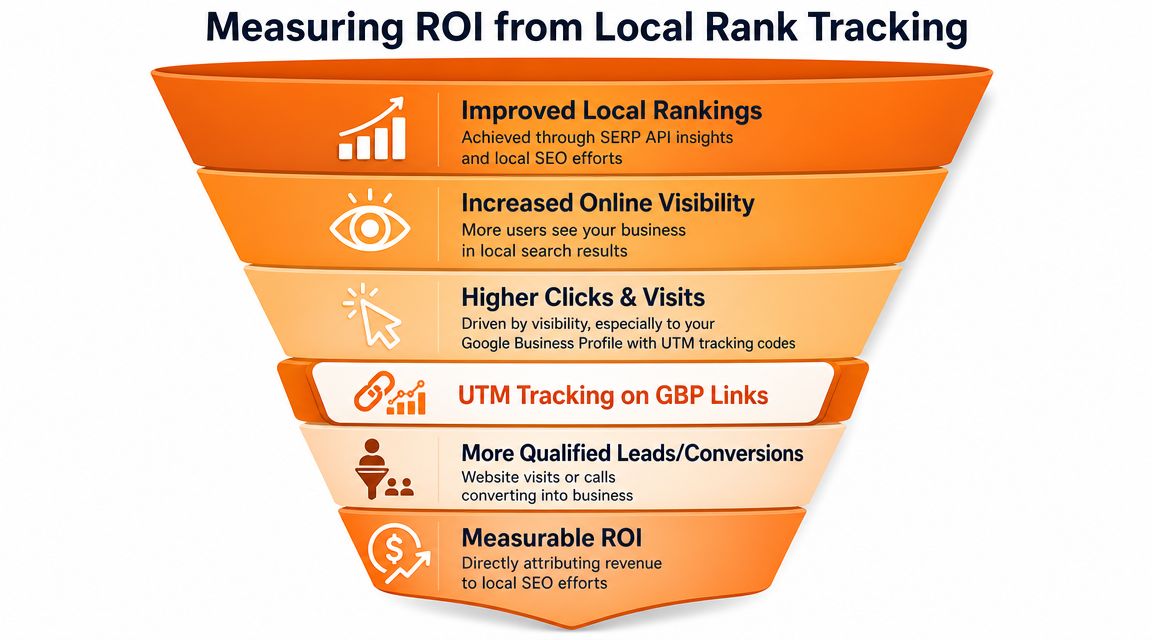
Rankings matter only when they connect to customer actions. The cleanest way to do that is to track what happens from your Google Business Profile to your website, booking page, or lead form.
This visual maps the path clearly.
A second useful reference is this walkthrough on local SEO reporting, especially if you need to show location-level performance to owners, operators, or regional leadership.
What to measure each month
Use a compact scorecard for each location:
- Review volume: Are new reviews arriving steadily?
- Review recency: Did the location go quiet?
- Response time: Are reviews answered quickly enough to show engagement?
- Star rating trend: Is trust moving up, down, or flat?
- GBP views and actions: Are users clicking, calling, booking, or requesting directions?
- Lead-to-sale conversion: Are leads from local search turning into customers?
Because the brief requires targets but no verified numeric benchmarks were provided, the safest recommendation is directional: set location-specific thresholds based on current performance, service line value, and staffing capacity. A med spa and an emergency plumber shouldn't use the same review or conversion targets.
How to track GBP traffic with UTMs
Use UTM tags on your Google Business Profile website and appointment links so analytics can distinguish GBP traffic from other sources.
A simple structure looks like this in concept:
- utm_source = google
- utm_medium = organic
- utm_campaign = gbp_[location]
That lets you measure whether stronger local visibility produced more visits to booking pages, quote forms, or contact pages.
This video is a helpful complement if you want a visual explanation of tracking and reporting workflows.
Frequently Asked Questions
What is a serp position api in plain English
It's a tool that pulls Google or other search result data into a format your team can track automatically.
Is it only for technical SEO teams
No. Operators, practice managers, and regional marketers can use the output if the reporting is built around locations, services, and business actions.
What should I track first
Start with your highest-intent services and your highest-value locations. “Near me” and city-modified keywords are usually the right place to start.
Should I track desktop and mobile separately
Yes. Local layouts can differ by device, and the customer experience often changes with them.
How do AI Overviews affect rank tracking
They can change visual visibility even when the organic ranking number looks stable. Bright Data documents a collapse_aio parameter specifically to keep organic positions more stable when AI Overviews expand, as explained in its guide to top Google results and AI Overview handling.
How do I choose a provider
Pick for stability, location controls, device controls, and useful result types. Don't choose based only on query volume.
Can this help multi-location brands more than single-location businesses
Usually, yes. The more locations, service areas, and managers involved, the more valuable automation and consistent reporting become.
If you want help turning rank data into a working local growth system, Reviews To The Top offers month-to-month support for review programs, listing accuracy, response workflows, and local visibility reporting. If that sounds useful, you can book a strategy call and map out a practical rollout for your locations.


