
If you've been searching your own business on Google and getting a different answer every time, you're not imagining it. A google position checker api gives you a more reliable way to track where you show up for searches like “dentist near me” or “HVAC repair [City],” and that matters because visibility in local results often decides who gets the call, message, or booking.
For a single location, rank tracking helps you spot missed opportunities. For a multi-location brand, it turns local search from guesswork into a repeatable operating system.
Table of Contents
- Why Your Google Ranking Drives Real-World Business
- Understanding Your Rank Tracking Options
- Comparing GSC API vs Third-Party SERP APIs
- How to Track and Improve Your Local Rankings
- Practical Assets to Fuel Your Local Growth
- Measuring Success and Answering Your Questions
Why Your Google Ranking Drives Real-World Business
A local owner usually starts the same way. They search “vet near me” from the office, see themselves high in results, and assume things are fine. Then a manager checks from home, or a patient says they found a competitor first, and suddenly the picture looks very different.
That inconsistency is exactly why manual checking breaks down. Google changes results based on location, device, and search context, so casual searching doesn't give you a dependable benchmark.
A google position checker api automates those checks and records the result in a way you can use. Instead of wondering whether you're visible for “urgent care [Neighborhood]” or “best med spa near me,” you get structured rank data tied to a place, a device, and a keyword.
What business owners usually miss
Ranking isn't just an SEO vanity metric. In local markets, it affects whether a prospect sees your business profile, compares your reviews, clicks to your site, or taps the call button.
If you're an HVAC company in [City], ranking well for “AC repair near me” matters most when someone has an urgent need. If you're a dental office, “teeth whitening [City]” and “emergency dentist near me” attract very different intent, and they deserve separate tracking.
Practical rule: Don't track broad visibility only. Track the terms that lead to booked jobs, consults, tours, and appointments.
Where rank tracking turns into revenue
A strong tracking setup helps you answer questions that affect real operations:
- Which locations are slipping: One clinic in [Neighborhood] may be losing visibility while another is stable.
- Which services deserve attention: “Brake repair [City]” may underperform while “oil change near me” is steady.
- Which competitors are taking demand: You can't fix what you never see.
- Which profile improvements matter: Review recency, category accuracy, photos, and service detail often show up in rankings before they show up in revenue reports.
For local teams, the payoff is speed. You notice ranking losses earlier, fix the likely cause faster, and give the front desk or call center a better shot at converting searchers into customers.
Many business owners also underestimate how closely rankings tie to reputation signals. If your profile is incomplete, your reviews are stale, or your responses are inconsistent, you make it easier for a stronger local competitor to outrank you. That's one reason local SEO matters so much for service-area businesses and storefronts.
What doesn't work
Three habits waste time:
- Searching your own keywords repeatedly
- Tracking only your homepage
- Ignoring Maps visibility while watching only organic results
A local customer doesn't care whether you rank in one report. They care whether they can find you fast, trust what they see, and take action without friction.
Understanding Your Rank Tracking Options
A plumbing company can rank well in one ZIP code, disappear in the next, and never notice until calls slow down. That gap usually comes from using the wrong rank data for the job.
Two systems dominate rank tracking. Google Search Console gives you first-party performance data for your own site. Third-party SERP APIs show what a searcher sees in a specific place, on a specific device, at a specific moment.
A quick comparison before you choose
| Option | Best for | Main strength | Main limitation |
|---|---|---|---|
| GSC API | Owned website performance | First-party query, click, impression, and average position data | Not real-time and not built for competitor tracking |
| Third-party SERP API | Live local rank monitoring | Geo-specific checks, device targeting, and competitor visibility | Paid usage and more moving parts |
A local business usually needs both, just for different decisions.
Use GSC to spot broad patterns. Use a SERP API to verify whether your business appears in the local pack, whether review stars show up, whether ads are pushing you lower, and whether a competitor is taking visibility in a target neighborhood. SearchAPI.io's Google rank tracking API documentation outlines how this type of tracking works, including geo-targeted result checks and page-level SERP data.
What the acronyms mean
API means Application Programming Interface. It lets software request rank data automatically instead of relying on someone to search manually and copy results into a spreadsheet.
SERP means Search Engine Results Page. For a local business, that can include ads, the map pack, review snippets, service menus, FAQs, and standard organic listings.
GSC means Google Search Console. It reports how Google users found your site, but only for properties you own and verify.
How business owners should choose
Start with the business question.
If the question is, "Which search terms already bring people to our site?" GSC is the better fit. If the question is, "Do we show up in Maps for 'emergency dentist' on mobile three miles from the office?" you need a live SERP API.
That difference matters because local buying behavior is messy. A prospect may see your Google Business Profile before your website. They may call from the map pack without ever clicking through. They may compare your review count, business category, and recent photos against two competitors in the same results page. A tool that only reports average organic position misses that decision moment.
This is also where technical features connect to revenue. Geo-targeting helps you see where visibility drops by neighborhood, not just by city. SERP feature detection shows whether reviews, map results, ads, or local competitors are taking attention away from your listing. Once you know that, you can act on the right fix. That might mean tightening your Google Business Profile categories, asking for fresher reviews after completed jobs, improving service-page relevance, or updating weak location pages.
I usually treat rank tracking as an operations tool, not just an SEO report. If rankings drop in one service area and review velocity also slows, the fix is rarely "write more blog content." The smarter move may be to improve review requests, add better service proof to the profile, and confirm that the business information matches across listings.
Pair rank tracking with review management and Google Business Profile work. Local visibility improves faster when those pieces support each other.
Teams comparing vendors should also review their broader set of search engine optimization tools for local visibility. If visual confirmation matters, especially for agencies or multi-location brands, this guide on ScreenshotEngine for modern SERP tracking is also worth reviewing.
Comparing GSC API vs Third-Party SERP APIs
A business owner searches "emergency plumber near me" from the north side of town at 7:10 a.m. Your company may look strong in Search Console that week and still miss that customer if a competitor owns the map results in that exact area.
That is the fundamental choice here. GSC helps you measure how your site performed. A third-party SERP API helps you see what a nearby customer saw before they decided who to call.
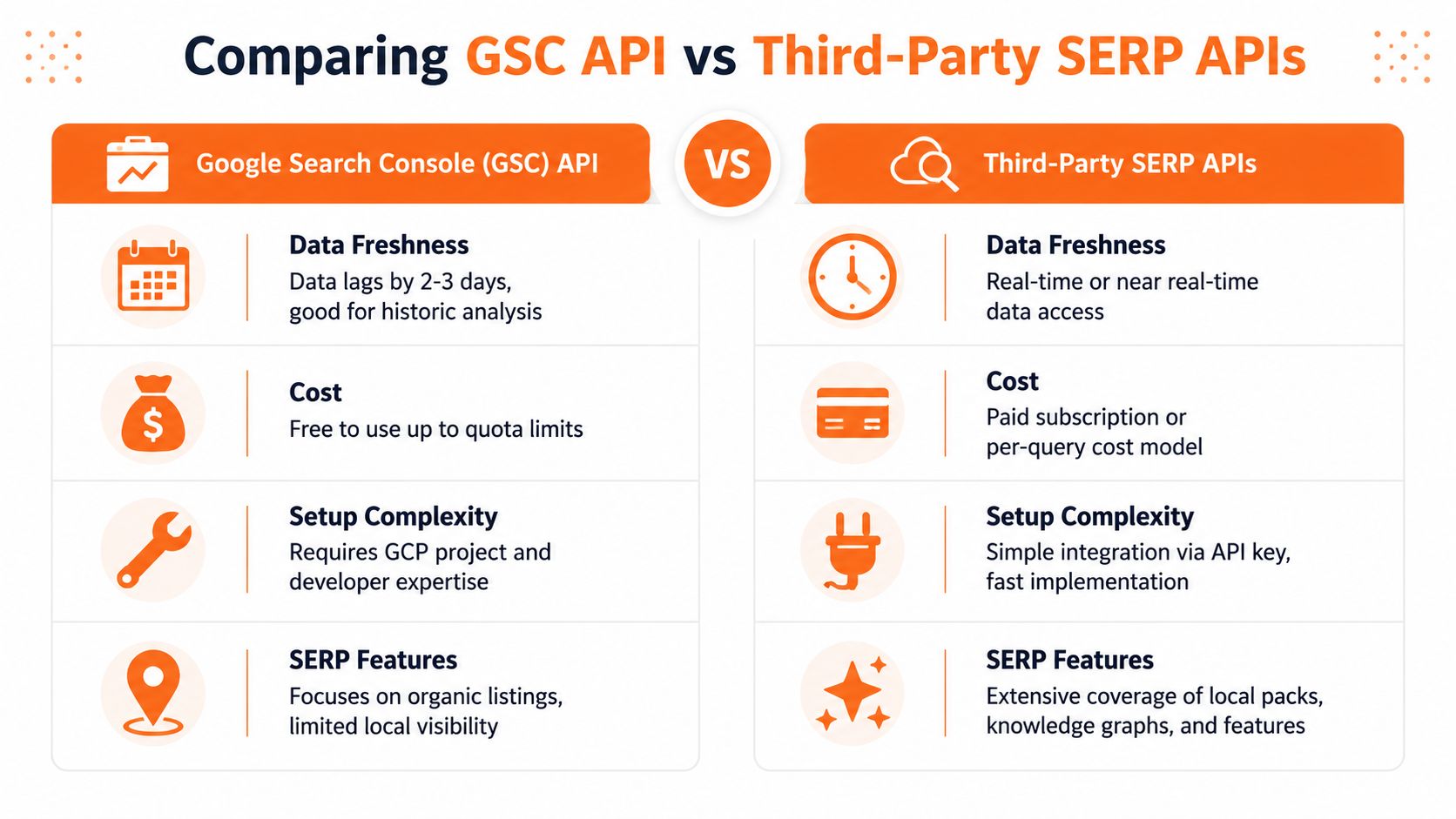
GSC API vs. Third-Party SERP API Comparison
| Feature | Google Search Console (GSC) API | Third-Party SERP API |
|---|---|---|
| Data freshness | Delayed, averaged data over time | Real-time or near real-time checks |
| Geo-specificity | Useful for owned-property analysis with location dimensions | Built for geo-specific checks, including fine local targeting |
| Competitor visibility | Limited to your own verified property | Can track competitors appearing in results |
| Cost | Free for eligible usage | Paid per subscription or query volume |
| Data granularity | Great for clicks, impressions, CTR, and average position | Better for seeing the actual results page, including ads and Maps features |
A quick terminology note: if someone on your team needs a plain-English refresher on what appears on a search results page, Data Hunters Agency's SERP explained is a useful overview.
Where GSC wins
GSC is the better starting point for understanding your own website. It shows which queries generated impressions, which pages earned clicks, and how average position trends over time.
That matters for service-page decisions. If a dental office gets impressions for "dental implants [City]" but weak clicks, the problem may be the page title, the offer, or a page that does not match search intent closely enough.
GSC also keeps owners from making decisions based on one manual search from one device in one location. For reporting, budgeting, and month-over-month trend review, that steadier view is often more useful than a single live ranking check.
Use GSC to answer questions like these:
- Which services are earning impressions but not clicks?
- Which pages gained or lost visibility over the last few months?
- Are branded searches growing faster than non-branded searches?
- Is organic traffic improving after page updates?
Where third-party SERP APIs win
Third-party SERP APIs show the live search environment. That includes local pack placement, ads above organic listings, competitor positions, and differences by ZIP code, device, or search location. RankActive's overview of Google keyword position checker APIs gives a good snapshot of how these tools are typically used.
For a local service business, that visibility has direct operational value.
If rankings drop in one service area, the fix may have little to do with your website. A competitor may have added stronger reviews. Google may be showing the map pack more often for that keyword. Your profile categories may be too broad. A location page may be weak for that neighborhood. A live SERP API helps you spot the cause faster, which means you can fix the right thing and recover calls sooner.
This is also the better option when you need to compare yourself to nearby competitors, not just monitor your own site. GSC cannot show who replaced you in the results. A SERP API can.
How to decide without overbuying
Choose GSC first if:
- You need owned-site performance data: You want query, page, click, and impression trends from Google directly.
- You run one location with a limited budget: Free data covers a lot if you review it consistently.
- You are improving service pages: GSC is stronger for spotting page-level opportunities and weak CTR.
Choose a third-party SERP API if:
- You need local rank precision: You care where you show up by neighborhood, device, or search location.
- You manage multiple locations: Side-by-side comparisons become much easier.
- You want competitive context: You need to know who is above you, which SERP features appear, and whether the map pack is taking the click.
Many local businesses end up using both. GSC covers trend reporting and page performance. A SERP API covers decision-point visibility, especially for high-value keywords tied to calls and appointments. If you also review off-page authority signals, this guide on how to check Google backlinks is a useful companion.
How to Track and Improve Your Local Rankings
A rank report becomes useful when it changes what your staff does this week.
If a roofer ranks third for “roof repair [city]” across town but disappears in the neighborhoods that produce profitable jobs, that is not a visibility win. It is a lead flow problem. Local rank tracking works best when you tie it to outcomes that matter at the front desk: calls, form fills, booked estimates, and appointment volume by service area.
How Google decides who shows up locally
Google usually sorts local visibility around three factors: proximity, relevance, and prominence.
Proximity changes block by block. A personal injury lawyer can rank well near downtown and barely appear a few miles away. That matters because local service demand is rarely spread evenly across a city.
Relevance comes from how clearly your Google Business Profile and landing page match the search. If someone searches “dental implants [City],” Google looks for a strong service match in your categories, business description, services, and on-page copy.
Prominence is where reputation starts affecting rankings. Review volume, recent reviews, response activity, citation consistency, and general brand presence all shape how established your business looks. For a fuller explanation of those inputs, see this breakdown of local search ranking factors.
A polished website does not fix a weak local profile. An incomplete Google Business Profile, stale photos, or months without new reviews can suppress visibility right where buying intent is highest.
A practical GBP checklist
Use this checklist to improve your Google Business Profile for city and “near me” searches:
- Choose the closest primary category: A precise category usually outperforms a broad one.
- Match your listed services to buying-intent searches: Add the services people search for, such as “water heater repair” or “same-day crowns.”
- Keep business details consistent: Hours, phone number, address, and service areas should match everywhere customers find you.
- Ask for reviews every week: Steady review flow often helps more than occasional bursts.
- Respond like a real business owner: Good responses support trust, and they can improve click-through once searchers compare profiles.
- Refresh photos often: Current photos strengthen conversion because they reduce uncertainty before the call.
- Send traffic to the right page: The landing page should match the service and location behind the query.
That last point gets missed a lot. If your GBP lists “emergency plumbing” but sends people to a generic home page, rankings can stall and conversions usually suffer. The search may be relevant, but the experience is weak.
Modern rank tracking APIs help because they return location-specific results, device-specific results, and SERP features in a format your team can review quickly. TrySight's overview of google position checker api options notes that providers like SearchAPI.io can return 100 results with sub-second parse time. The same source recommends logging query, location, device, URL, position, and timestamp so teams can spot ranking shifts early and connect them to spend.
A short walkthrough helps if your team needs to connect local SEO mechanics to daily practice:
What an API response means in plain English
An API response looks technical at first, but the useful part is simple. You are usually reviewing six fields:
- Query
- Location
- Device
- URL
- Position
- Timestamp
Here is a simplified example:
| Field | Example |
|---|---|
| Query | emergency dentist [City] |
| Location | [Neighborhood] |
| Device | mobile |
| URL | /emergency-dentistry |
| Position | 4 |
| Timestamp | current check time |
Each field points to a business decision.
If your rank drops only on mobile, check your Google Business Profile first, then review page speed, tap-to-call usability, and whether the page answers the search cleanly on a phone. If you rank well in one location but poorly in another, you may need a stronger nearby landing page, more localized proof, or a review generation push in that area. If the API shows a local pack, reviews, or other SERP features taking up more space above organic listings, your next move may be GBP work, not another round of page edits.
Local service businesses find real value in rank tracking. You are not just watching positions. You are identifying why calls are strong in one ZIP code and soft in another, why one service page books consultations and another does not, and whether review management should be the next priority.
Track a focused keyword set. Review it by neighborhood and device. Compare the ranking changes against calls, booked jobs, and appointment requests. That is how API data turns into practical local SEO work that fills the schedule.
Practical Assets to Fuel Your Local Growth
Strong rankings and strong reviews tend to reinforce each other. If your reputation program is inconsistent, your local visibility usually follows.
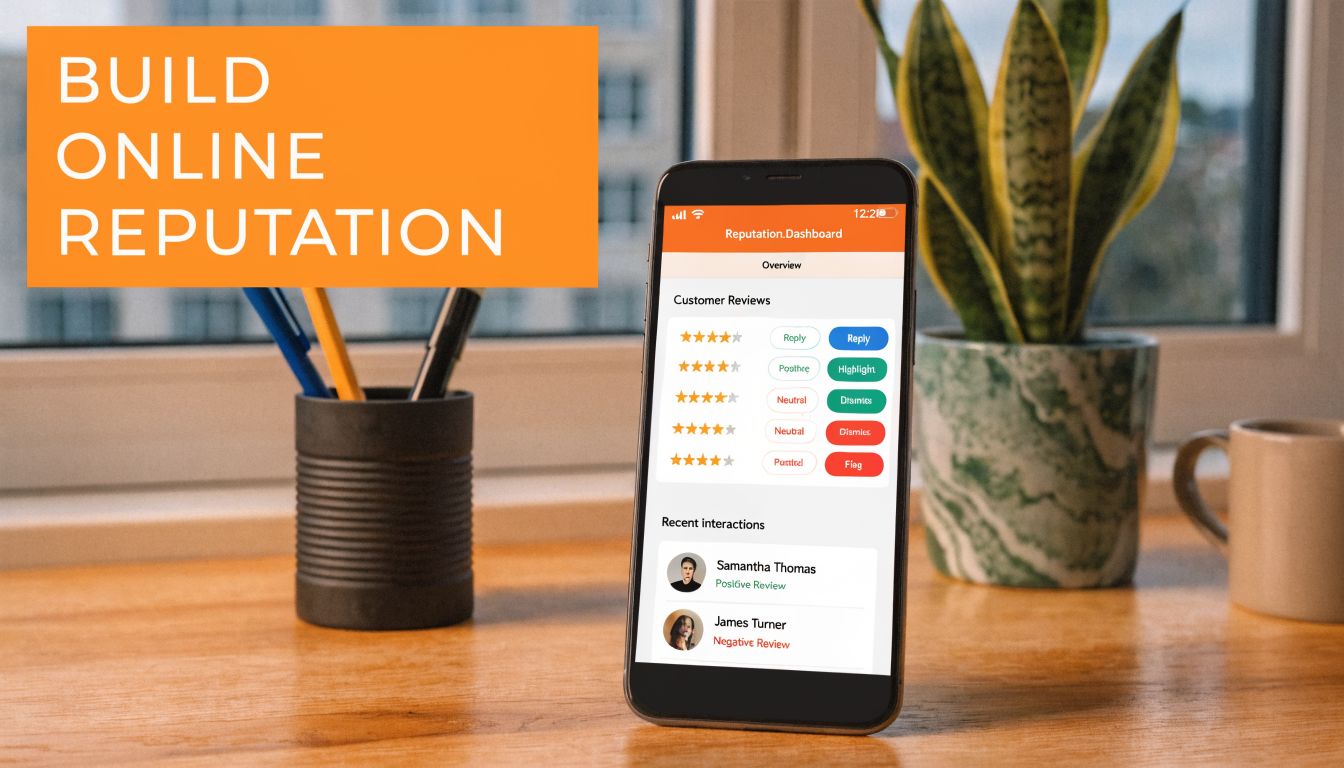
Review request scripts
SMS script for HVAC
Hi [First Name], thanks for choosing [Business Name] for your service today. If you'd be open to it, would you leave a quick Google review about your experience? Your feedback helps other homeowners in [City] find a trusted technician. [Review Link]
Email script for dental
Subject: Quick favor from [Practice Name]
Hi [First Name],
Thank you for visiting [Practice Name]. If you'd like to share feedback, we'd appreciate a Google review. It helps other patients in [City] know what to expect and helps our team keep improving.
[Review Link]
Thank you,
[Practice Name]
For healthcare, keep requests HIPAA-aware. Don't mention procedures, diagnoses, or any protected health information.
Review response templates
Positive review response
Thank you, [First Name]. We appreciate you taking the time to share your experience with [Business Name]. Our team works hard to make every visit straightforward and helpful, and we're glad that came through. We look forward to serving you again.
Negative review response
Thank you for your feedback, [First Name]. We're sorry to hear that your experience didn't meet expectations. We take concerns seriously and would like the chance to learn more and address this directly. Please contact [Phone/Email] and ask for [Manager Name] so we can follow up.
Never argue in public review replies. A calm, specific, professional response protects trust with future customers reading the thread.
If your listings are inconsistent across platforms, review momentum won't carry as far as it should. Clean that up alongside your response workflow with a process for local listings on Google.
7-day launch checklist
Day 1
Choose the locations, services, and team owners. Decide who sends requests and who replies.
Day 2
Create your review links and save approved SMS and email templates.
Day 3
Train front-desk, advisor, or field teams on when to ask. Right after a positive interaction usually works best.
Day 4
Set a response standard for all incoming reviews. Positive, negative, and neutral all need a plan.
Day 5
Audit your Google Business Profile categories, services, hours, and photos.
Day 6
Match each key service to a landing page and make sure review request links are working.
Day 7
Start sending requests and hold a short review of what was sent, what came in, and where follow-up is needed.
This process works for a single med spa, a three-location auto group, or a regional senior living operator. The difference is governance, not the fundamentals.
Measuring Success and Answering Your Questions
Rank improvements are useful only if they lead to more qualified actions. The cleanest reporting setup connects visibility, reputation, and conversion into one routine review.
What to measure each week
Track these indicators in one dashboard or shared report:
- Review volume: Are new reviews coming in consistently by location and service line?
- Review recency: Are your latest reviews recent enough to show active customer feedback?
- Response time: How fast does your team answer new reviews?
- Star rating: Is the overall rating stable, improving, or slipping?
- GBP views and actions: Are profile views, calls, direction requests, messages, or bookings moving in the right direction?
- Lead-to-sale conversion: Are leads from GBP and local landing pages turning into scheduled appointments, jobs, tours, or estimates?
You don't need to obsess over every fluctuation. You do need a repeatable review cadence.
Watch trends by location, not just in aggregate. One underperforming branch can hide inside a strong regional average.
A simple operating rule helps. If rankings improve but calls don't, review your profile presentation and conversion path. If calls increase but booked appointments don't, the issue may be front-desk handling, speed to lead, or offer clarity rather than search visibility.
How to tag GBP traffic with UTMs
UTM tags help you identify visits and conversions coming from your Google Business Profile. Add UTM parameters to the website link in your profile so analytics can separate that traffic from other sources.
A basic structure looks like this in practice:
- Source: google
- Medium: organic
- Campaign: gbp
Use a consistent naming standard across every location. That way, regional marketing can compare clinics, shops, or communities without cleaning messy reports later.
Also track what happens after the click. Look at form fills, booking completions, call tracking outcomes, and closed revenue where possible. A rank gain for “urgent care near me” matters more when it also produces patient appointments.
Common questions
Can Google penalize me for using a google position checker api
Using reputable tools for rank tracking is common practice. The bigger issue is choosing a provider whose method fits your needs and using the data responsibly.
How often should I check rankings
For most local businesses, a regular cadence works better than constant checking. Daily monitoring can make sense for priority keywords, multi-location brands, or competitive markets.
Is the Maps Pack more important than regular organic results
Often, yes for local intent. Many searchers act directly from the business profile without visiting a website first.
Should I track desktop and mobile separately
Yes. Customers often search locally on phones, and visibility can differ by device.
Do reviews really affect rankings
Reviews influence prominence and buyer trust. They also affect whether a searcher chooses you once they see your listing.
What keywords should I track first
Start with branded terms, core service terms, and high-intent local phrases such as “[service] [City]” and “[service] near me.”
Can one dashboard cover all locations
Yes, if the setup is consistent. The useful dashboards separate performance by location, service, and device so operators can act on the data.
If you want help turning rank tracking, Google Business Profile optimization, and review operations into a practical local growth system, Reviews To The Top offers month-to-month support for local and multi-location brands. If you'd like a hands-on plan, explore reputation management, see how to optimize your Google Business Profile, or book a strategy call for a low-pressure conversation about your locations and goals.


