
Think of a Google Local Listing as your digital storefront, planted right on the busiest street in the world: Google Search. These aren’t just simple directory entries; they are free, interactive profiles that show up in Google Search and on Maps, putting your business in front of people who are looking for exactly what you offer, right now.
Getting this right is absolutely critical for anyone hoping to attract local customers and drive foot traffic.
Your Digital Storefront on Google’s Main Street
Imagine your business has a prime piece of real estate on the most bustling main street imaginable. Millions of potential customers are strolling by daily, and your goal is to get them to walk through your door. That’s precisely what a well-managed Google Local Listing does for you online. It’s far more than a static line in a phone book—it’s a living, breathing hub that shapes how customers see and interact with your brand.
This whole system is powered by your Google Business Profile (GBP). This is the control panel, the back office where you feed Google all the crucial details about your business. It’s what populates your listing with the information customers need most:
- Your physical address or service area: So people can actually find you on Google Maps.
- Your up-to-date business hours: Nothing frustrates a customer more than showing up to a closed shop.
- A direct phone number: This enables one-click calls right from the search results.
- A link to your website: Driving high-intent traffic directly to your online home base.
This infographic breaks down how a customer’s simple search can lead directly to real-world action, all thanks to your business profile.
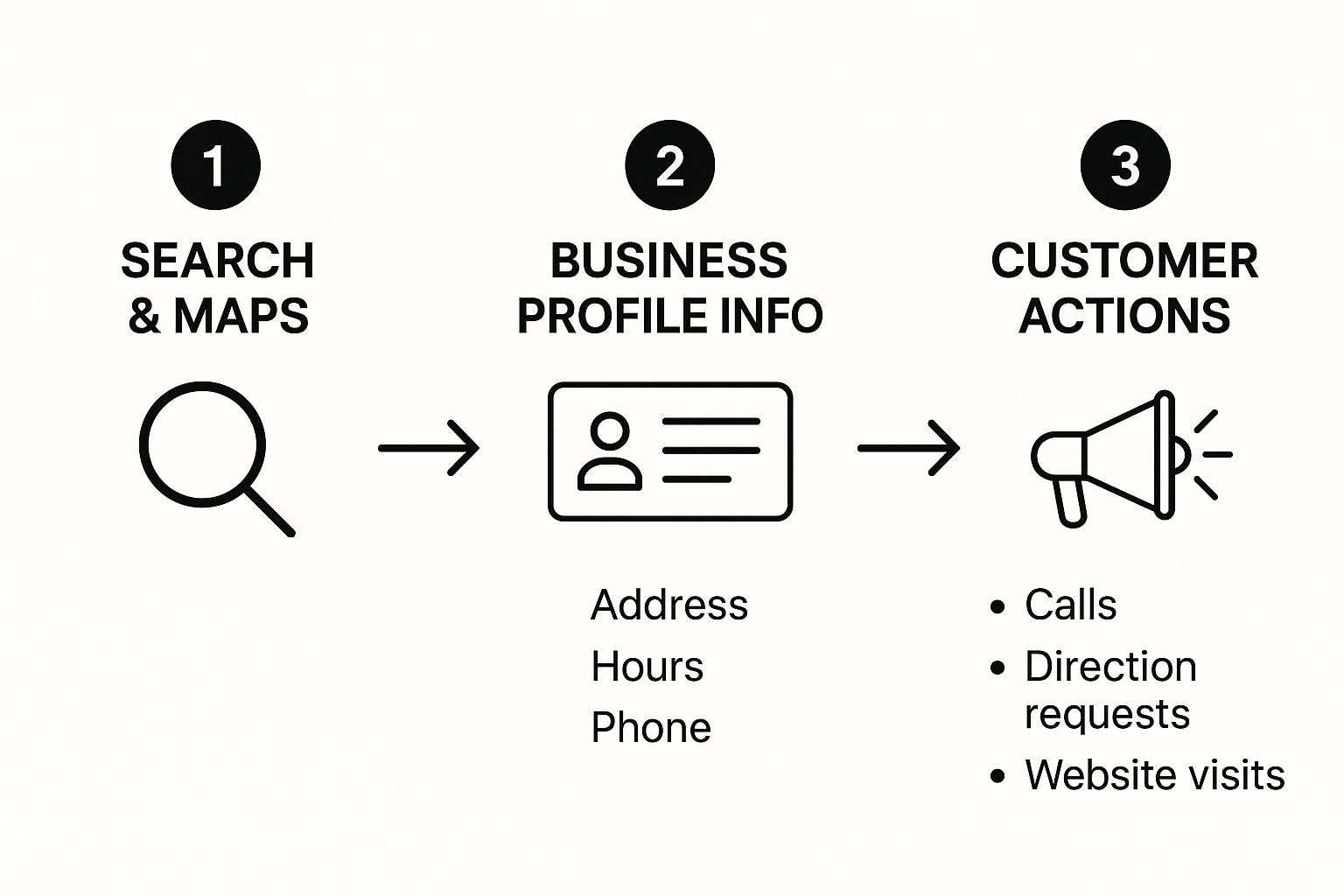
As you can see, your profile is the essential bridge connecting a potential customer’s initial query with their final decision to call, visit, or click.
Why This Digital Storefront Matters
A solid Google Business Profile does more than just list facts; it builds instant trust. When someone finds a complete, active profile brimming with recent, positive reviews, it sends a powerful signal: this is a legitimate, professional, and reliable business. That trust is what turns a searcher into a customer.
Ever since Google rebranded the platform from “Google My Business” back in 2021, its importance has skyrocketed. Google absolutely dominates the search market, holding over 91% of the share. It’s just how people find things. In fact, studies show a staggering 87% of consumers use Google to evaluate local businesses, making your profile a non-negotiable tool for staying competitive.
Ultimately, your Google Local Listing is your first impression. It’s where customers decide if you’re worth a visit, a call, or a click. Getting it right isn’t just an SEO task—it’s a fundamental business practice.
Core Components of a Winning Google Local Listing
To build that powerful first impression, you need to make sure the foundational elements of your profile are complete and accurate. Think of these as the non-negotiables for local search success.
| Component | Why It’s Critical for Local SEO |
|---|---|
| Business Name, Address, Phone (NAP) | This is the bedrock of local SEO. Consistency across the web signals to Google that your information is reliable. |
| Categories | Choosing the right primary and secondary categories tells Google exactly what you do, helping you show up in relevant searches. |
| Business Hours | Accuracy prevents customer frustration and negative reviews. Keep them updated, especially for holidays. |
| Website Link | Drives valuable, high-intent traffic directly to your site, where customers can learn more or make a purchase. |
| Photos & Videos | Visuals build trust and give customers a real feel for your business. Profiles with photos get more clicks and direction requests. |
| Customer Reviews & Responses | Reviews are a huge ranking factor and social proof. Responding shows you’re engaged and value customer feedback. |
| Google Posts | A way to share timely updates, offers, and news directly in your listing, keeping it fresh and engaging. |
Nailing these core components gives you a solid foundation to build upon. It’s the first and most important step toward turning your Google listing into a customer-generating machine.
Creating and Verifying Your Business Profile
Getting your business to show up on Google Maps isn’t some black-box technical mystery. Think of it more like planting a flag to claim your patch of digital real estate. It all starts with creating or claiming your Google Business Profile (GBP), which is the absolute foundation for any Google local listings. This is you, officially telling Google, “I’m here, and I’m open for business.”
The first step is a simple one. Just head over to Google’s business creation page. There, you’ll either find an existing, unmanaged listing for your business or start a brand new one from scratch. You might be surprised to find that Google has already created a basic profile for you; it’s just waiting for the rightful owner to step in and claim it.
This is the first thing you’ll see when you start the process.

It’s a straightforward prompt to type in your business name. This quick search stops you from creating a duplicate listing and keeps the whole setup process clean and simple.
Defining Your Business Identity
Once you’re in, Google will ask for the core details that define your business. This isn’t just filling out a form; every piece of information you provide tells both Google and your future customers who you are and what you do. Each choice you make has a direct impact on who finds you.
The most important decision you’ll make right now is choosing your primary business category. This one selection is your main signal to Google’s algorithm about what you offer, which in turn determines the searches you’ll show up for. For example, selecting “Italian Restaurant” gets you in front of people searching for “pasta near me,” while “Pizzeria” targets a slightly different (though related) crowd.
You’ll also need to fill in other essential details:
- Business Name: Use your real-world business name. No keyword stuffing here.
- Address or Service Area: If you have a storefront, you’ll list your physical address. If you’re a mobile business like a plumber or a landscaper, you’ll define your service area instead.
- Contact Information: Your phone number and website are non-negotiable. They are the bridge that turns a searcher into a customer.
For a great walkthrough of the fundamentals, check out this guide on how to get your business on Google and get your digital storefront up and running.
The All-Important Verification Step
Setting up the profile is only half the job. To actually unlock its power and make sure your information goes live, you have to get verified. This is how Google confirms you are the legitimate owner of the business and that it’s located where you say it is.
Verification is the key that unlocks your ability to manage your listing, respond to reviews, and access performance insights. Without it, your profile is essentially a placeholder with no control.
Google has a few different ways to verify a business, and the options you see might vary. No matter the method, the goal is the same: prove you’re the real deal.
Here are the most common ways they do it:
- Video Verification: This has become the go-to method. You’ll need to record a quick, continuous video showing proof of your location (like your sign), your equipment, or business documents.
- Postcard Verification: The old-school classic. Google mails a postcard with a unique PIN to your business address. Once it arrives, you just enter the code online.
- Phone Call or Text: An automated system will call or text your business phone number with a verification code.
- Email Verification: A code is sent to an email address linked to your business domain (think [email protected]).
Sometimes the verification process can feel like a bit of a hassle, especially if the first attempt doesn’t work. But stick with it. Having a verified profile is your non-negotiable ticket to competing in local search. Once that’s done, you’re officially on the map and ready to start optimizing.
Optimizing Your Profile to Win the Local Pack
Getting your business listed on Google Maps is a great first step, but the real work starts now. Think of your new profile as a blank canvas. It’s up to you to turn it into a masterpiece that catches the eye of potential customers and, just as importantly, convinces Google’s algorithm you deserve a spot in the coveted “Local Pack.”
You know the one—it’s that high-visibility box of three businesses that pops up at the very top of local search results.
Transforming a basic listing into a client-magnet means you need to actively “feed” the algorithm what it loves: rich details, fresh content, and consistent engagement. This isn’t a “set it and forget it” task. To make your Google local listings truly stand out, you need to be strategic and consistent.
Every update you make is a signal to Google that your business is active, relevant, and trustworthy. You’re not just filling out a form; you’re building a case for why you’re the best choice in town.
Crafting a Compelling Business Description
Your business description is your digital elevator pitch. You have 750 characters to tell people who you are, what you offer, and what makes you special. But remember, you’re writing for Google’s search engine just as much as you are for human readers.
So, skip the dry, generic statements. Instead, tell a story. Weave in the keywords and phrases your ideal customers are actually searching for. A bakery shouldn’t just say, “We sell baked goods.” That’s a missed opportunity.
Try something like this: “Your friendly neighborhood bakery in downtown Springfield, specializing in custom wedding cakes, fresh sourdough bread, and gluten-free pastries. Visit us for your morning coffee and croissant!” See the difference?
A well-written description serves two masters: it informs the customer and educates the algorithm. It should be rich with the terms your ideal customer would use to find you, turning a simple summary into a powerful SEO asset.
The Power of High-Quality Visuals
In the world of local search, a picture is worth more than a thousand words—it’s worth clicks and customers. According to Google’s own research, businesses with photos get 42% more requests for directions and 35% more clicks to their websites. It’s simple: visuals build trust and give people a peek inside your business before they even arrive.
A solid visual strategy should include a mix of photos and videos:
- Exterior Shots: Help people spot your location from the street.
- Interior Photos: Show off your atmosphere and what it feels like to be there.
- Team Photos: Put a friendly face to your brand and make a human connection.
- Products & Services in Action: Show what you do best, whether it’s a chef plating a stunning dish or a personal trainer guiding a client.
Don’t let your gallery get stale. Adding new photos regularly sends a strong signal to Google that you’re actively managing your profile, which can give your ranking a nice boost. For a deeper dive into climbing the search results, check out our guide to improve your Google Business ranking.
Actively Managing the Q&A Section
The Questions & Answers section on your profile is a goldmine for customer engagement, and you shouldn’t ignore it. It’s where potential customers can ask questions directly on your listing, and anyone—including you—can jump in with an answer.
But don’t just sit back and wait for questions. Be proactive! Think about the most common questions you get and add them to the Q&A section yourself, along with clear, helpful answers. This is your chance to tackle common concerns, highlight unique features, and steer the conversation.
For example, a local restaurant could pre-populate questions like, “Do you have vegan options?” or “Is parking available?” This not only saves customers time but also shows you’re attentive and on top of your game.
Keeping Your Profile Dynamic with Google Posts
Think of Google Posts as bite-sized blog entries or social media updates that show up right on your profile in the search results. They’re a fantastic tool for sharing timely news, running promotions, and generally keeping your listing looking fresh and active. And in Google’s world, an active profile is a healthy one.
You can use Posts to announce all sorts of things:
- Special Offers: A 20% off discount for the week.
- Upcoming Events: A weekend sale or an online workshop.
- New Products or Services: Showcasing your latest and greatest.
- Company News: Welcoming a new team member or celebrating a business anniversary.
Most posts last for seven days, which creates a natural sense of urgency and gives people a reason to check back. By consistently using all these features—a great description, compelling photos, a helpful Q&A, and timely Posts—you’ll turn your static listing into a dynamic marketing machine that wins over both customers and Google.
Using Reviews to Build Trust and Climb the Ranks
Think of your Google Business Profile as your digital storefront. If that’s the case, then your customer reviews are the glowing neon signs out front and the word-of-mouth buzz that gets people to walk through the door. They’re easily the most powerful form of social proof you have, and they’re a huge piece of the puzzle for how Google ranks google local listings.
Reviews aren’t just feedback. For a local business, they’re the lifeblood of your reputation.
It’s a simple gut check. When you’re looking for a new restaurant or a plumber, do you even consider the one with zero reviews? Or do you immediately gravitate toward the one with dozens of recent, happy customers? Your potential customers are making that same snap judgment about you every single day, and your reviews are front and center.
Let’s break down how to master the art and science of reputation management. We’ll turn that customer feedback into your best tool for building rock-solid trust and climbing those search rankings.
Getting a Steady Stream of Positive Reviews
First things first: you need more reviews. But you have to go about it the right way. Google is very clear in its policies—you can’t offer people freebies or cash for a review. Your whole strategy should be about making it incredibly easy and natural for your happy customers to share their thoughts.
Here are a few proven ways to do this without breaking any rules:
- Ask at the Perfect Moment: Timing is everything. The best time to ask for a review is right after a customer has had a great experience—maybe after a successful service call or when they’re telling you in person how much they love your work.
- Create a Direct Review Link: Google gives you a short, shareable link that takes people straight to the review form for your business. This little link is gold. Put it in your email signature, print it on receipts, and make it easy to find on your website.
- Keep Your Request Simple: You don’t need a long, formal email. A friendly follow-up text or email that says, “We’d love to hear your feedback on your experience today!” is usually all it takes to get the ball rolling.
Some businesses also get creative by looking into how loyalty features can boost Maps reviews, encouraging repeat customers to share their positive experiences.
The Art of Responding to Every Single Review
Getting reviews is only half the job. How you respond to them is where you can really set yourself apart. It’s a powerful signal to both customers and Google that you’re an engaged, trustworthy business that listens. A massive 97% of consumers who read reviews also read how the business responds.
You absolutely must respond to every review. The good, the bad, and the just okay. This is non-negotiable.
Responding to reviews shows you’re listening. Responding to negative reviews with grace and professionalism shows you care. This simple act can turn a detractor into a loyal advocate and demonstrates your commitment to customer service for all to see.
The data backs this up. Businesses that land in the top three local search spots often have more than 200 reviews on their GBP. It’s not just about reviews, though—75% of those same top-performers have also fully completed their profile descriptions. It’s a clear sign that both the quantity and quality of your engagement matter.
Crafting the Perfect Response
How you reply is just as critical as the fact that you replied. The goal is always to come across as professional, personal, and genuinely helpful.
For a Positive Review:
“Hi [Customer Name], thank you so much for the kind words! We’re so glad you had a great experience with our [mention the service/product they used]. We can’t wait to see you again soon!”
For a Negative Review:
“Hi [Customer Name], thank you for taking the time to leave this feedback. We’re sorry to hear your experience didn’t meet your expectations. We take this very seriously and would appreciate the chance to learn more. Please give us a call at [phone number] or email us at [email address] so we can work to make this right.”
A proper response doesn’t just solve a problem for one person; it shows every future customer who reads it that you stand by your work. If you’re still wondering about the direct impact, you can learn more about how do google reviews help SEO. This kind of engagement builds community trust and sends strong positive signals to Google, which directly helps your listing rank higher.
Staying Out of Trouble: Common Mistakes and Profile Suspensions
Knowing what not to do with your Google local listings is just as crucial as knowing what you should be doing. Think of your Google Business Profile as having a set of community guidelines. Stay within those lines, and your listing will stay healthy and visible. But if you bend or break the rules—even by accident—you risk watching your rankings plummet.
In a worst-case scenario, you could even face a full profile suspension, which is like having your digital front door boarded up overnight. Many of these mistakes happen when business owners get a little too clever trying to outsmart the system. Others are just simple oversights. Either way, the consequences for your visibility and customer trust can be severe.
Steer Clear of These Common Profile Pitfalls
Let’s walk through some of the most frequent errors that land businesses in hot water. Google’s algorithm is specifically tuned to sniff these out, so it really pays to play by the rules. Getting these foundational details right is what gives your profile stability and helps it perform well for the long haul.
Here are a few of the most damaging mistakes we see all the time:
- Keyword Stuffing Your Business Name: It’s tempting to add descriptive keywords or your city to your business name, like “Springfield’s Best Plumbing & Drain Experts” instead of just “Springfield Plumbing.” Don’t do it. This is a direct violation of Google’s guidelines. The name on your profile needs to be your real-world, legal business name—the one on your sign.
- Using a Flimsy Address: Listing a P.O. box, a co-working space you don’t actually work from, or any address where you don’t physically meet customers is a surefire way to get suspended. If you’re a service-area business (like a plumber or electrician), you need to hide your address and set up your service areas instead.
- Creating Duplicate Listings: Having more than one profile for the same business location is a recipe for confusion, both for Google and for your customers. You need to hunt down any duplicates and have them removed to consolidate all your ranking power into a single, official listing.
Accuracy isn’t just a best practice; it’s a requirement for building trust. And this stuff matters to real customers. A staggering 62% of consumers report they would stop using a local business if they found incorrect information online. As Google continues to tighten its quality standards, profiles with these kinds of sloppy mistakes are the first ones on the chopping block. You can see more data on what customers expect in these local search trend reports.
What to Do If Your Profile Gets Suspended
Waking up to find your profile suspended is one of the most gut-wrenching experiences for a local business owner. One day you’re on top of the map, getting calls and direction requests; the next, you’ve vanished. A suspension means Google has flagged your profile for a serious violation.
The most common triggers we see are:
- Inconsistent NAP: Major differences in your Name, Address, and Phone number across the web.
- Shady Review Activity: A sudden, massive spike in new reviews looks unnatural and can get flagged as review-buying.
- Too Many Big Edits at Once: Changing your business name, address, and primary category all at the same time can trigger an automatic lockdown while Google figures out what’s going on.
If your profile gets suspended, the first rule is: don’t panic. And whatever you do, do not create a new profile. That will only dig you into a deeper hole. Instead, take a breath and start figuring out what went wrong.
Your first step is to pull up Google’s guidelines and comb through your profile, line by line. Did you slip a keyword into your name? Is your address legitimate? Once you’ve found the problem and fixed it, you can submit a reinstatement request. Be thorough in your explanation, provide proof (like photos of your storefront signage or a business license), and be prepared to be patient. It’s a frustrating process, but getting your business back online is absolutely possible if you’re willing to play by the rules.
To help you stay on the right track, here’s a quick-reference guide to some of the most common pitfalls and how to correct them.
Common Google Business Profile Mistakes and How to Fix Them
| Mistake | Why It’s a Problem | How to Fix It |
|---|---|---|
| Keyword-Stuffed Name | Violates Google guidelines and looks spammy to users, eroding trust. | Edit your profile to show your exact, legal business name as it appears on your signage. |
| Incorrect Address | Misleads customers and can lead to a “hard” suspension that’s difficult to reverse. | Use your real physical address where you serve customers. If you’re a service-area business, hide your address and define your service areas. |
| Duplicate Listings | Splits your reviews and SEO authority, confusing both Google and potential customers. | Use a duplicate finder tool or search for your business. Claim any duplicates and then request to have them merged or removed. |
| Ignoring Q&A | Misses an opportunity to address customer concerns and control the narrative. Spam or wrong answers can mislead people. | Regularly monitor the Q&A section. Answer new questions promptly and upvote correct answers to keep them visible. |
| Inconsistent NAP | Creates conflicting signals for Google’s algorithm, which can hurt your ranking authority. | Audit your citations across the web and update them to ensure your Name, Address, and Phone number are identical everywhere. |
| Fake or Gated Reviews | Violates Google’s terms of service and can lead to review removal or even profile suspension if the pattern is egregious. | Earn reviews organically by asking all customers. Never offer incentives for reviews or “gate” them by only asking happy customers. |
Getting these basics right is more than half the battle. A clean, accurate, and guideline-compliant profile is the foundation you need to dominate local search.
Preparing Your Listing for the Future of Search
The world of local search never sits still. What got you to the top of the rankings last year might not be enough today, and what works today is practically guaranteed to be outdated by tomorrow. To keep your Google local listings competitive, you have to ditch the “set it and forget it” mentality. It’s time to embrace constant adaptation.
Two massive forces are steering the ship now: artificial intelligence and the unstoppable dominance of mobile search. Getting a handle on how these trends affect both customer behavior and Google’s algorithm is the secret to staying visible. This isn’t about chasing shiny objects; it’s about making your business’s digital front door future-proof.
The Rise of AI and Answer Engines
Artificial intelligence isn’t just a buzzword anymore—it’s woven directly into Google’s local search fabric, and it has completely changed the rules for GBP visibility. As of 2025, Google’s AI-driven search no longer spits out the same results for everyone. Your ranking can now shift based on a user’s exact location, the time of day, and even what’s trending locally.
We’re also seeing the rise of AI Overviews, which are those AI-generated summaries Google puts at the top of the results. These summaries pull key details directly from GBP listings, meaning well-structured, fresh content is more likely than ever to be featured. To get a better sense of this shift, you can discover more insights about AI’s impact on Google Business Profile.
What does this mean for you? The small details now have a huge impact. Your profile isn’t just a simple listing anymore; it’s a direct data feed for Google’s answer engine.
Think about it. When someone asks a natural question like, “Where can I find a pet-friendly cafe with outdoor seating?,” Google’s AI scours business profiles for those exact attributes to build a direct answer. If that information is missing from your profile, you’re not even in the game.
Keeping every single field in your profile complete and accurate is your best strategy here. This goes beyond the basics—you need to max out the attributes, services, and Q&A sections to give Google’s AI all the specific data it’s looking for.
Winning the “Near Me” Mobile Search
The phrase “near me” isn’t just a popular search query; it’s a window into modern consumer behavior. People on the move expect immediate, ultra-local results delivered right to their smartphones. This makes a mobile-first strategy for your listing non-negotiable.
Put yourself in their shoes and look at your listing on a small screen. Do your photos pop? Is your phone number a single tap away from a call? Can someone easily send your address to their maps app? Every bit of friction you remove for a mobile user could be the difference between them choosing you or a competitor down the street.
While your Google Business Profile is the star of the show, making sure your information is consistent everywhere it appears is just as important. You can check out our guide to the most important local listing directories to see where else your business needs a solid presence.
Got Questions About Your Google Local Listing? We’ve Got Answers.
Even after you get your Google Business Profile up and running, practical questions will pop up. It’s totally normal. Here’s a quick-reference guide to tackle some of the most common things people ask, so you can manage your profile with confidence and keep your local presence strong.
How Often Should I Actually Update My Profile?
Think of your Google Business Profile less like a static sign and more like a living, breathing part of your business. To keep it healthy and working for you, you need to engage with it every single week. No, this doesn’t mean a complete overhaul each time. It’s the small, consistent actions that send huge signals to Google that you’re active, open for business, and relevant.
A solid weekly routine looks something like this:
- Publish one Google Post: Got a special offer, a recent project photo, or just a company update? Share it.
- Upload a new photo: Show off your team, a new product, or your storefront looking its best.
- Respond to new reviews: Jump on these fast. Try to reply within 24 hours—it shows you’re paying attention.
- Answer any new Q&As: Don’t leave customer questions hanging.
This steady drumbeat of activity keeps your listing fresh and, over time, helps it climb higher in the search results.
Can I Have a Listing if I Don’t Have a Physical Storefront?
Absolutely. This is a super common scenario for service-area businesses—think plumbers, electricians, or mobile dog groomers who go directly to their customers. Google has a setup specifically for you.
When you create your profile, you’ll enter a real address for verification mail, but then you’ll choose the option to hide it from the public. Instead of showing a map pin at your home or office, you get to define your specific service areas. You can list the cities, zip codes, or general regions you cover. This gets your Google Local Listings in front of the right customers without revealing an address you don’t want them visiting.
A word of caution: be honest. Never use a P.O. box or a virtual office to try and fake a physical location. That’s a fast track to getting your entire profile suspended.
Why Did Google Reject My Edits?
It’s incredibly frustrating when you make a change to your profile and it either gets rejected or just reverts back to the old information. This almost always boils down to one of a few things. Google’s algorithm is constantly scanning for changes that might violate its guidelines, and sometimes it gets a little overzealous.
The most common triggers for rejected edits are:
- Keyword stuffing: Trying to add keywords or city names into your business title (e.g., “Bob’s Best NYC Plumbing”).
- Wrong field, wrong info: Putting a URL or phone number in a field where it doesn’t belong.
- Bad photos: Uploading images that are low-quality, blurry, or irrelevant to your business.
If you’re making an edit, always give Google’s official guidelines a quick check. If a perfectly legitimate change keeps getting rejected, you may need to reach out to Google support. Be prepared with proof, like a clear photo of your business sign, to show your information is correct. It’s a bit of a hassle, but it’s the best way to keep your profile accurate and trustworthy.
At Reviews To The Top, we specialize in transforming your Google Business Profile into a powerful tool for attracting new customers. Ready to take control of your online reputation and start climbing the local rankings? Visit our website to see how we can help.


