
Google Business Profile optimization is the process of updating your free profile to increase its visibility in local search results and drive more customer actions like calls, messages, and bookings. For busy operators, an optimized profile is your most powerful tool for converting high-intent "near me" searches into measurable revenue, acting as your digital front door for new customers.
Key Facts
- Visibility & Conversions: A complete Google Business Profile (GBP) is 2.7x more likely to be considered reputable and gets 7x more clicks than an incomplete one.
- Google's Ranking Factors: Google ranks local businesses based on three core pillars: Proximity (how close you are to the searcher), Relevance (how well your profile matches the search query), and Prominence (your online reputation, especially reviews).
- Critical Data: Your business Name, Address, and Phone number (NAP) must be 100% consistent across all online directories to build trust with search engines.
- Reviews Matter Most: Over 90% of consumers read online reviews before visiting a business, and a steady stream of recent, positive reviews is a primary factor in local search rankings.
- Freshness is Key: Regularly adding photos (1-2 per week) and publishing Google Posts (1 every 7-14 days) signals to Google that your business is active and relevant.
Step-by-Step: How to Optimize Your Google Business Profile
Optimizing your profile isn't a one-time task; it's an ongoing process. Follow these steps to build a powerful, lead-generating asset for your local or multi-location business.
Step 1: Solidify Your Core Information
The foundation of google business profile optimization is accuracy. Get these basics right first.
- Claim & Verify Your Profile: If you haven't already, find your business on Google Maps and claim it. Google will verify your ownership, usually by sending a postcard with a code to your physical address.
- Ensure NAP Consistency: Your Name, Address, and Phone number (what we call NAP) must be identical everywhere online. A small difference like "St." vs. "Street" can hurt your local authority.
- Choose the Right Categories: Your primary category is the most critical choice. It must be the most accurate description of your core business. A veterinary clinic's primary category is "Veterinarian," even if they also offer boarding. Add up to nine secondary categories (e.g., "Animal Hospital," "Pet Boarding Service") to cover all your offerings. Use a Google Business Categories list to find the best fits.
- Complete Every Section: Fill out everything. Add your website, hours of operation, and a detailed, keyword-rich business description. Don't leave any field blank.
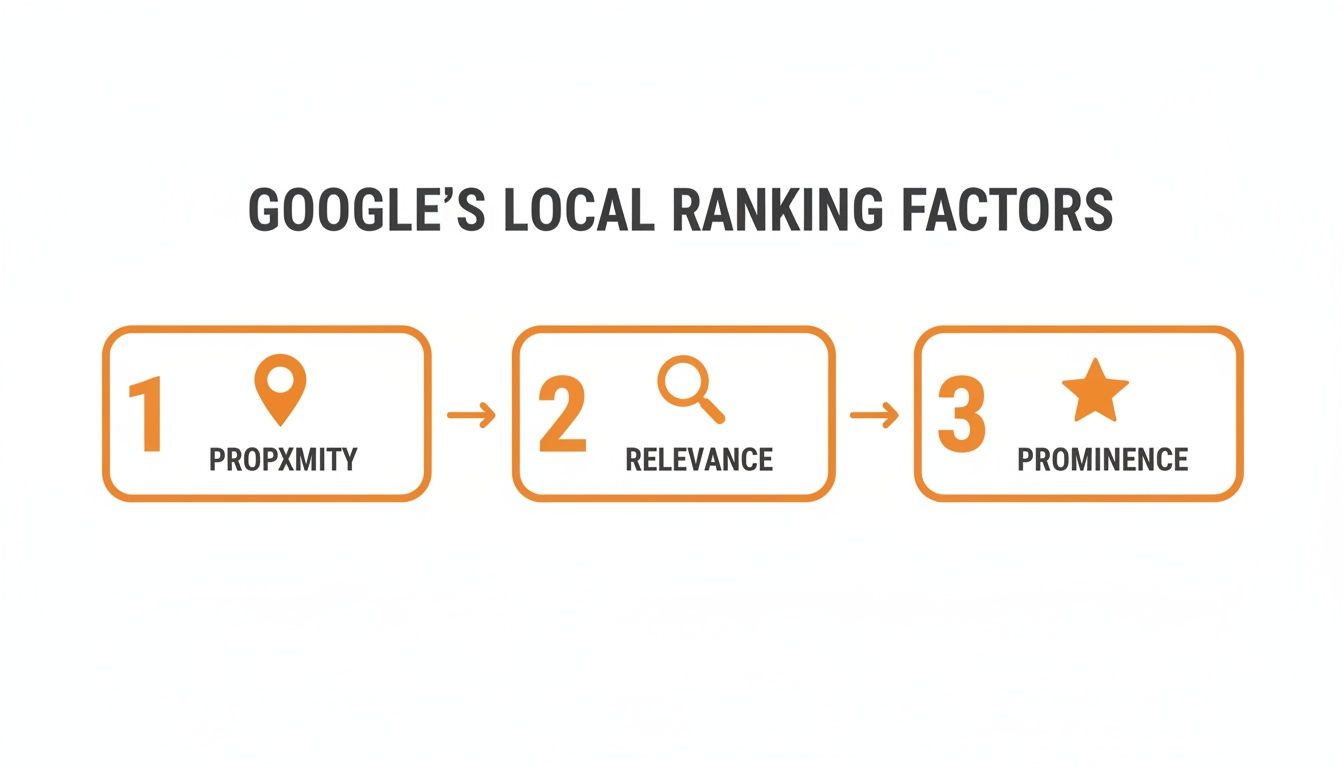
As the infographic shows, once Google establishes a searcher's Proximity to you, it immediately looks at your profile's Relevance (driven by categories and content) before weighing your Prominence (reviews and reputation) to decide your rank.
Step 2: Keep Your Profile Fresh and Engaging
An active profile signals to Google that you are an open, engaged, and reliable business.
- Upload High-Quality Photos Weekly: Profiles with photos get 42% more direction requests. Aim to add 1-2 new photos each week. Include exterior shots, interior ambiance, team photos, and pictures of your services in action. For a med spa in [City], this could be photos of the treatment rooms; for an HVAC company in [Neighborhood], it could be a picture of a newly installed unit.
- Publish Google Posts: Use Posts to share special offers, announce new services, or highlight company news. Publish a new Post every 7-14 days to keep your profile active. This is a simple but powerful way to optimize your Google Business Profile.
- Manage the Q&A Section: Proactively populate the Questions & Answers section. Add the top 5-10 questions your front desk staff gets (e.g., "Do you accept new patients?" or "Is parking available?") and answer them yourself from the business account. This turns a potential liability into a valuable FAQ.
A Quick Checklist for Optimizing Your Google Business Profile
- Claim and fully verify your listing.
- Ensure your Name, Address, and Phone (NAP) are 100% correct.
- Select the most accurate primary and secondary business categories.
- Write a keyword-rich business description (750 characters max).
- Add your services and products with detailed descriptions.
- Upload at least 10-15 high-quality photos to start.
- Add 1-2 new photos every week.
- Publish a new Google Post every 7-14 days.
- Pre-populate the Q&A section with common customer questions.
- Implement a system to consistently generate new reviews.
- Respond to ALL reviews (positive and negative) within 24 hours.
- Use UTM-tagged links to track website clicks from your profile.
Templates & Scripts for Review Management
Reviews are the engine of your profile's prominence. A steady flow of recent, positive reviews is your strongest trust signal. Use these practical, field-tested templates to build a five-star reputation.

| Template Type | Example Content |
|---|---|
| SMS Request (Dental Practice) | "Hi [Patient Name], thank you for visiting [Clinic Name] today. We value your trust in us for your dental care. Would you mind sharing your experience in a quick review? It helps our practice and other patients in [City]. [Review Link]" |
| Email Request (HVAC Company) | "Hi [Client Name], thank you for choosing [Company Name] for your recent service. Your feedback is important to us. If you have a moment, please share your thoughts about our technician, [Technician Name], here: [Review Link]" |
| Positive Review Response | "Thank you so much, [Reviewer Name]! We're thrilled you had a five-star experience with our team. We truly appreciate you choosing us and look forward to seeing you again!" |
| Negative Review Response | "Hi [Reviewer Name], thank you for your feedback. We are sorry to hear your experience did not meet expectations and we take this very seriously. Our practice manager, [Manager Name], would appreciate the opportunity to discuss this with you directly. Please contact us at [Phone/Email] at your convenience." |
7-Day Launch Checklist for Your Review Program
- Day 1: Finalize your SMS/email request scripts and create a direct Google review link.
- Day 2: Train front-line staff on why reviews matter and who is responsible for sending requests.
- Day 3: Send requests to your last 5-10 happy customers to build initial momentum.
- Day 4: Go live. Integrate the review request into your daily checkout or service completion workflow.
- Day 5: Assign one person to monitor for new reviews and respond within 24 hours.
- Day 6: Review your first few responses to ensure they are on-brand and sound authentic.
- Day 7: Share positive reviews with your team to celebrate successes and reinforce the habit.
Effective reputation management is a cornerstone of the importance of local SEO and is critical for both single and local SEO for multiple locations.
Measuring What Matters: Tracking Your GBP Performance
You can't improve what you don't measure. Tracking performance is how you prove ROI and make smarter decisions. Focus on metrics that tie directly to business goals, not vanity metrics like views.
The best way to track conversions is by using UTM (Urchin Tracking Module) parameters. These are simple tags added to your website URL in your profile. When someone clicks it, your analytics software (like Google Analytics) will show that the visit—and any subsequent form fill or booking—came directly from your Google Business Profile.
Recommended Performance Targets
- Review Volume & Recency: Aim for 5-10 new reviews per location per month.
- Average Star Rating: Maintain a 4.5-star rating or higher.
- Response Time: Respond to 100% of reviews within 24 hours.
- GBP Actions: Track for a steady month-over-month increase in calls, messages, and direction requests from your profile's Performance dashboard.
- Lead-to-Sale Conversion: Use UTMs and call tracking to measure what percentage of GBP-driven leads become paying customers.
Analyzing these KPIs provides a clear path from a search for "auto repair near me" to a paying customer. You can enhance this with customer satisfaction measurement tools to gain deeper insights.
Google Business Profile Optimization FAQ
Here are concise answers to the most common questions from busy local operators.
1. How long does it take to see results from GBP optimization?
You can expect to see initial movement in local rankings within 2-4 weeks after a thorough optimization. However, significant increases in calls and bookings typically build over 3-6 months of consistent activity (reviews, photos, posts).
2. How often should I post on my Google Business Profile?
Publish one new Google Post every 7-14 days. This is frequent enough to signal activity to Google and keep customers informed without being overly burdensome for your team.
3. What is the best way to handle a negative review?
Respond publicly and professionally within 24 hours. Acknowledge the feedback, apologize that their experience didn't meet expectations, and provide a direct offline contact (manager name and phone/email) to resolve the issue. Do not get into a public argument.
4. Can I add keywords to my business name on Google?
No. This is called keyword stuffing and is a direct violation of Google's guidelines that can lead to your profile being suspended. Your business name on GBP must exactly match your real-world business name as it appears on your physical signage.
5. Should I pay for a service to optimize my Google Business Profile?
While you can manage your profile yourself, many multi-location operators and busy practice managers hire specialists to save time and ensure best practices are followed. This is especially valuable for managing reviews, posts, and Q&As at scale. As your visibility grows, it's also wise to learn how to recognize and prevent Google Business Listing spam calls.
6. How many photos should my profile have?
Start with a base of at least 15-20 high-quality photos covering your exterior, interior, team, and services. More importantly, add 1-2 new photos every week to keep your profile fresh and engaging.
7. Does responding to reviews help my SEO?
Yes. Responding to reviews signals to Google that you are an active and engaged business owner, which is a positive factor for local rankings. It also shows potential customers that you value their feedback, building trust.
Ready to turn your Google Business Profile into a consistent source of new leads? Our team offers month-to-month support to handle the details, from managing your reputation to keeping your listings accurate across every location. Book a strategy call to see how we can help you dominate local search.


