
To get more reviews, you must consistently ask every customer for feedback via SMS or email immediately after their service or purchase. This steady stream of fresh, positive reviews is a powerful signal to Google that boosts your local search ranking. Higher rankings in the Google Maps Pack lead directly to more calls, messages, and bookings because customers see you as the most trusted choice in [City].
Key Facts About Getting More Reviews
- Proximity, Relevance, Prominence: These are Google's three core local ranking factors. Reviews are the single best way to control and improve your business's prominence.
- Target Volume: Aim for at least 10 new reviews per location per month to signal ongoing activity and relevance to Google's algorithm.
- Timing is Critical: Request a review within 1–4 hours of service completion. Waiting longer than 24 hours causes response rates to drop significantly.
- SMS is King: Text message requests have an average open rate of over 95%, making them far more effective than email for immediate feedback.
- Response Time Matters: Replying to all new reviews within 24 hours (and negative reviews within 4 hours) shows potential customers you are engaged and trustworthy.
Step-by-Step: How to Build a System to Get More Reviews
If you want to consistently get more reviews, you have to make the process invisible for your team and simple for your customers. The secret is an automated system that sends a request at that perfect "wow" moment after a great experience. This setup ensures you never miss a chance to turn a happy customer into a marketing asset.
The goal is to remove friction. The easier you make it for someone to leave feedback, the more likely they are to do it. Automation handles the timing and delivery, freeing up your staff to provide amazing service.
This simple flow chart breaks it down. A great service experience is the first step to generating a powerful ranking signal.
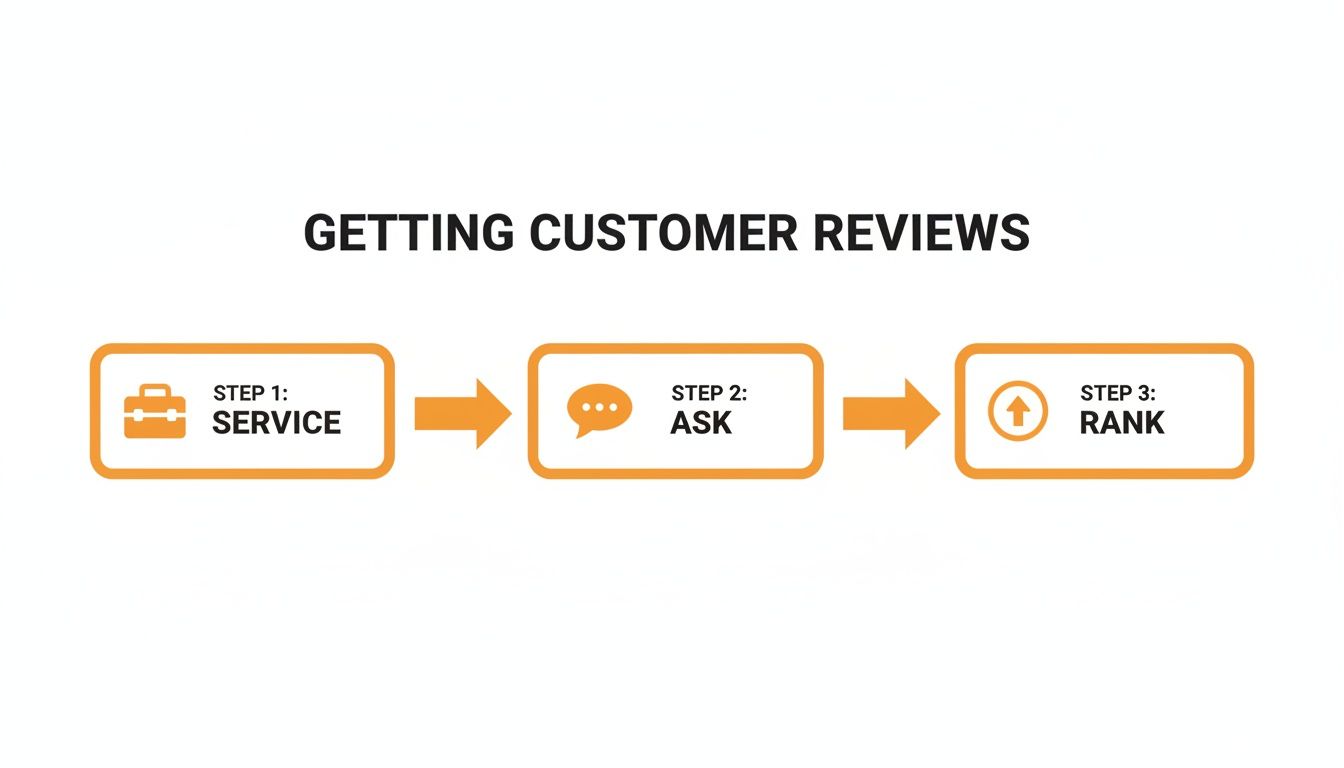
It all comes down to a simple loop: you deliver the service, you ask for feedback, and you use that feedback to climb the local rankings.
Step 1: Optimize Your Google Business Profile
Think of your Google Business Profile (GBP) as your digital front door. It’s often the first place potential customers find your business and your reviews. If this profile isn't in top shape, your efforts to get more reviews will fall flat. A fully optimized profile sends strong signals to Google that you're a legitimate business worthy of a high rank.
Quick GBP Optimization Checklist:
- Verify Your NAP: Ensure your Name, Address, and Phone number are 100% consistent everywhere online.
- Select All Relevant Categories: Choose a primary category (e.g., "Med Spa") and add all applicable secondary categories ("Laser Hair Removal Service," "Skincare Clinic").
- Upload Recent Photos: Add new, high-quality photos of your team, location, and work every quarter. Profiles with 10+ photos get more calls.
- Answer Questions: Use the Q&A feature to proactively answer common customer questions.
- Enable Messaging: Turn on the messaging feature but be prepared to respond to inquiries within 2 hours.
Getting these fundamentals right is the bedrock of any solid review strategy. For a deeper dive, learn how to optimize your Google Business Profile.
Step 2: Pinpoint the Perfect Moment to Ask
Timing is everything. The absolute best time to ask is within a few hours of service completion, while the positive feeling is still fresh.
- For an HVAC company: The request should fire off the second a technician marks the job "complete" in their software.
- For a dental practice: Send it right after the patient checks out at the front desk.
- For an auto shop: The perfect trigger is as soon as the customer pays their bill.
- For a vet clinic: Send the request an hour after the pet owner has returned home.
If you wait even 24 hours, response rates plummet. The emotional connection to the great service fades, and your request becomes just another piece of marketing.
Step 3: Connect Your Systems to Trigger Automated Requests
This is where the automation magic happens. You need your existing business software to "talk" to your review request platform. This is often a direct integration with your scheduling software, Point of Sale (POS), or Customer Relationship Management (CRM) system. The idea is to use an event that already happens in your workflow to kick off the review request.
For example, when a customer’s status is updated to “service completed” in your CRM, it automatically triggers the review request. This makes the entire process hands-off. Nobody has to remember to send an email or a text; the system just does it.
Pro Tip: The single most important technical detail is using a direct, shortened link straight to the "Leave a Review" pop-up on Google. Don't just send people to your main Google Business Profile page. Every extra click costs you reviews.
Step 4: Respond to Every Single Review
When a customer leaves a review, they start a public conversation. How you respond shows everyone else what you’re really like to do business with. Your replies are just as important as the reviews themselves.
Set Clear Response Time Goals (Service Level Agreement or SLA):
- Negative Reviews (1-2 stars): Respond within 4 business hours.
- Neutral Reviews (3 stars): Respond within 24 hours.
- Positive Reviews (4-5 stars): Respond within 48 hours.
This shows you are accountable and value all feedback. In fact, over 90% of consumers are more likely to use a business that responds to all its reviews.
Step 5: Launch Your Review Program
Getting a new initiative off the ground can be done in just one week. This plan breaks the process into manageable daily tasks.
7-Day Review Program Launch Checklist
| Day | Focus | Key Tasks |
|---|---|---|
| 1 | Strategy & Audit | Set review goals (10+ per month, 4.5+ star rating). Audit and update online listings. |
| 2 | Tools & Messaging | Choose review software. Customize email and SMS request templates. |
| 3 | Team Alignment | Train frontline staff on the process and its importance. |
| 4 | Technical Setup | Integrate review platform with CRM/POS for automated triggers. |
| 5 | Quality Assurance | Send test requests to a small group. Verify links and workflow. |
| 6 | Launch | Activate the automated workflows for all eligible customers. |
| 7 | Observation | Monitor request performance (opens, clicks) and watch for new reviews. |
Templates & Scripts to Get More Reviews
You don't need to reinvent the wheel every time. Use these templates as a starting point, and encourage your team to customize them with specific details.
Review Request Templates
SMS Template (Med Spa)
Hi [Customer Name], it's the team at [Spa Name]. We hope you loved your treatment! We would be so grateful if you could share your experience with our team. Tap here to leave a quick review: [Shortened Link]
Email Template (Dental Practice)
Subject: How was your visit to [Practice Name]?
Dear [Patient Name],
Thank you for choosing us for your dental care. Your feedback is important as we work to create the best possible experience for our patients in [City].
If you have a moment, we would appreciate you leaving a review about your visit on Google:
[Leave a Review Here – Linked Button]
Thanks again for your time.
Sincerely,
The Team at [Practice Name]
Review Response Templates
Positive Review Response Template (HVAC Company)
Hi [Customer Name], thank you so much for the 5-star review! We're thrilled to hear that our technician, [Technician Name], did a great job with your [Service Mentioned] at your home in [Neighborhood]. We've passed your kind words along to the team, and we look forward to helping you again in the future!
Negative Review Response Template (Auto Repair Shop)
Hi [Customer Name], thank you for bringing this to our attention. We are very sorry to hear that your experience with your recent repair did not meet your expectations. Providing excellent service is our top priority. Please call our manager, [Manager's Name], at [Phone Number] so we can learn more and work to make this right.
Compliance Note: For healthcare businesses, all responses must be HIPAA-aware. Never acknowledge someone is a patient or share any Protected Health Information (PHI). For property managers, ensure all replies are Fair Housing neutral.
How to Measure Your Review Program's Success
Getting reviews is great, but you need to know if it's helping your business. By focusing on a few key performance indicators (KPIs), you can draw a straight line from your reputation management efforts to tangible business results.
Key Performance Indicators (KPIs) to Track
Aim for these targets for each of your locations:
- Review Volume: 10+ new reviews per month.
- Average Star Rating: Maintain 4.5 stars or higher.
- Review Recency: Your latest review should be no more than 2 weeks old.
- Response Time: Respond to all reviews within 24 hours.
- GBP Performance: Track the monthly increase in profile views, clicks, and calls from your Google Business Profile Insights.
- Lead-to-Sale Conversion: Use trackable links and phone numbers to measure how many leads from your GBP become paying customers.
To track conversions from GBP, use UTM parameters. A UTM is a simple tag you add to the end of your website link on your Google profile. This tells your analytics software (like Google Analytics) that a visitor came from your GBP listing. When that visitor calls or books, you can attribute the conversion directly to your local SEO efforts.
Frequently Asked Questions (FAQ)
1. How many reviews do I need for my local business?
There is no magic number, but businesses in Google's top three local results ("Map Pack") average around 47 reviews. More important than the total number is consistency. Aim to get 5–10 new reviews every month to show Google your business is active and relevant right now.
2. Can I offer a gift card or discount for a review?
No. Offering incentives for reviews violates Google's policies and can lead to your reviews being removed or your profile being suspended. The best strategy is to earn reviews by providing excellent service and making it easy for all customers to share their honest feedback.
3. What is the best way to ask for a review: SMS or email?
For most local businesses, SMS (text message) is the most effective method due to its 95%+ open rates. Send a text within an hour of service for the best results. Email is a good backup or a better choice for businesses with longer-term client relationships, like a law firm or financial planner.
4. How do I handle a fake negative review?
First, reply publicly and professionally. State that you have no record of the person as a customer and invite them to contact you directly. This shows other potential customers that you are responsive. Second, log in to your Google Business Profile, find the review, and flag it as a violation of Google's policies.
5. Should I only focus on getting Google reviews?
For most local businesses, Google should receive 80% of your focus due to its direct impact on local search rankings. The other 20% of your effort can be directed toward industry-specific sites that build credibility in your niche, such as Healthgrades for doctors, Angi for home services, or Yelp for restaurants.
Managing review requests, responses, and reporting across one or multiple locations can quickly become a full-time job. Our team specializes in building and running disciplined review programs that centralize everything, so you can focus on your business. We offer flexible, month-to-month support for businesses in the senior living industry and many others. If you're ready to turn customer feedback into measurable growth, book a strategy call with our team.


