
If you're running several locations, you’ve probably seen the same problem over and over. The phone rings, the team answers, and nobody has the full picture fast enough to save the call, book the job, or ask for the review afterward. crm and voip integration fixes that by connecting your phone system and customer records so each call starts with context, not guesswork.
That matters for more than call handling. When the right location answers faster, logs the interaction correctly, follows up, and requests feedback at the right moment, you get more bookings, better reviews, and stronger visibility for searches like “dentist near me” in [City] or “emergency HVAC repair near me” in [Neighborhood].
What is CRM and VoIP Integration and Why It Matters
A missed call rarely looks dramatic in the moment. A receptionist puts someone on hold, can’t find their last appointment, asks them to repeat everything, and the caller moves on to the next option in Google Maps.
CRM and VoIP integration is the connection between your CRM (Customer Relationship Management) system and your VoIP (Voice over Internet Protocol) phone system. In plain English, it means your phone calls and customer records talk to each other automatically, so when someone calls, your team can see who they are, what happened last time, and what should happen next.
If you want a simple refresher on the CRM side, this guide on What is client relationship management? gives useful background before you start comparing phone integrations.
Key Facts
- 92% of organizations adopted AI in customer experience by 2025, and VoIP-CRM setups are a core part of that shift, according to Nextiva’s VoIP statistics roundup.
- That same source reports 14% higher resolution per hour and 9% reduced handling time when AI-supported customer experience systems are in place.
- For operators, the practical win is simple. Fewer repeated questions, cleaner call records, and faster handoffs between locations or departments.
- In local service businesses, that usually shows up as more completed bookings, fewer dropped leads, and better review opportunities after a successful call.
- If you’re evaluating the broader communication side of your stack, this overview of customer communication management software is a useful next step.
Why multi-location operators care
Single-location businesses can sometimes get by with workarounds. A front desk person remembers regulars. An owner jumps in. A shared inbox patches over missing details.
That breaks down fast across five, ten, or twenty locations.
A regional manager needs a system that helps each location answer consistently, route correctly, and log the same basic data every time. If your [City] office tags a call one way and your [Suburb] office logs nothing at all, you don’t just lose operational clarity. You lose review opportunities, follow-up discipline, and local search momentum.
Practical rule: If your team still has to ask, “Who is this?” after answering the phone, your phone system and CRM aren’t working as one system yet.
How CRM and VoIP Integration Works
Think of it as a digital receptionist. The phone system sees the incoming number, checks the CRM for a match, and puts the right customer record in front of the person answering before the conversation gets far.
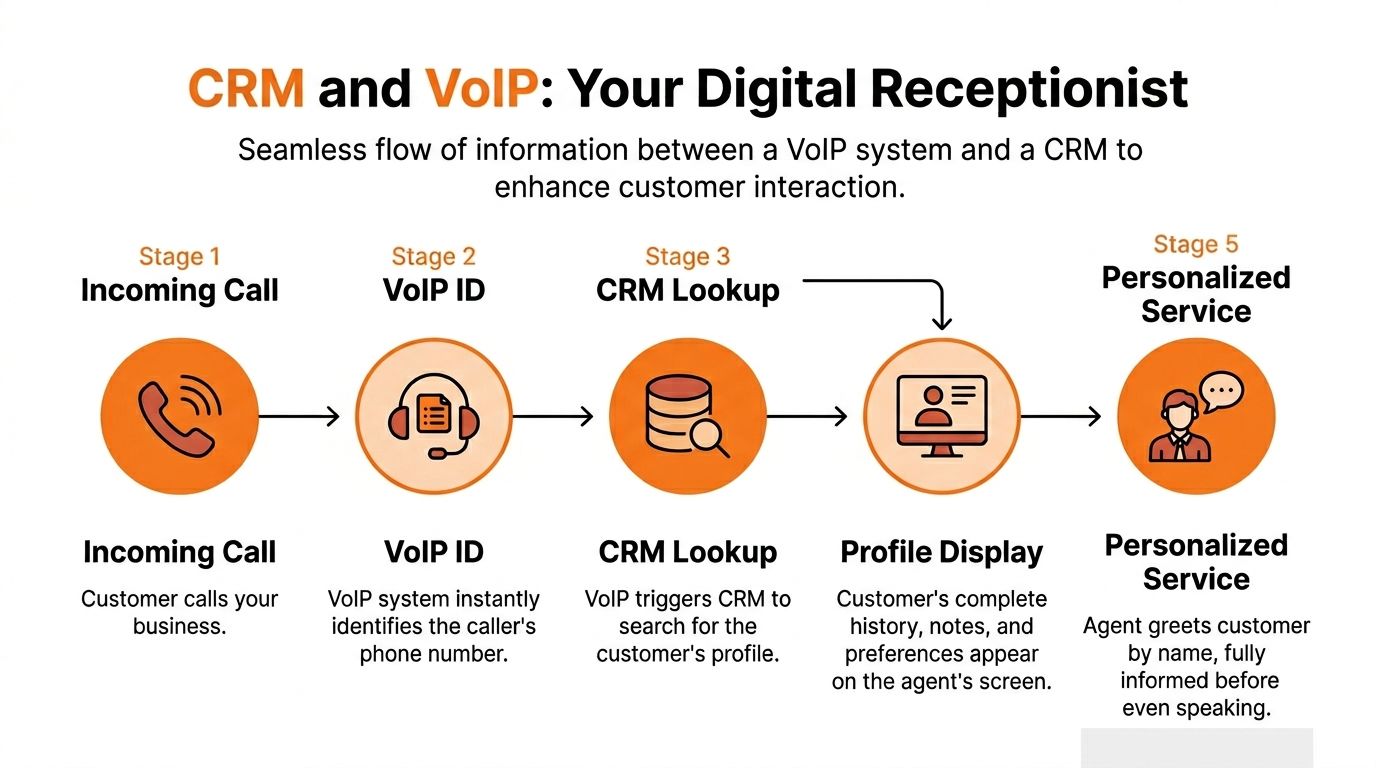
What happens during a call
The sequence is usually straightforward:
- A customer calls your local number.
- The VoIP system recognizes the number and checks whether that caller already exists in your CRM.
- The CRM returns the matching record if one exists.
- A screen pop appears with the customer’s name, notes, job history, appointment history, or lead source.
- The system logs the call activity when the call ends, often including time, duration, and notes.
That’s the part many teams notice first. The less visible part is what happens after the call. Good integrations can trigger follow-up tasks, route messages to the correct location, and keep call records from getting trapped in one person’s memory.
Click-to-call and why it matters
Outbound calling usually suffers from tiny delays that add up all day. Staff copy numbers, mistype digits, switch tabs, then lose their place.
According to ClearlyIP’s overview of VoIP integration with CRM systems, click-to-call cuts dialing time from 20 to 30 seconds to under 2 seconds and reduces errors by 95%. The same source says agents using it contact twice as many leads daily without leaving the CRM platform.
For a dental group or auto shop chain, that means the recall list, estimate follow-up list, or unsold-tour list gets worked more consistently. The speed gain matters, but the bigger benefit is workflow discipline. The call is launched from the customer record, so the team is more likely to document the outcome properly.
Choosing Your Integration Architecture
Not every business needs a custom build. Most local operators should keep this simple.
| Integration Type | Best For | Pros | Cons |
|---|---|---|---|
| Native integration | Teams using common tools with built-in support | Easier setup, fewer moving parts, cleaner support path | Less flexible if your workflows are unusual |
| Third-party connector | Businesses stitching together tools without direct compatibility | Faster to test, useful for light automation | Can be brittle if workflows get complex |
| Custom API integration | Multi-location groups with unique routing, tagging, or reporting needs | Greater control, better fit for branch-level operations | Needs technical oversight and better documentation |
What usually works best
For most operators, I’d choose based on process maturity, not feature lists.
- Native first: If your CRM and phone platform already support each other well, start there.
- Connector second: Use middleware when you need modest automation and don’t want a full custom project.
- Custom last: Build custom only when your branches, franchises, or service lines need specialized routing, governance, or reporting.
A lot of buyers overcomplicate this. They chase a perfect architecture before they’ve agreed on simple operational rules like call dispositions, ownership of missed-call follow-up, and which location should own a shared customer.
The wrong setup isn’t always the cheaper one. It’s often the one that lets every location improvise.
If your current phone workflows are messy, review your call management systems before you connect anything. Integration won’t fix confusion you haven’t defined.
Key Benefits for Your Local Business Growth
The main benefit isn’t technical. It’s that your team stops treating every inbound call like a cold start.

When a caller reaches your med spa in [City], your dental office in [Neighborhood], or your HVAC branch across town, staff should know whether this is a new lead, a past customer, an estimate follow-up, or a complaint that needs escalation. That changes the tone of the call immediately.
Better conversations create better conversions
People searching “vet near me” or “brake repair near me” usually aren’t looking for a complicated buying journey. They want fast answers and confidence that they’ve called the right place.
When the person answering can greet them by name, see prior notes, and move straight to the next step, you reduce friction. Calls feel organized. Customers don’t have to repeat themselves. Teams are more likely to book while interest is still high.
That’s especially important for multi-location businesses where customers may call one branch today and another branch next month. Without shared context, your brand feels fragmented. With it, your brand feels coordinated.
Administrative drag drops fast
Manual call logging is where good intentions go to die. Teams mean to enter notes later, then the front desk gets busy, a technician calls in, and the details disappear.
According to Tata Communications’ explanation of VoIP CRM integration, automatic call logging can reduce data entry errors by up to 90% and cut post-call administrative time by 40% to 60%. The same source says this automation can boost agent productivity by 25% to 35% and help teams handle 20% more calls per hour.
For local operators, that translates into cleaner records and fewer missed follow-ups. It also means your manager in [Region] can review outcomes by location without chasing handwritten notes or half-finished CRM entries.
Why this helps local SEO and reviews
Google’s local results are shaped by proximity, relevance, and prominence.
- Proximity is how close the searcher is to your location.
- Relevance is how well your business profile and service information match the search.
- Prominence is the strength of your local reputation, including reviews and overall brand signals.
A phone integration doesn’t change proximity. But it absolutely affects relevance and prominence.
Here’s how:
- Cleaner service notes help your team categorize calls correctly and understand which services customers ask about.
- Faster, more accurate handling leads to better experiences, which makes review requests more likely to succeed.
- Consistent follow-up helps each location ask for reviews at the right moment, while the experience is still fresh.
That matters for searches like “pediatric dentist near me,” “urgent care near me,” or “AC repair near me” in [City]. The location that answers well, follows up properly, and earns recent feedback usually has an advantage over the location that lets good calls vanish into a phone log.
If you’re tightening that customer journey, a practical next read is customer communication strategies.
A short Google Business Profile checklist
Use this alongside your call workflow.
- Match location data: Keep your business name, address, phone number, hours, and categories accurate for each branch.
- Clarify services: Make sure each location lists the services it answers calls for.
- Route to the right number: The number on your profile should reach the correct team for that location.
- Respond to reviews: Positive and negative reviews both need timely, professional replies.
- Track bookings from profile traffic: Tie calls and booking clicks back to each Google Business Profile listing.
A short explainer may help your team connect the dots between call handling and customer perception:
Good phone handling doesn’t just save one conversation. It gives your location more chances to earn the next review, the next map click, and the next booking.
Your Implementation Checklist and Best Practices
At 4:45 p.m., the busiest location is still answering calls, one branch is already forwarding to voicemail, and a customer searching your brand on Google taps the number for the wrong office. The integration did its job technically. Operations did not.

For multi-location service businesses, rollout success depends on branch rules, local ownership, and clean follow-up. If a call is answered but never logged, never booked, or never tied back to the right location, you lose more than one lead. You lose review opportunities, local ranking signals, and a fair read on which branch is performing well.
Use this checklist to set the system up in a way your front desk and managers can keep running.
Step 1 Audit the current workflow by location
Start with what each branch is doing now.
Map the customer path for every location: Google Business Profile call, website call, missed call, voicemail, text follow-up, booking, completed job, and review request. Write down where each step breaks. In multi-location groups, the break is often simple. Wrong number on the profile. No owner for missed calls. Two teams using different disposition labels for the same outcome.
Review these items:
- Phone setup by branch: Main number, overflow rules, after-hours routing, mobile forwarding, voicemail ownership
- CRM usage: Who updates records, who skips them, and which fields are usually blank
- Message channels: SMS, web forms, chat, appointment reminders, and manual texting
- Location records: Whether one customer can interact with multiple branches without creating duplicate contacts
- Review trigger point: What event should mark a customer as eligible for a review request
That last point matters more than many teams expect. If one office sends requests after booking and another sends them after completed service, your review volume and review quality will vary by process, not by branch performance.
Step 2 Define operating outcomes
Good integrations are built around decisions your team has to make fast.
Set the few outcomes that matter most, and define them in plain language. Examples include returned missed calls within one business hour, booked jobs tagged to the correct branch, complaint calls flagged for manager follow-up, and completed services marked eligible for review outreach.
Avoid feature-first planning. "We want AI summaries" is not an operating goal. "We want every missed call from Google Business Profile to create a callback task at the correct location" is a useful goal.
A simple manager check helps here: if a branch hits the goal, does it lead to more bookings, fewer dropped leads, or more recent reviews? If not, it probably does not belong in phase one.
Step 3 Standardize the fields your staff use
The CRM should capture enough detail to run the business, not every detail someone might want later.
Keep the required fields short and consistent across locations:
- Location
- Lead source
- Requested service
- Call outcome
- Follow-up owner
- Review eligible
- Complaint or service recovery flag
Use a short call outcome list. "Booked," "Need callback," "Quote pending," "Wrong location," and "Issue to resolve" will get used. A list of twenty options will not.
For businesses that rely on text follow-up after calls, add one approved workflow for CRM text messaging so staff are not switching tools or sending inconsistent messages from personal phones.
Step 4 Choose the simplest stack your locations will follow
Consistency beats feature depth in most branch environments.
A practical setup usually includes a VoIP system with dependable CRM integration, one front-line CRM view, branch-level routing, and reporting that shows activity by location and by outcome. If a tool does not make it easier for a receptionist, service advisor, or office manager to do the next step correctly, it will create workarounds within a month.
Ask vendors and internal admins these questions before rollout:
- Can incoming calls match to an existing contact automatically?
- Can missed calls create a task for the right branch without manual sorting?
- Can each location have its own number, hours, and routing rules?
- Can call outcomes trigger review eligibility without exposing sensitive information?
- Can managers compare locations using the same definitions?
If the answer is no on any of those, expect reporting disputes later.
Step 5 Build routing for customer behavior
Call flows should reflect how customers behave, not how the org chart looks.
Set rules for normal hours, lunch gaps, after-hours coverage, overflow, urgent service requests, bilingual routing if needed, and calls that land at the wrong branch. Then test those rules with live scenarios. A customer searching "[service] near me" does not care which office owns the account. They care that someone picks up, understands the need, and gets them to the right person fast.
Include a process for shared customers who contact the wrong location. In many groups, that happens every day. The fix is not just forwarding the call. The fix is logging the interaction so the correct branch can follow up and the reporting still reflects what happened.
Step 6 Train to one screen, one owner, one next action
Front-line training should be short and repeatable.
Show staff the incoming call screen, the customer history they should check, the exact fields they must complete, and what happens next for each call outcome. Then give them a short checklist at the desk.
A workable call handling checklist:
- Confirm the caller reached the correct location
- Verify contact information
- Select the service needed
- Set the call outcome before closing the task
- Assign follow-up if the booking is not completed on the call
- Flag complaints for manager review
- Mark review eligibility only after the right service milestone
Keep special care around healthcare, legal, and other sensitive categories. Do not include protected or confidential details in texts, CRM notes used for review workflows, or review request triggers.
Step 7 Connect branch operations to local search and reputation work
This is the piece many teams miss.
Your CRM and VoIP integration should support local visibility, not just call logging. Each branch needs the correct public number, the correct routing schedule, and a way to connect completed customer interactions to review generation and response ownership. Otherwise one location can appear weak in Google results because calls were mishandled or reviews were never requested at the right time.
Check these items during rollout:
- Google Business Profile number matches the branch that should answer
- Published hours match actual call coverage
- Calls from local listings can be tracked to the correct location
- Completed jobs or resolved visits can trigger review outreach
- Negative experiences are routed to service recovery before a review request goes out
- Each branch has a named owner for review responses
That combination improves more than reporting. It helps protect review quality, keeps location pages accurate, and gives managers a clean way to see whether weak local performance is a marketing issue or an operations issue.
Ready-to-Use Scripts and Templates
The phone call is often the moment that determines whether you’ll earn a review later. If the integration captures the outcome cleanly, your team can follow up while the experience is still fresh.
SMS review request script
Use after a completed service call, appointment, or resolved issue. Keep healthcare messages free of protected health information.
SMS for dental, vet, HVAC, or auto service
Hi [First Name], thanks for choosing [Business Name] in [City] today. If you have a minute, we’d appreciate your feedback about your experience with our team at [Location Name]. Share your review here: [Review Link]
Email review request script
Subject: Thanks for visiting [Business Name]
Hi [First Name],
Thank you for choosing [Business Name]. We’re always working to improve the experience at our [City] location, and your feedback helps.
If you’re open to it, please leave a quick review here: [Review Link]
Thank you again,
[Manager Name]
[Business Name]
[Location Phone]
Positive review response template
Hi [Reviewer Name], thank you for the kind feedback. We’re glad our team at [Location Name] could help. We appreciate you taking the time to share your experience, and we look forward to seeing you again.
Negative review response template
Hi [Reviewer Name], thank you for your feedback. We’re sorry your experience did not meet expectations. We take concerns like this seriously and would like the chance to follow up directly. Please contact [Manager Name] at [Phone] so we can learn more and work toward a resolution.
Keep negative-review responses calm, short, and non-defensive. Don’t argue facts in public, and don’t include private customer details.
7-day review program launch checklist
- Day 1: Confirm each location’s review link and who owns replies.
- Day 2: Set the rule for when a review request is sent after a successful call or completed visit.
- Day 3: Train staff on who qualifies for a request and what not to send in healthcare or sensitive situations.
- Day 4: Load the SMS and email templates into your workflow.
- Day 5: Test with one location in [City] before rolling out chain-wide.
- Day 6: Review the first batch of requests, replies, and any delivery issues.
- Day 7: Tighten the process and add the script to your standard phone greeting for business workflow.
How to Measure Success and Prove ROI
Most operators don’t struggle to launch. They struggle to prove which location is getting better and why.
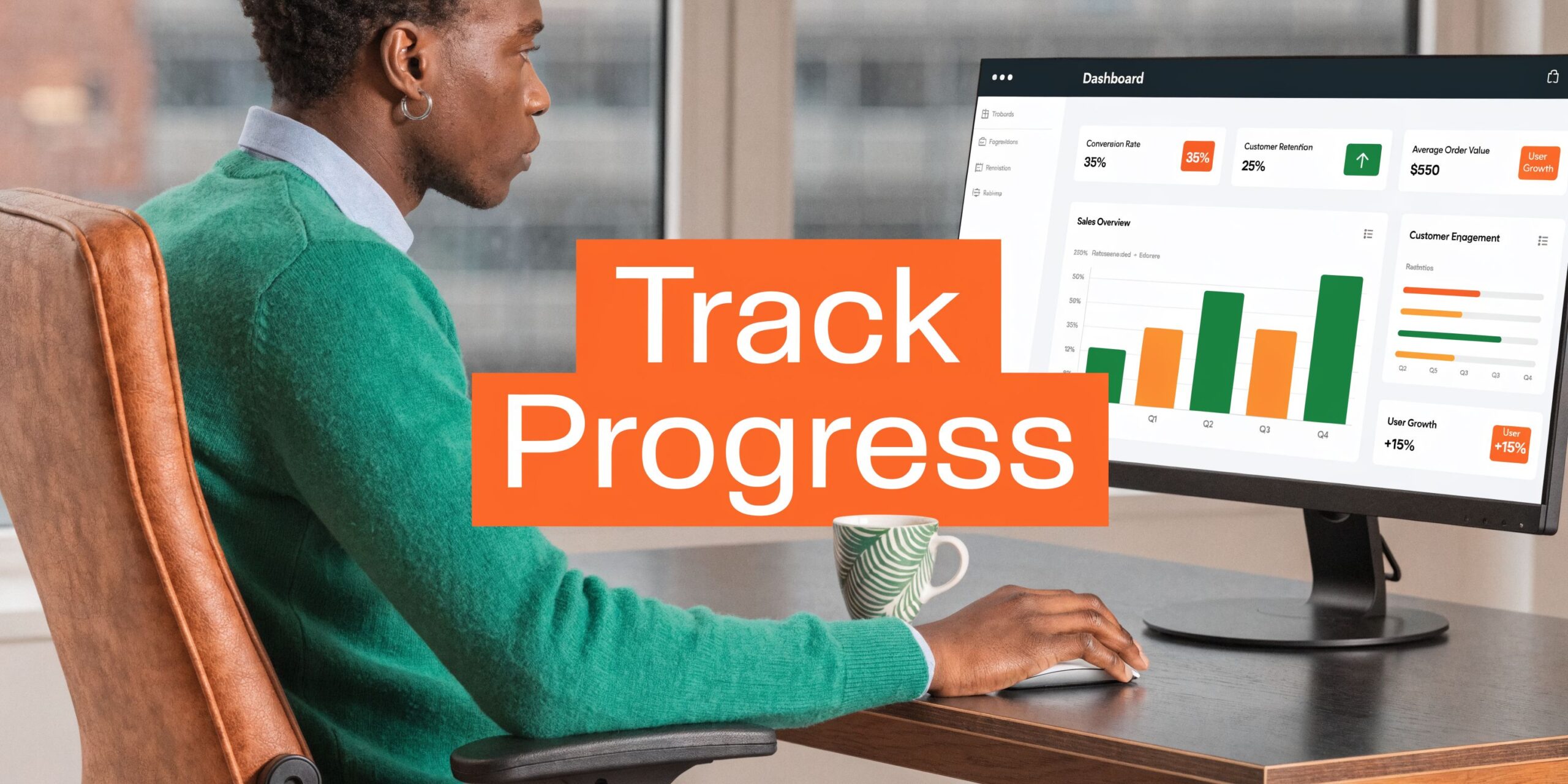
That’s why I’d avoid one giant summary dashboard with no branch detail. Regional managers need to compare locations on the same scorecard, but each location also needs ownership of its own call outcomes, review timing, and booking conversion.
What to track each month
Use a simple branch-level scorecard.
- Review volume: Track whether each location is generating a steady flow of fresh reviews.
- Review recency: Watch for branches that go quiet even when call volume is healthy.
- Response time: Measure how quickly reviews are answered.
- Star rating trend: Look for declines that line up with staffing, routing, or service issues.
- Google Business Profile calls and booking actions: Compare profile activity with actual booked outcomes.
- Lead-to-sale or lead-to-booking conversion: Separate answered calls from completed appointments or jobs.
The important part isn’t having perfect data. It’s having the same definitions across every branch.
A simple attribution method
Use UTM tags on links from your Google Business Profile to your website or booking page so you can identify which location listing drove the click.
A practical naming structure looks like this in concept:
- source: google
- medium: organic
- campaign: gbp-[location]
- content: bookings or website
Then connect the rest of the journey:
- A customer clicks from the profile.
- They land on the location page or booking page.
- They call or submit a form.
- The CRM records the lead source and location.
- The VoIP log confirms the call happened.
- The booked job or appointment closes the loop.
That’s enough to answer a useful management question: which branch profile generated interest, which branch answered well, and which branch converted.
Cost and scale matter too
This category isn’t niche anymore. The Speedflow 2025 VoIP industry review says the global VoIP market reached approximately USD 161.79 billion in 2025 and is projected to reach USD 415.20 billion by 2034. The same source notes that small businesses can see 25% to 50% cost savings over traditional phone lines.
That doesn’t mean every integration pays off automatically. It means the infrastructure is mature enough that local operators should expect business-grade options, not workarounds.
If a branch can’t show call outcomes, booking outcomes, and review outcomes in one reporting rhythm, you don’t have usable attribution yet.
Examples Troubleshooting and Advanced Topics
A dental practice in [City] can use integrated calling to identify returning patients, confirm appointments, and route billing questions correctly. The important compliance point is simple. Don’t include protected health information in texts, review requests, or public replies.
An HVAC company in [Neighborhood] can route urgent after-hours calls to the on-call technician while keeping routine estimate requests in the CRM for next-morning follow-up. The trick is to separate emergency routing from standard sales routing so the team doesn’t burn out on non-urgent calls overnight.
A senior living operator with several communities can tag inbound tour calls by property, then compare which communities convert interest into scheduled visits. Keep all language Fair Housing neutral in call notes, scripts, and follow-up messages.
Common issues to fix early
- Mismatched caller ID: Standardize phone number formatting in the CRM so records match correctly.
- Duplicate contacts: Decide whether shared family numbers create one household record or separate individual records.
- Missing call logs: Check whether the integration is failing on certain queues, users, or branch rules.
- Wrong branch ownership: Set clear rules for transfers and reassignment when a customer calls the wrong location.
- Messy notes: Use a short call disposition list instead of free-form notes for reporting.
Most troubleshooting comes back to process discipline. The software does what you tell it to do. The problem is often that different locations told it different things.
Frequently Asked Questions
How much does crm and voip integration cost for a small business?
Pricing depends on your phone provider, CRM, number of users, and whether you use native tools or custom work. The safer approach is to price the total workflow, including setup, training, call routing, and reporting, not just the phone license.
Can I keep my existing phone numbers?
Usually, yes. Many businesses keep their local numbers because those numbers are already tied to signage, listings, repeat customers, and Google Business Profile traffic.
How long does setup take?
That depends on how clean your current processes are. A simple single-brand rollout can move quickly. A multi-location rollout takes longer if branches use different call rules, inconsistent CRM fields, or separate ownership models.
Will this work on mobile phones too?
It often can, especially if your VoIP provider supports mobile apps. That’s useful for field teams, on-call staff, and managers who need visibility without being at the front desk.
What training does staff need?
Front-line teams need practical workflow training, not theory. Show them how to answer with context, update the record, tag the call, and trigger the right next step.
Should I choose an all-in-one platform or connect separate tools?
If your needs are standard and your team is small, all-in-one can reduce complexity. If you operate multiple locations with stricter reporting and review workflows, separate tools can be the better fit as long as the integration is stable and governed well.
Does this help with “near me” search visibility?
Indirectly, yes. Better call handling improves follow-up, booking discipline, and review generation. Those improvements support the relevance and prominence signals that matter in local search.
If you want help connecting calls, reviews, listings, and branch-level reporting into one operating rhythm, Reviews To The Top can help you map the workflow and roll it out with month-to-month support. A good starting point is to book a strategy call, review your current phone and CRM setup, and identify the few changes that will have the clearest impact on bookings, response speed, and review generation.


