
Choosing the right Google Business Listing categories is a critical step to ranking higher in local search results. This tells Google exactly what your business does, connecting you with customers in your area who are searching for your specific services. Getting categories right means more calls, website clicks, and bookings from high-intent “near me” searches.
This guide provides a step-by-step process for selecting the best categories, with templates and a checklist to help busy operators optimize their listings and track results.
Key Facts
- Primary Category: Your primary category is the single most important local SEO ranking factor.
- Category Count: You can have one primary category and up to nine additional categories.
- Specificity Wins: A specific category (e.g., "Pediatric Dentist") will outperform a general one ("Dentist") for targeted searches.
- Google's Algorithm: Categories directly influence the "Relevance" factor in Google's Proximity–Relevance–Prominence local ranking model.
- Features: The right primary category can unlock special features in your profile, like booking buttons or menu options.
- Negative Impact: Choosing the wrong primary category is a major negative ranking factor that can make you invisible to potential customers.
How to Select the Right Google Business Categories
Selecting your Google Business Profile (GBP) categories is a strategic decision that directly impacts how many new customers find you. Your primary category is the most important choice, as it defines your core business. Your additional categories support this by highlighting all the other services you offer, helping you appear in a wider range of relevant searches.
Here’s how to do it right.
Step 1: Define Your Core Business
Start by identifying your main service. This will be your primary category. It must be the most specific and accurate description of what you are known for. For a veterinary clinic that offers grooming but primarily provides medical care, "Veterinarian" or "Animal Hospital" is the correct choice. For a med spa, "Medical Spa" is much better than a generic "Beauty Salon."
Step 2: List All Your Services
Write down every service you offer. An HVAC company might list air conditioner repair, furnace installation, duct cleaning, and 24/7 emergency services. This list will form the basis for your additional categories. Be thorough but realistic; only list services you actually provide.
Step 3: Match Services to Google’s List
Google maintains a predefined list of nearly 4,000 categories. You cannot create your own. In your GBP dashboard, start typing your services into the category field to see the official options that appear. For the HVAC example, you would find "Air Conditioning Contractor," "Heating Contractor," and "Air Duct Cleaning Service." Select all that apply.
Step 4: Research Your Top Competitors
Search Google Maps for your main service in your city (e.g., “HVAC contractor in [City]”). Analyze the top three businesses in the Local Pack. What is their primary category? This isn't about copying them but understanding what Google is rewarding for that search term. You might discover a more specific category that you overlooked.
Understanding Proximity, Relevance, and Prominence
Your category choices have a direct impact on Google's local search algorithm, which is based on three pillars:
- Proximity: How close your business is to the person searching.
- Relevance: How well your profile matches the search query. Your categories are the #1 factor here.
- Prominence: How well-known your business is, based on factors like reviews, links, and online citations.
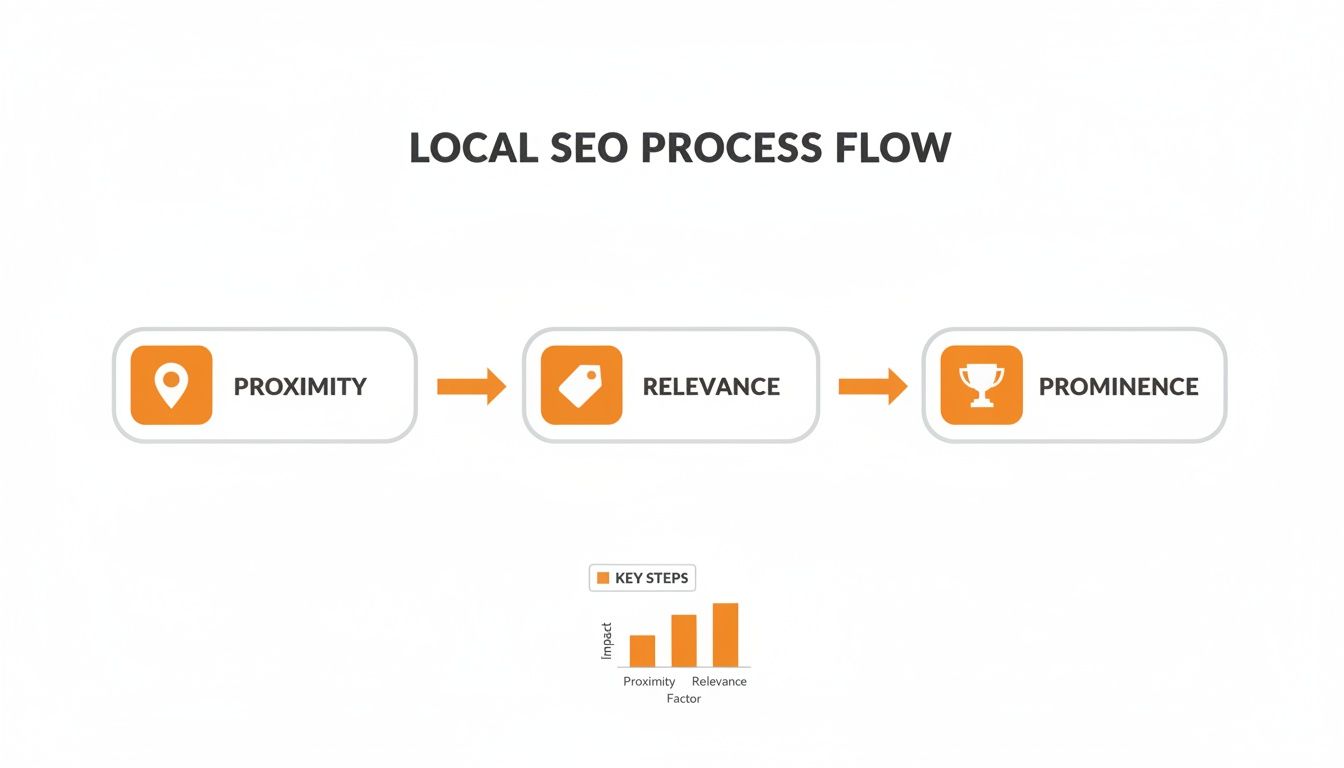
As this model shows, getting your categories right is fundamental to signaling your relevance and earning a top spot. For a complete walkthrough, see our guide on how to optimize your Google Business Profile.
Category Examples and Templates for Top Verticals

The best category strategy depends on your industry. A dental practice has different goals than an auto repair shop, and their category choices must reflect that. Below are proven category combinations to help you attract the right customers in your area, such as the [Neighborhood] district of [City].
Recommended GBP Category Combinations by Industry
| Business Vertical | Recommended Primary Category | Suggested Additional Categories | Strategic Goal |
|---|---|---|---|
| Med Spa | Medical Spa | Laser Hair Removal Service, Facial Spa, Skin Care Clinic | Attract clients for high-margin aesthetic and wellness services. |
| Dental Office | Dentist | Cosmetic Dentist, Dental Implants Provider, Emergency Dental Service | Capture routine patients and high-value emergency or cosmetic cases. |
| HVAC Company | HVAC Contractor | Air Conditioning Repair Service, Heating Contractor | Rank for urgent repair searches while covering seasonal needs. |
| Veterinary Clinic | Veterinarian | Animal Hospital, Emergency Veterinarian Service, Pet Groomer | Serve general pet health needs and capture critical emergency calls. |
| Auto Repair Shop | Auto Repair Shop | Brake Shop, Oil Change Service, Car Inspection Station | Be visible for routine maintenance and specific, urgent repair searches. |
| Senior Living | Assisted Living Facility | Nursing Home, Retirement Community, Memory Care Facility | Address the varied needs of families at different stages of care. |
Templates for Review Requests & Responses
Optimizing categories gets customers to find you; managing your reputation convinces them to choose you. Here are practical scripts to build trust and encourage feedback. For more, explore our reputation management services.
SMS Review Request (for a Dental Practice)
Hi [Patient Name], this is [Your Name] from [Dental Practice Name]. It was a pleasure seeing you today! We'd be so grateful if you could share your experience with a quick Google review. It helps us a lot! [Link to GBP Review Page]
Email Review Request (for a Vet Clinic)
Subject: How was your visit to [Vet Clinic Name]?
Hi [Pet Owner Name],
Thanks for trusting us with [Pet's Name] today. We always aim to provide 5-star care, and your feedback is a huge part of making that happen.
When you have a minute, could you leave us a review on Google?
[Link to GBP Review Page]We appreciate your business.
The Team at [Vet Clinic Name]
Positive Review Response Template
Hi [Reviewer Name], thank you for the wonderful feedback! We’re so glad to hear [mention something specific from their review]. We look forward to seeing you again soon!
Negative Review Response Template
Hi [Reviewer Name], thank you for bringing this to our attention. We are sorry your experience did not meet your expectations. We take this feedback seriously. A manager will be reaching out to you at [Phone Number/Email] to discuss this further.
7-Day Launch Checklist for a Review Program
- Day 1: Set goals with your team for star rating (aim for 4.5+), new review volume per month (target 5–10), and response time (under 24 hours).
- Day 2: Finalize your review request and response templates.
- Day 3: Designate one person as your "review champion" to own the process.
- Day 4: Train front-line staff on when and how to ask happy customers for reviews.
- Day 5: Send your first batch of review requests to recent, satisfied customers.
- Day 6: Monitor incoming reviews and respond promptly using your templates.
- Day 7: Review the week’s results and make adjustments to your process.
How to Measure the Impact of Your Category Changes

After updating your categories, you must track performance to confirm your changes are working. Use your Google Business Profile Insights to monitor key metrics.
Key Performance Indicators (KPIs) to Track:
- GBP Views: Are more people seeing your profile in search and maps?
- Phone Calls: Is there an increase in calls originating from your listing? This is a primary conversion metric.
- Website Clicks: Are more users clicking through to your website?
- Direction Requests: A rise in this metric indicates higher foot traffic.
Recommended Targets:
- Review Volume & Recency: Aim for 5–10 new reviews per month.
- Response Time: Respond to 100% of reviews within 24 hours.
- Star Rating: Maintain an average of 4.5 stars or higher.
- GBP Performance: Target a 15–20% increase in calls and views within 60 days of optimization.
- Lead-to-Sale Conversion: Track how many calls from GBP convert to booked appointments or sales.
To track conversions accurately, use UTM (Urchin Tracking Module) parameters on your website link in GBP. A UTM is a code snippet added to a URL that tells Google Analytics exactly where the traffic came from. This allows you to measure how many clicks from your profile result in a completed contact form or online booking, proving your return on investment. We cover this in our guide to local SEO reporting.
Your GBP Optimization Checklist
Category selection is powerful, but it's just one piece of the puzzle. Use this checklist to ensure your entire profile is optimized.
- [✓] Verify Your Listing: Your business must be claimed and verified.
- [✓] Accurate NAP: Ensure your Name, Address, and Phone number are 100% consistent everywhere online.
- [✓] Complete All Sections: Fill out business hours, attributes, and services.
- [✓] Add High-Quality Photos: Upload recent, professional images of your business.
- [✓] Generate Reviews: Maintain a steady flow of new, positive reviews.
- [✓] Respond to All Reviews: Engage with both positive and negative feedback.
- [✓] Use Google Posts: Share regular updates, offers, and news.
Q&A: Common Questions About Google Business Categories
Here are concise answers to the most common questions we receive from local business operators.
1. How often should I update my Google Business Listing categories?
You should audit your categories at least twice a year. Google adds new, more specific categories every month, and staying current gives you a competitive advantage.
2. Can I create a custom category?
No. You must choose from Google's predefined list of nearly 4,000 categories. If a perfect match doesn't exist, select the next closest and most accurate option that describes your core business.
3. What is the difference between categories and services?
Categories define what your business is (e.g., "Plumber"). They are a major ranking factor. Services describe what your business does (e.g., "Drain cleaning," "Water heater installation"). Services add detail for customers but have less impact on ranking than your primary category.
4. How long does it take to see results after changing categories?
You may see ranking changes within a few hours, but it often takes several days. To accurately measure the impact, track your performance metrics for 30 to 60 days to allow Google's algorithm to fully process the update.
5. What are the most common category mistakes?
The two biggest mistakes are being too broad (e.g., choosing "Store" instead of "Shoe Store") and "category stuffing" (adding categories for services you don't actually offer). Both will hurt your visibility and can lead to a suspended Google Business Profile.
Getting your profile optimized is the critical first step. The next is managing your online reputation to convert searchers into customers.
Reviews To The Top offers flexible, month-to-month support to help you rank higher and build a powerful online presence. If you're ready to increase your local visibility and get more leads, let's talk. Book a strategy call with us today.


