
Getting more Google reviews for your local business is the fastest way to build trust with new customers and rank higher in local search results. A steady stream of recent, positive reviews signals to both Google and searchers that you're a prominent, reliable choice, which directly leads to more calls, messages, and bookings. This social proof is often the final nudge a potential customer needs to choose you over a competitor "near me."
Key Facts About Google Reviews for Local Businesses
- Conversion Impact: Businesses in the top 3 of Google's Local Pack have an average of 47+ reviews, while those in positions 7-10 have only 38.
- Ranking Factor: Reviews are estimated to influence around 10-15% of Google's local search ranking factors, directly impacting your visibility.
- Consumer Trust: 97% of consumers read reviews when searching for local services, making it a critical part of their decision-making process.
- Algorithm Pillars: Reviews heavily influence the Prominence factor in Google's Proximity–Relevance–Prominence local search model.
- Response ROI: Businesses that respond to at least 32% of their reviews report an 80% higher conversion rate than competitors who only reply to 10%.
A Step-by-Step Guide to Getting and Managing Google Reviews
For a busy operator, a review strategy must be simple, repeatable, and effective. This process breaks down how to build a powerful review engine, from optimizing your profile to asking for feedback and responding professionally.
Step 1: Optimize Your Google Business Profile (GBP) Foundation
Before asking for a single review, your digital storefront must be flawless. An incomplete or inaccurate Google Business Profile (GBP) creates friction and undermines trust. Run through this checklist for every location.
- Verify Your Business: Ensure every location is claimed and verified.
- Complete All Fields: Fill out every section, including services, attributes (e.g., "wheelchair accessible"), and a keyword-rich business description.
- Accurate NAP: Your Name, Address, and Phone Number (NAP) must be 100% consistent across the web.
- Upload High-Quality Photos: Add recent, high-resolution images of your storefront, team, and services.
- Enable Messaging: Turn on the messaging feature to give customers a direct, low-friction way to contact you.
A complete profile is a non-negotiable first step. To dig deeper, our guide on how Google reviews help SEO can provide more context.
Step 2: Ask for Reviews at the Right Moment

The single most important factor in getting more reviews is when you ask. You must catch customers when their positive experience is top of mind. This "moment of peak satisfaction" is your golden window.
- Med Spa: A follow-up text 24-48 hours after a successful treatment.
- HVAC Company: Right after the technician finishes the installation and confirms the system is working perfectly.
- Dental Practice: At the front desk, immediately after a patient expresses relief that a procedure was painless.
If you wait too long, that positive energy fades. Seizing the right moment will dramatically increase your success rate. Make it easy by sending a direct Google Review link that takes them straight to the review pop-up.
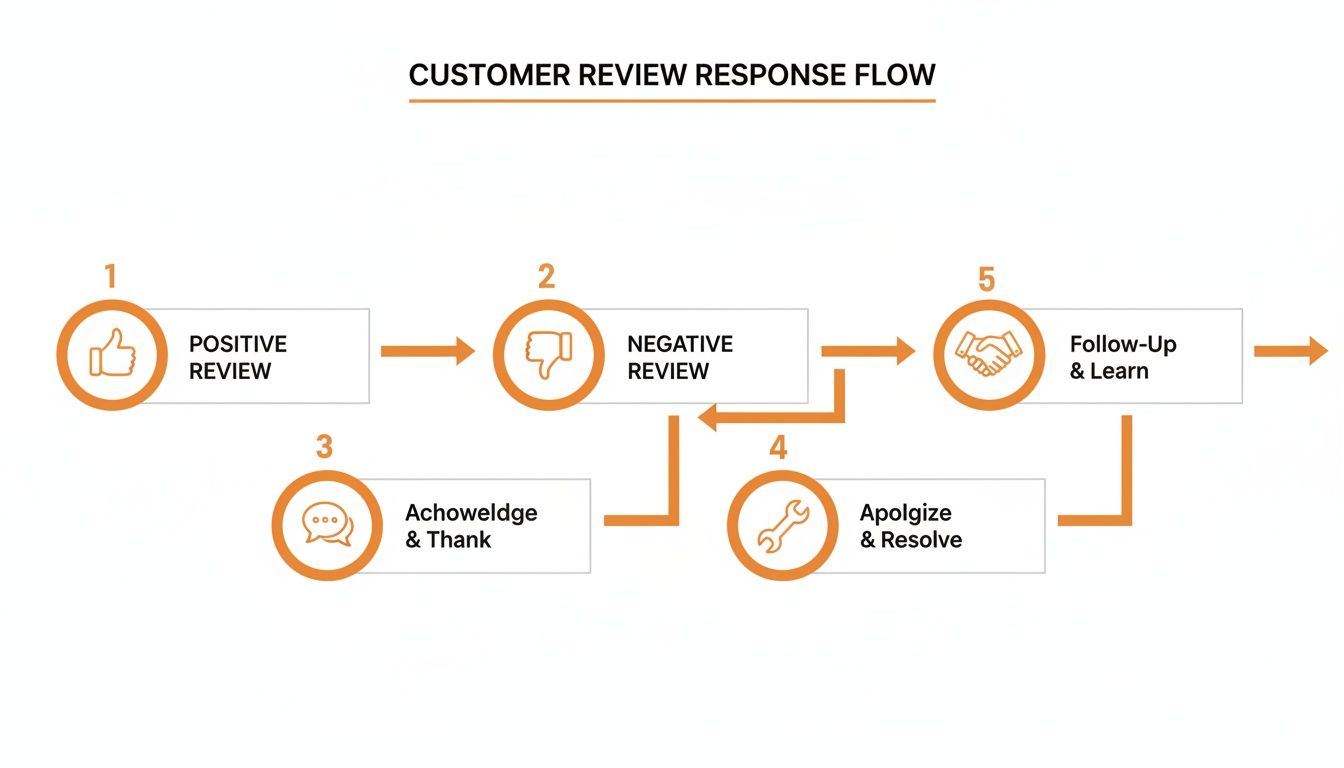
Step 3: Respond to Every Review (Good and Bad)
Every review is a public conversation. How you handle it shows everyone in your area—including potential customers in [City]—what it’s like to do business with you. Responding quickly and professionally is a powerful way to build trust.
A prompt reply can turn a happy customer into an advocate and show a frustrated one that you're committed to making things right. This is a critical part of managing google reviews for your local business and building a solid reputation. Our guide on how to respond to reviews offers more advanced tactics.
Templates and Scripts for Your Review Program
Having go-to scripts ensures your team asks for and responds to reviews consistently and effectively. Adapt these templates to fit your brand's voice and your specific vertical. You can find more ideas in these review prompt templates.
Review Request Scripts
SMS Template (For an Auto Repair Shop)
This is perfect for a quick, automated text after service pickup.
"Hi [Customer Name], this is [Your Name] from [Business Name]. Thanks for trusting us with your car today! We'd be grateful if you could share your experience on Google. It only takes a moment: [Direct Review Link]"
Email Template (For a Veterinary Clinic)
An email works well when you want to add a more personal touch.
Subject: How was your visit to [Clinic Name]?
Hi [Pet Owner Name],
We loved seeing [Pet's Name] today! We hope you both had a great experience with our team.
Your feedback helps other pet owners in [City] find trusted care. If you have a moment, would you mind leaving us a review on Google?
[Direct Review Link]
Thank you for being part of the [Clinic Name] family!
Sincerely,
The Team at [Clinic Name]
Review Response Templates
Positive Review Response Template (Senior Living)
"Hi [Reviewer Name], thank you so much for your kind words about our team here at [Community Name] in [Neighborhood]. It means the world to us to hear that you've noticed how dedicated our staff is to providing compassionate care. We'll be sure to pass your compliments along to the team!"
Negative Review Response Template (Dental Practice – HIPAA Aware)
"Hello [Reviewer Name], thank you for bringing this to our attention. We are very sorry to hear that your experience did not meet expectations. We strive to provide excellent care, and we apologize for falling short. Please call our Practice Manager, [Manager's Name], at [Phone Number] so we can learn more and address your concerns directly."
7-Day Review Program Launch Checklist
This day-by-day plan helps you build a sustainable review system in just one week.
| Day | Key Action | Goal for the Day |
|---|---|---|
| 1 | Audit and optimize all Google Business Profiles. | Ensure 100% accuracy on NAP, hours, and services. |
| 2 | Create review links and finalize request/response templates. | Have a complete toolkit ready for launch. |
| 3 | Manually send 10 review requests to happy customers. | Get your first 1-3 new reviews and test the process. |
| 4 | Monitor and respond to all new reviews within 24 hours. | Establish a habit of rapid, professional engagement. |
| 5 | Train frontline staff on the process and its importance. | Achieve team buy-in and clarity on roles. |
| 6 | Explore and set up automation with your CRM or POS. | Reduce manual work by using customer feedback forms to trigger requests. |
| 7 | Analyze week 1 data and set monthly KPIs. | Establish clear targets for review volume and response time. |
How to Measure the ROI of Your Google Reviews
To justify the effort, you must connect your review strategy to tangible business results. This means tracking metrics that prove your reviews are driving more calls, bookings, and revenue. Without measurement, you're just guessing.
Key Performance Indicators (KPIs) to Track
These are the vital signs of your online reputation. Monitor them monthly for each location.
- Average Star Rating: Target: 4.5 stars or higher.
- Review Volume & Recency: Target: 5-10+ new reviews per month.
- Response Rate & Time: Target: Respond to 100% of reviews within 24 hours.
Connecting Reviews to Business Growth with UTMs
Your Google Business Profile "Performance" report shows how many calls, messages, and direction requests you get. To track these visitors all the way to a sale, use UTMs (Urchin Tracking Modules).
A UTM is a code snippet you add to your website link in your GBP. It tells Google Analytics exactly where the traffic came from.
Example URL for an HVAC company in [City]:https://www.yourhvac.com/?utm_source=google&utm_medium=organic&utm_campaign=gbp-[city]-listing
With this in place, you can filter your analytics to see only visitors from your GBP. This allows you to track exactly how many of those people filled out your "Request Service" form or called a tracked phone number. It draws a straight line from a potential customer reading your great reviews to them becoming a paying client. This approach applies principles of measuring content effectiveness to your reputation efforts, proving their value. You can also explore specialized customer satisfaction measurement tools for more advanced tracking.
Q&A: Frequently Asked Questions about Google Reviews
1. How many Google reviews do I need?
There is no magic number, but a great goal is to consistently get more reviews than your top competitors. Aim for at least 10-15 new reviews per location, per month. Recency is key; a steady flow of fresh reviews tells Google you're a prominent and active business.
2. Can I delete a bad Google review?
No, you cannot delete a review simply because it's negative. However, you can and should report reviews that violate Google's policies, such as spam, hate speech, or a clear conflict of interest (e.g., from a competitor).
3. What is the best way to handle a fake review?
First, report it to Google. Then, post a calm, professional public response. This shows real customers that you're reasonable and take feedback seriously. A good template is: "Thank you for the feedback. We have no record of a customer under this name. Please contact our manager at [Phone Number] so we can address your concerns."
4. Should I ask every customer for a review?
It's smarter to be strategic. The best practice is to automate review requests that trigger after a positive interaction, such as a completed service or a positive in-person comment. This targets customers when they are happiest and most likely to leave a glowing review.
5. What are Proximity, Relevance, and Prominence?
This is Google's model for local search ranking.
- Proximity: How close your business is to the searcher.
- Relevance: How well your business category and services match the search query.
- Prominence: How well-known and respected your business is. This is where review volume, rating, and recency have the biggest impact.
6. How often should I get new reviews?
Consistency is more important than volume spikes. Aim for a steady, natural-looking flow. For most local businesses, getting at least one new review per week is an excellent target that keeps your profile fresh and relevant.
7. How does this fit into a larger strategy?
Google reviews are a cornerstone of a complete reputation management strategy. They build social proof that you can leverage on your website, in social media, and in your advertising to improve conversions across all channels.
Ready to turn customer feedback into a growth engine? We provide a complete, done-for-you service to generate, manage, and showcase your reviews to help you dominate local search. Our month-to-month support helps you optimize your Google Business Profile without adding more work to your plate. Book a strategy call with us today to learn more.


