
Think of your Google local listing as your business’s digital storefront. It’s the first thing potential customers see when they’re nearby and searching for exactly what you offer. It’s not just a boring directory entry; it’s a dynamic, interactive profile that instantly gives them the crucial info they need: your address, hours, phone number, and what other people think of you.
It’s basically the 21st-century version of a Yellow Pages ad, but infinitely more powerful.
What Are Local Listings on Google and Why They Matter
Picture your business on a busy main street. Now, think of Google as the map everyone in town uses to find their way around. A great local listing is like a massive, brightly lit sign pointing directly to your door. It doesn’t just show them where you are—it tells them why they should walk in.
This isn’t some side project for your marketing; it’s a core way to find new customers. The numbers are staggering: a full 46% of all searches on Google are from people looking for something local. That’s billions of searches a day from people with “I need this now” intent.
Even better, a whopping 78% of local searches on a mobile phone lead to a real-world purchase, and it usually happens within 24 hours. If you want to dive deeper into these trends, Hook Agency has some great stats on local search. In short, if you’re not showing up here, you’re invisible to the majority of your nearby customers.
Where Do Local Listings Appear
Your Google listing doesn’t just live in one place. It pops up across Google’s entire network, appearing right when and where a customer needs a local solution. Getting a handle on these placements shows you just how much ground one profile can cover.
Here’s a quick look at the most important spots your business listing will appear.
| Platform | Appearance | Primary User Intent |
|---|---|---|
| The Local Pack | Prime real estate at the very top of the search results, showing a map and three top businesses. | Quickly find the best nearby option for a specific need (e.g., “best coffee near me”). |
| Google Maps | A pin on the map when users search directly within the Google Maps app or website. | Get directions, explore an area, or see what’s available around a certain location. |
| The Local Finder | The extended list of businesses shown after a user clicks “More places” from the Local Pack. | Compare more options, dig into details, and make a more considered choice. |
Each of these placements is designed to capture a customer at a different stage of their journey, whether they need a quick answer or want to do more research.
Understanding how these work together is key. Your single business profile acts as the central hub, feeding consistent information to all these high-visibility spots.
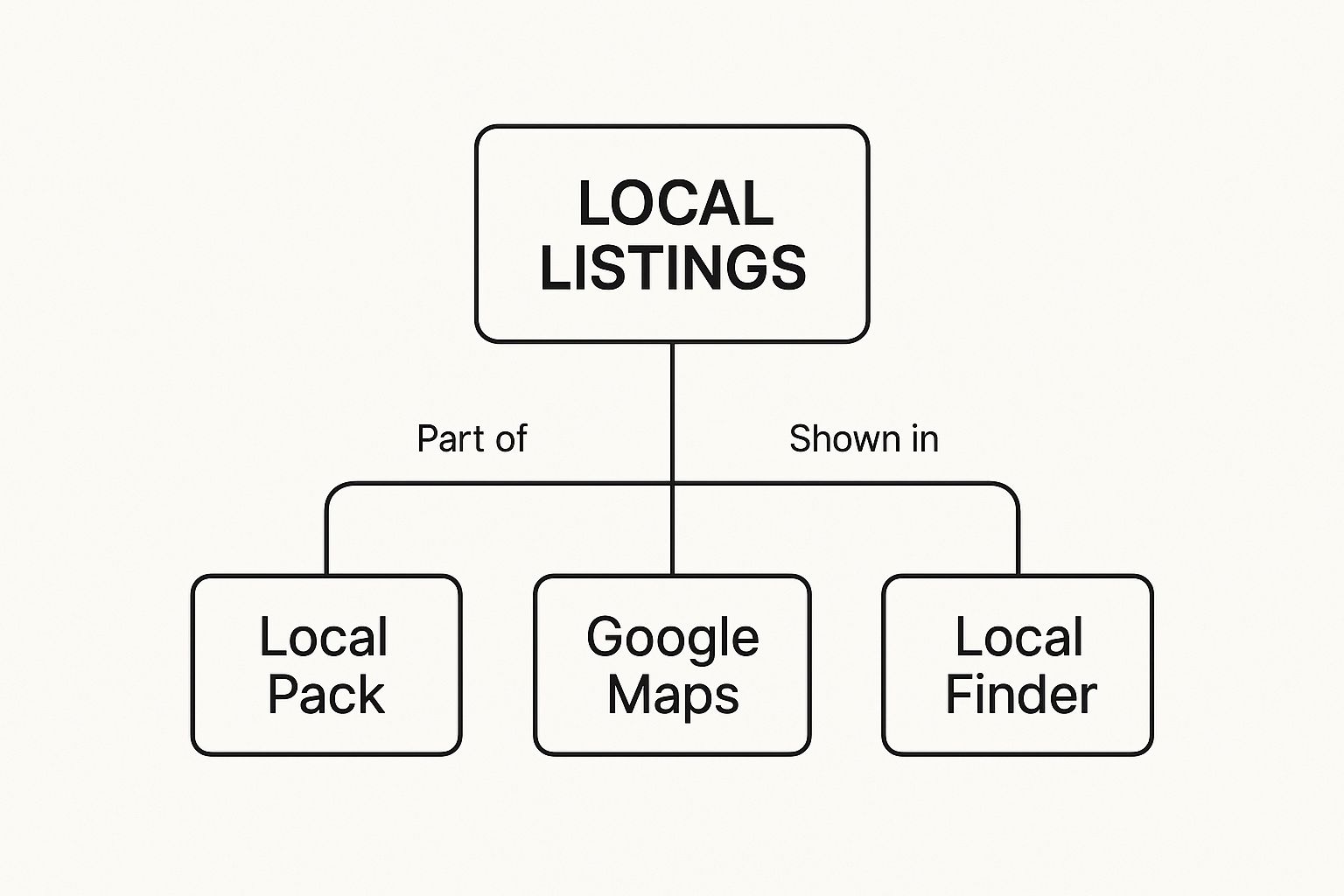
As you can see, it’s all one connected system. A strong profile in one place means a strong presence everywhere.
A Closer Look at Google Maps Visibility
Showing up on Google Maps is absolutely critical for businesses that rely on foot traffic. When someone pulls out their phone and searches for a “bike shop,” the results instantly appear on a map, showing them what’s closest to their current location.
A well-managed local listing does more than just give out information—it builds trust before a customer even sets foot in your store. It answers their questions on the spot and makes it easy for them to choose you, turning a simple search into a sale.
Every pin on that map is a competitor vying for that same customer’s attention. That’s why having a complete, accurate, and compelling listing isn’t just a good idea; it’s essential for standing out. These listings are your digital handshake with every potential local customer.
Your Google Business Profile: The Heart of Your Local Listing
If a local listing is your digital storefront, then your Google Business Profile (GBP) is the key to the front door. This free tool is your command center for managing how your business shows up across Google Search and Maps. Think of it as your business’s official resume for Google—it’s how you tell the world’s biggest search engine who you are, what you do, and why you’re the best choice for customers.
Claiming and verifying your profile is the first real step in taking control of your online presence. If you don’t, you’re essentially leaving your storefront unattended, where anyone—including competitors—can spread outdated or incorrect information about you. This isn’t just a box to check; it’s you planting a flag and taking ownership of your brand’s identity online.

The verification process is simply Google’s way of making sure your business is real and that you’re the one who should be calling the shots. It’s a crucial checkpoint that protects everyone, ensuring that the information people find in local listings is accurate and trustworthy.
Your Most Important Choice: The Primary Business Category
As you set up your profile, you’ll make plenty of choices, but none carry more weight than selecting your primary business category. This single selection is arguably the most powerful ranking factor for local search. It’s the main signal you send Google about what your business is, which directly impacts the searches you’ll show up for.
For example, choosing “Pizzeria” instead of the much broader “Restaurant” tells Google exactly what you offer. That kind of specificity is gold because it connects you with customers looking for precisely what you sell. An incorrect or vague category can make you practically invisible to the people who are ready to buy.
Building Your Digital Foundation, Piece by Piece
Once you’ve locked in your primary category, the next goal is 100% profile completion. An incomplete profile not only looks unprofessional to customers but also tells Google that you might not be an active or reliable business. Every empty field is a missed chance to inform a potential customer and build credibility with the search engine.
Here’s a quick checklist for creating a solid, trustworthy profile:
- Consistent NAP: Make sure your Name, Address, and Phone number are identical across your website and any other online directories. Consistency is key.
- A Solid Business Description: You have 750 characters to tell your story. Write a compelling summary and naturally weave in keywords that describe your services, like “family-owned bakery specializing in artisanal sourdough.”
- Define Your Service Area: If you’re a business that travels to customers (like a plumber or an electrician), map out your service areas so local homeowners can find you.
- Keep Your Hours Updated: Post your regular hours, but don’t forget to update them for holidays or special events. A staggering 87% of consumers use Google to find local businesses, and showing up to a closed store is a surefire way to lose a customer for good. You can find more insights about Google Business Profile on Blogging Wizard.
Filling out your Google Business Profile isn’t just data entry; it’s storytelling. Each piece of information—from your service list to your photos—helps paint a picture of your business, making it easier for customers to see themselves walking through your door.
Getting these details right is the bedrock of your entire local SEO strategy.
Adding the Details That Make You Stand Out
With the fundamentals in place, you can start adding more layers to your profile. These extra details, or attributes, help you stand out from the competition and give customers the specific information they need to make a quick decision.
Think about adding important attributes like:
- Service Options: Do you offer delivery, curbside pickup, or online appointments?
- Accessibility: Is your storefront wheelchair accessible?
- Amenities: Do you have free Wi-Fi or a dog-friendly patio?
- Crowd: Let people know if your spot is popular with families or college students.
Each attribute you select acts like a filter, helping you appear in more specific searches, like “restaurants with outdoor seating near me.” By filling out every possible section, you give Google all the information it needs to confidently recommend your business to its users, cementing your spot in the local listings on Google.
Optimizing Your Listing for Maximum Local Visibility
Just having a Google Business Profile isn’t enough—that’s just the starting point. To actually climb the local search rankings and grab a customer’s attention, you have to actively optimize it. Think of it like setting up a physical storefront; you wouldn’t just unlock the doors and hope for the best. You’d arrange your displays, put up a great sign, and make it inviting.
This is all about going beyond the basics and using every tool Google gives you. Your goal is to turn a static profile into a dynamic, engaging hub that convinces both Google and potential customers that you are the best local option. This is what separates the businesses in the coveted Local Pack from those that get lost in the shuffle.
Weave in Keywords Where They Count
While you should never cram keywords where they don’t belong, placing them strategically helps Google understand exactly what you do. A perfect place for this is the “Services” section of your profile. For example, a plumber in Denver shouldn’t just say “plumbing.” They should list specific services like “emergency plumbing in Denver,” “Denver drain cleaning,” and “hot water heater repair Denver.”
This level of detail makes your profile a much stronger match for those specific, ready-to-buy searches. It tells Google precisely what you offer and where, which is a critical factor for ranking in local listings on Google.
Showcase Your Business With High-Quality Visuals
They say a picture is worth a thousand words, and in local search, it might be worth a thousand customers. Profiles loaded with high-quality photos and videos get way more engagement—more clicks, more calls, and more requests for directions. Visuals give people a sneak peek before they even decide to visit.
Make sure your photo gallery is well-rounded:
- Exterior Shots: Show your storefront from a few different angles. This helps customers spot you easily when they arrive.
- Interior Atmosphere: Capture the vibe of your space. Is it a cozy cafe, a sleek office, or a busy shop? Let people see it.
- Products and Services: Show your products in action or your team doing what they do best. It’s tangible proof of your quality.
- Team Photos: Putting a face to the name builds a ton of trust and makes your business feel more human.
Adding new photos regularly also keeps your listing looking fresh and signals to Google that you’re an active, thriving business.
Use Google Posts as Your Free Billboard
Google Posts are essentially mini-updates that show up right on your business profile. Think of it as a free billboard on the most valuable real estate online. You can use it to share promotions, announce an upcoming event, highlight a new product, or just share some company news.
Studies have shown that businesses using Google Posts consistently see better engagement and more conversions. It’s a simple, free way to talk directly to customers right when they’re looking you up.
Use Posts to create a little buzz. A restaurant could post about a “Weekend Brunch Special,” while a retail store could announce a “24-Hour Flash Sale.” Each post typically lasts for seven days (unless it’s an event), making them perfect for timely, short-term marketing. To stay on top of everything, a good Local SEO checklist can be a huge help.
Proactively Manage the Questions and Answers Section
The Q&A feature is a double-edged sword. Anyone can ask a question, and worse, anyone can answer it. If you’re not paying attention, you could end up with incorrect information sitting on your profile. The best defense is a good offense.
Get ahead of it by seeding the section yourself. Brainstorm the most common questions you get from customers, post them, and then answer them immediately with clear, accurate information.
Here are a few common questions to start with:
- “Do you offer free parking?”
- “Are you pet-friendly?”
- “What are your busiest hours?”
- “Should I make an appointment?”
By taking control of the conversation, you provide instant value and prevent misinformation from spreading. It shows you’re on top of your game and care about the customer experience. For more advanced strategies, you can dive into our full guide on local business listing optimization.
The Critical Role of NAP Consistency and Citations
Beyond what you enter into your Google Business Profile, Google is constantly cross-referencing information across the entire internet to make sure your business is the real deal. It’s looking for your business’s unique digital fingerprint on hundreds of websites and online directories.
That fingerprint is your NAP: your official business Name, Address, and Phone number. When this information is perfectly identical everywhere it shows up online, Google gets a strong, consistent signal. That consistency builds trust, confirming you are who you say you are and that you’re located where you claim to be.
But when your NAP is inconsistent, it’s like leaving smudged fingerprints at a crime scene. A slight change in your business name, an old address lingering on a forgotten directory, or a different phone number creates confusion. This erodes Google’s confidence and can tank your ranking in local search results.
What Are Local Citations, Anyway?
These online mentions of your NAP data are called local citations. Simply put, a citation is any place on the web where your business name, address, and phone number appear together on another website. They are a cornerstone of local SEO, acting as third-party proof that your business actually exists.
Think of each consistent citation as a vote of confidence. When reputable sites like Yelp, the Better Business Bureau, or an industry-specific directory list your information correctly, it reinforces to Google that your business is a legitimate local operation. The more consistent and authoritative these “votes” are, the more seriously Google takes your business.
Why Inconsistencies Kill Your Rankings
Even tiny mistakes can create massive headaches for your local listings. An old address from a previous location or a simple typo like listing “St.” instead of “Street” can be enough for search engines to see a completely separate, conflicting identity for your business.
These discrepancies make Google hesitate. It has to ask, “Which information is correct?”—and that doubt makes it far less likely to show your business in the valuable Local Pack.
Maintaining accuracy and consistency in Google local listings is fundamental. According to a recent survey, 98% of consumers use the internet to find local business information. Inconsistent or outdated listings create confusion for search engines, undermining trust and reducing ranking in local search results. To discover more about how uniformity can boost brand credibility, you can read the full guide on local listing management.
The only way forward is to hunt down and fix these errors through a thorough audit.
Conducting a Citation Audit and Cleanup
A citation audit is the process of systematically finding every online mention of your business and correcting any inconsistencies you find. It’s absolutely critical for building a solid foundation for your local search presence.
Here’s a straightforward way to get started:
- Establish a Canonical NAP: First, decide on the one official version of your business Name, Address, and Phone number. This is your single source of truth.
- Search for Variations: Use Google search operators to uncover different versions of your business info. Try searching for your business name paired with old phone numbers or previous addresses.
- Check Key Directories: Manually check your listings on the most important data aggregators and directories.
Focus on the heavy hitters first:
- Yelp
- Apple Maps
- Better Business Bureau (BBB)
- Industry-specific sites (like TripAdvisor for restaurants or Houzz for contractors)
When you find an incorrect listing, you’ll need to claim it and update the information. Yes, it can be tedious work, but it’s one of the most important things you can do to earn Google’s trust. For a deeper look at this process, check out our guide on how to build local citations for your business.
Tapping into the Power of Customer Reviews and Engagement
Once you’ve built a solid foundation for your local listing, it’s time to lean into what might be the single most influential element: the voice of your customers. Think of customer reviews as today’s word-of-mouth marketing. They act as powerful social proof that can either draw people in or send them running to a competitor. And they aren’t just for human readers; they’re a massive ranking signal for Google’s local algorithm.
A steady stream of recent, positive reviews sends a clear message to Google that your business is not just real, but also active, popular, and delivering a great experience. Every single review, often filled with keywords and real-world descriptions of your services, gives Google more context about what you do. This user-generated content strengthens your listing’s relevance for all sorts of searches and builds a tremendous amount of trust with potential customers.

Encouraging a Flow of Genuine Reviews
The secret to getting more reviews is simply to make it incredibly easy for happy customers to leave them. While you should never offer incentives (that’s against Google’s policies), you absolutely can and should ask. You’d be surprised how far a simple, polite request can go.
Here are a few proven ways to encourage more feedback:
- Email and SMS Follow-ups: After a sale or service, send a quick message thanking the customer. Be sure to include a direct link to your Google review page to make it effortless.
- QR Codes: Put QR codes on your receipts, business cards, or signs in your shop. One scan can take a customer straight to the review form.
- In-Person Requests: When a customer is beaming with satisfaction, that’s the perfect moment. Empower your staff to say something like, “We’re so glad you had a great experience! If you have a moment, we’d be grateful if you’d share your thoughts on Google.”
If you want a deeper dive into the best ways to prompt customers, our guide on how to ask for a review on Google is packed with more templates and tactics. The real goal is to weave the “ask” right into your everyday customer service flow so it feels natural, not forced.
Masterfully Managing All Types of Feedback
Getting reviews is only half the job. Responding to them is where you can truly set your business apart. Every reply is public, showing prospective customers that you value feedback and genuinely care about your clients’ experiences. A business that engages with its reviews turns a static local listing on Google into a dynamic, living conversation.
Responding to every single review—good or bad—is a masterclass in customer service. It proves you’re listening and builds a level of trust that competitors who ignore their reviews can never achieve.
It’s essential to have a plan for handling both praise and criticism. A clear strategy helps protect your online reputation and fosters a loyal community around your brand.
A Blueprint for Responding to Reviews
Your approach to responding should naturally change based on the tone of the review. Having a consistent strategy for each type ensures you’re always putting your best foot forward.
The table below breaks down some effective strategies for handling customer feedback.
Effective Strategies for Responding to Customer Reviews
| Review Type | Key Objective | Response Example Snippet |
|---|---|---|
| Positive | Amplify the good vibes and show genuine appreciation. | “Thank you so much for your kind words, [Customer Name]! We’re thrilled to hear you enjoyed [specific detail they mentioned] and we can’t wait to see you again.” |
| Negative | Acknowledge the problem, apologize sincerely, and take it offline. | “Hi [Customer Name], we’re very sorry to hear about your experience. This isn’t the standard we strive for. Please contact us directly at [email/phone] so we can make this right.” |
Remember, speed matters. Aim to reply to all reviews within 24 hours to show you’re attentive and on top of things. By engaging thoughtfully with every piece of feedback, you signal to both customers and Google that your business is active, customer-focused, and absolutely worthy of a top spot in local search.
Frequently Asked Questions
Even with a solid plan, managing your local listings can throw you a curveball now and then. Here are some answers to the most common questions we hear from business owners, designed to clear things up and help you handle whatever comes your way.
How Much Do Local Listings on Google Cost?
This is one of the best parts—it costs absolutely nothing. Creating and managing a Google Business Profile to show up in local listings on Google is completely free. Google doesn’t charge a dime for setting up your profile, adding photos, responding to reviews, or appearing in the organic local results on Search and Maps.
This makes it one of the most powerful and cost-effective marketing tools out there for any local business. It really levels the playing field, giving small mom-and-pop shops the ability to compete with huge chains for local attention without needing a massive budget.
Of course, while the listing itself is free, some businesses do choose to invest in related services. You might hire a local SEO agency to manage your profile or run paid Google Local Services Ads, which are a separate advertising product. But for gaining that crucial organic visibility? There’s no direct cost from Google.
What Should I Do If My Business Location Is Incorrect on Google Maps?
An incorrect location on Google Maps is a five-alarm fire. It needs to be fixed immediately because it sends potential customers on a wild goose chase and can lead to some seriously frustrated reviews. The good news is you can fix it right from your Google Business Profile dashboard.
First, log in to your profile and head over to the “Info” section. Find your address and click the little pencil icon to edit it. Be super precise when you type in the new address, and just as importantly, drag the map pin to the exact spot where your front door is. This is key for making sure GPS directions lead people right to you, not the business next door.
Once you save the changes, Google will need to review them, which can take a few days. In some cases, Google might even ask you to re-verify the business to confirm the new address is legitimate. It’s also a great idea to update your address on your website and other big online directories to keep your NAP information consistent across the web.
How Can I Track the Performance of My Google Local Listing?
You can keep tabs on everything directly within your Google Business Profile dashboard. Just look for a feature called “Performance” (it used to be called “Insights”). This built-in analytics section is packed with valuable data on how customers are actually finding and interacting with your listing.
Checking these numbers regularly is the key to understanding what your customers are doing and whether your optimization efforts are actually paying off.
Here are some of the most important metrics to keep an eye on:
- Queries: This shows you the exact search terms people used to find your business. It’s a direct window into what your customers are looking for.
- How customers search for your business: This breaks down whether people found you through a “Direct” search (they typed in your business name) or a “Discovery” search (they were looking for a category, product, or service you offer).
- Where customers view you on Google: This tells you if more people are finding your listing through a standard Google Search or on Google Maps.
- Customer actions: This is a goldmine. It tracks website clicks, requests for directions, and phone calls that came directly from your listing.
- Photo views: This metric shows how many times your photos have been viewed compared to your competitors, really driving home the importance of great visuals.
My Competitor Is Using Keywords in Their Business Name
It’s incredibly frustrating to see a competitor stuffing keywords into their business name (like “Denver Elite Plumbing – 24/7 Emergency Service”) to try and game the system. While this shady tactic can sometimes give them a short-term bump in rankings, it’s a direct violation of Google’s guidelines unless those keywords are part of their actual, legally registered business name.
A comprehensively optimized and legitimate profile will often outperform a spammy one in the long run as Google’s algorithms continue to prioritize authentic and trustworthy business information.
Instead of stooping to their level, you have two much better options. First, if you’re certain a competitor is using a fake or keyword-stuffed name, you can report it. Just go to their listing on Maps, click “Suggest an edit,” and correct the name to what it should be.
Second, and more importantly, focus on outshining them by doing everything right. A powerful, well-managed profile built on trust will almost always win in the end. Make sure your primary category is perfect, write a helpful business description, get a steady stream of great reviews, add new photos regularly, and use Google Posts to share updates.
Ready to take control of your online reputation and turn customer feedback into your most powerful marketing tool? With Reviews To The Top, you can streamline your review generation, manage all your listings, and engage with customers from a single, easy-to-use platform. Stop letting competitors get the spotlight—start climbing the rankings and become the top choice in your area. Learn more about how we can help your business shine.


