
Effective marketing for assisted living facilities builds trust with families by combining a dominant local search presence with a stellar online reputation. This strategy is critical because it directly answers a family's urgent, local search for care, leading to more qualified calls, messages, and scheduled tours from those ready to make a decision.
Key Facts
- Local Search is Primary: Nearly every family's journey to find senior care begins on Google with searches like "assisted living near me."
- Trust is the Goal: Your marketing must build confidence at every touchpoint, from your Google profile to your website content.
- Reputation Drives Decisions: A steady stream of recent, positive reviews is one of the most powerful conversion tools you have.
- Google Business Profile (GBP) is Your Foundation: This free tool is the most important factor for appearing in local search results and on Google Maps.
- Measurement is Non-Negotiable: Tracking key metrics like calls from Google and tour conversion rates is the only way to know if your marketing is working.
Step-by-Step Guide to Assisted Living Marketing
This guide provides a step-by-step playbook for facility owners and marketing managers. We will walk through the essential tactics you need to master, from dominating local search results to creating content that answers the tough questions every family asks. By the end, you'll have a clear, actionable plan to turn online searches into scheduled tours and new residents.
Step 1: Dominate Local Search Results
The search for senior care is intensely local. When families need help, they search for options "near me." Your visibility in local search results is the single most important factor for getting initial calls. To win, you must understand how Google ranks local businesses.
Google's Ranking Model: Proximity, Relevance, and Prominence
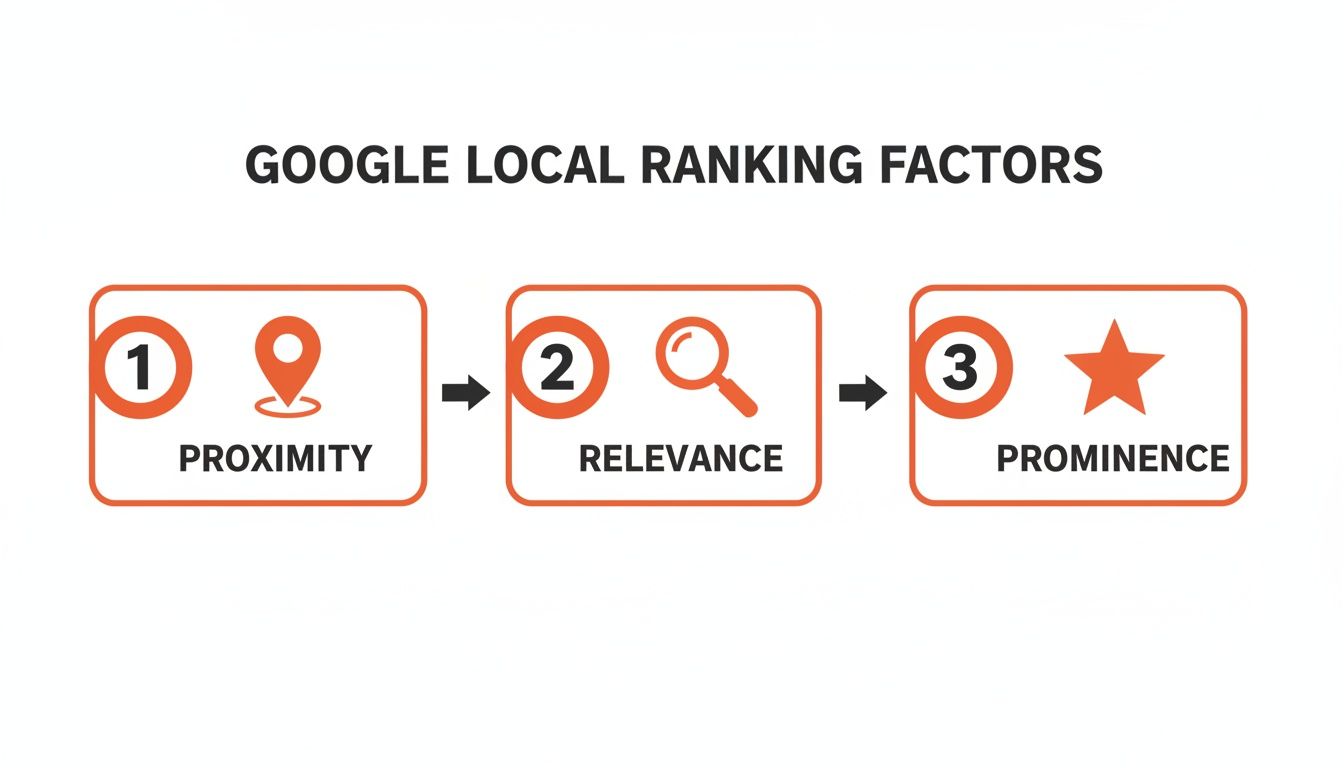
Google’s goal is to provide the most helpful local answer by weighing three signals:
- Proximity: The physical distance between the person searching and your facility. If someone in [Neighborhood] searches for care, Google favors communities located there.
- Relevance: How well your online profile matches the search term. If your Google Business Profile lists "Memory Care," you are highly relevant for that search.
- Prominence: Your facility's online authority, measured by the quantity and quality of your reviews, the consistency of your business information online, and links from other reputable websites.
Action Plan: Optimize Your Google Business Profile (GBP)
Your Google Business Profile is the foundation of your local marketing. It’s the info box that appears in Google Search and Maps and is often a family's first impression.
Quick Checklist for Optimizing Your GBP:
- Claim & Verify: Ensure you have full control over your profile.
- Correct Categories: Set your primary category to "Assisted Living Facility." Add secondary categories like "Memory Care Center" or "Retirement Community."
- Compelling Description: Use the 750 characters to describe your care philosophy and what makes your community unique.
- High-Quality Photos: Upload at least 10 recent photos and videos of your rooms, common areas, and residents in activities.
- Turn on Messaging: Allow families to text you directly from your profile.
- Use Google Posts: Post weekly updates about events or staff to show your community is active.
- Build Out Q&A: Proactively add and answer common questions about pricing, care levels, and amenities.
Step 2: Build an Unbeatable Online Reputation
For senior living, trust is everything. Today, that trust is built or broken by your online reviews. A strong reputation management strategy shows prospective families that you are responsive, transparent, and genuinely care. It also directly boosts your "prominence" in Google's eyes.
Action Plan: Systematize Review Collection & Response
You need a consistent flow of new reviews. Train staff to listen for moments of gratitude from families and make a gentle, personal request.
Templates & Scripts for Your Review Program
Here are practical assets you can use immediately to manage your online reputation.
HIPAA-Aware SMS Review Request Script:
Hi [Family Member Name], it’s [Your Name] from [Facility Name]. We're so glad [Resident Name] is part of our community. We'd be grateful if you could share your experience with others by leaving us a review on Google. It only takes a minute: [Link to Google Review Page]
HIPAA-Aware Email Review Request Script:
Subject: A quick question about your experience with us
Dear [Family Member Name],
We truly value you and [Resident Name] being part of our community here at [Facility Name].
Your feedback is incredibly important as it helps other families in the [City] area who are looking for a caring environment. If you have a moment, we would be grateful if you could share your thoughts by leaving us a review on Google.
[Link to Google Review Page]
Thank you for your trust in us.
Warmly,
[Your Name]
[Your Title]
Positive Review Response Template:
Hi [Reviewer Name], thank you so much for your kind words. We are thrilled to hear that you've had a positive experience. Our team works hard to create a welcoming home for all our residents, and your feedback is a wonderful affirmation of that.
Negative Review Response Template:
Hi [Reviewer Name], thank you for sharing your feedback. We take all comments very seriously and are concerned to hear about your experience. Providing exceptional care is our top priority. We would appreciate the opportunity to discuss this with you directly. Please contact our Executive Director, [Director's Name], at [Phone Number].
7-Day Launch Checklist for a Review Program
- Day 1: Set a goal for 10 new reviews in the first 30 days.
- Day 2: Train key staff (Executive Director, admissions) on when and how to use the review request scripts.
- Day 3: Assign one person to monitor for new reviews and respond to all of them within 24 hours.
- Day 4: Send initial requests to 5–7 happy families to build a positive base.
- Day 5: As reviews come in, the point person responds promptly and personally.
- Day 6: Huddle with the team to discuss what worked and refine the approach.
- Day 7: Integrate the review request into your standard follow-up process for all new families.
Step 3: Create Content That Answers Tough Questions
Great content marketing for assisted living is about serving, not selling. You build trust by tackling the difficult, emotional questions families have. This positions your community as a compassionate expert and builds a relationship before they ever book a tour.
Action Plan: Focus on Benefits, Not Features
Translate every feature into a tangible, emotional benefit.
- Instead of: "24/7 nursing staff."
- Try: "Complete peace of mind knowing a compassionate expert is always here to help, day or night."
Create content that answers real questions:
- How can we pay for assisted living?
- What does a typical day look like for a resident?
- How do you help new residents make friends?
Practical Content Ideas:
- "What to Ask on a Facility Tour" Checklist: A downloadable PDF that keeps your brand top-of-mind.
- Video Interviews with Your Team: Film short videos with your Director of Nursing or Activities Director to let their passion shine.
- Hyper-Local Blog Posts: Write about topics like "A Guide to Senior Resources in [City], [State]" or "Comparing Memory Care Options in [Neighborhood]."
How to Measure Marketing Success
Marketing for assisted living is about driving occupancy. Tracking the right numbers is the only way to know if your efforts are working. You must connect your marketing activities to scheduled tours and move-ins.
Key Performance Indicators (KPIs) and Recommended Targets
| Metric | Recommended Target | Why It Matters |
|---|---|---|
| GBP Calls | 25-50+ per month | Measures direct interest and high-intent leads from local search. |
| GBP Website Clicks | 100+ per month | Shows your listing drives traffic to your site for more information. |
| Average Star Rating | 4.5+ | Crucial for building trust and achieving top search rankings. |
| New Reviews Per Month | 3-5 | Keeps your profile fresh and shows ongoing satisfaction. |
| Review Response Time | < 24 hours | Demonstrates attentiveness and professionalism to prospective families. |
| Lead-to-Tour Rate | 30-40% | A low rate may signal issues with your follow-up process or lead quality. |
| Tour-to-Move-In Rate | 25% | This is the ultimate test of your sales team and community presentation. |
How to Track Accurately with UTMs
A UTM (Urchin Tracking Module) is a code added to a URL to tell analytics software where a visitor came from. Create unique UTM links for the website button on your GBP, Facebook ads, or email campaigns. When someone clicks that link and fills out a "Schedule a Tour" form, Google Analytics will show that the lead came from your GBP listing. This provides clear proof of ROI for your marketing efforts.
If you need help setting up tracking or want to optimize your Google Business Profile, our team can assist.
Frequently Asked Questions (FAQs)
1. How long does local SEO take to show results?
You should see a noticeable increase in local search rankings, calls, and website clicks within 3 to 6 months of consistent effort. This includes actively earning reviews, optimizing your GBP, and posting content regularly.
2. What is the best way to handle a negative online review?
Respond publicly within 24 hours. Acknowledge their concern with empathy and without getting defensive. Then, immediately take the conversation offline by providing a direct contact name and phone number to resolve the issue privately. Never mention Protected Health Information (PHI).
3. How much should an assisted living facility budget for marketing?
A good rule of thumb is 5% to 10% of your gross annual revenue. New communities or those in highly competitive markets should aim closer to 10%. Track every dollar and shift your budget toward what generates tours and move-ins.
4. What are the most important marketing metrics to track?
Focus on metrics that directly tie to occupancy:
- Calls from Google Business Profile: High-intent leads.
- Lead-to-Tour Conversion Rate: Measures your follow-up effectiveness.
- Tour-to-Move-In Conversion Rate: Your ultimate closing metric.
- Cost Per Move-In: The final ROI calculation.
5. Is social media effective for marketing assisted living?
Yes, but as a trust-building tool, not a lead generation machine. Use platforms like Facebook to post photos of resident activities, staff celebrations, and family testimonials. This gives prospective families a feel for your community's culture and builds an emotional connection. For more strategies, explore our guide on reputation management.
We build powerful digital reputations and local search visibility for assisted living facilities. Our month-to-month support helps you manage reviews, optimize listings, and attract more qualified families without adding to your team's workload. Ready to increase your tour bookings? Book a strategy call today.


