
To make a sitemap, you can use a free plugin on your website’s content management system (CMS), an online generator tool, or desktop software. A sitemap acts as a roadmap of your website for search engines like Google, helping them discover and index all your important pages, like service and location pages. A complete sitemap is critical for local SEO because it makes your business more visible in "near me" searches, leading to more calls, messages, and bookings.
Key Facts About Sitemaps
- What it is: A sitemap is a file (usually an XML file) that lists all the important URLs on your website for search engines.
- Why it matters: It ensures search engines can find and index your pages faster, which is vital for appearing in local search results for queries like "HVAC repair in [City]."
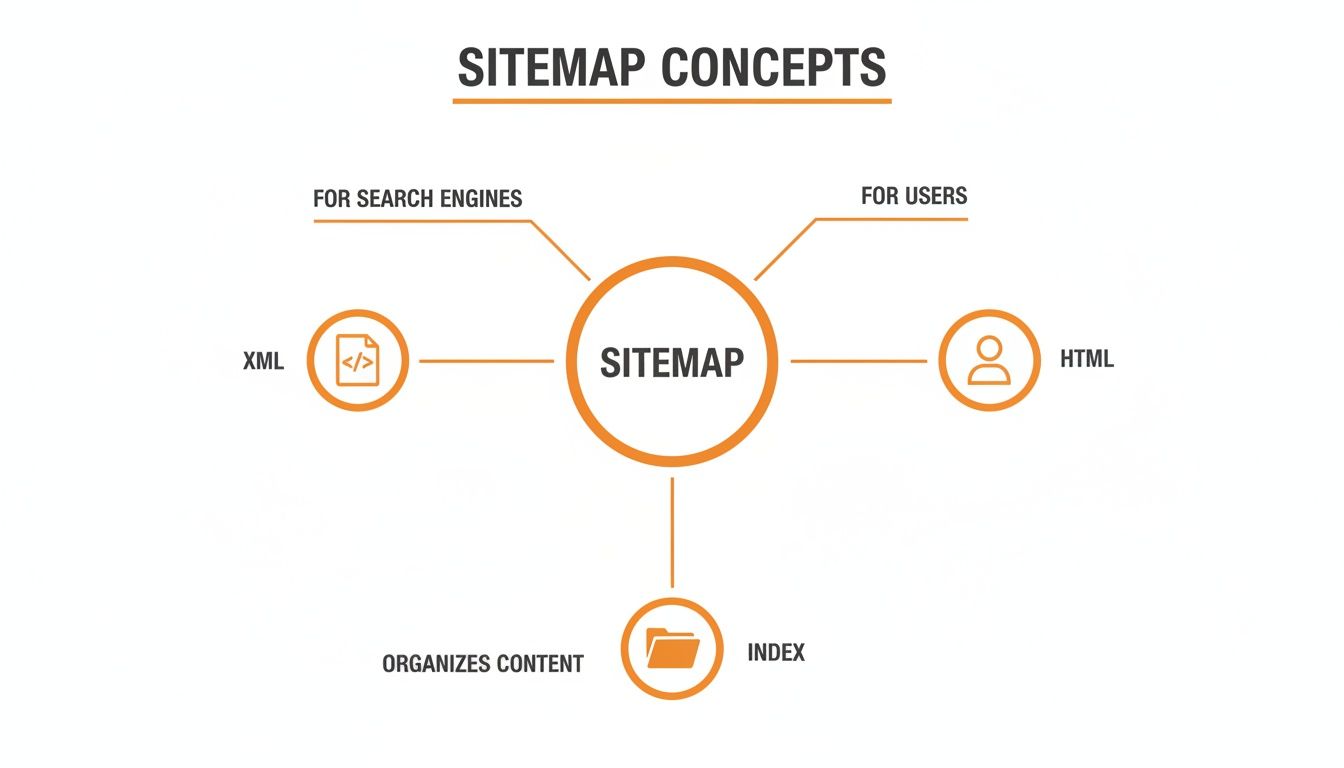
- Primary Types: An XML sitemap is for search engines, while an HTML sitemap is a navigation page for human visitors.
- For Multi-Location Businesses: A "sitemap index" file is used to organize multiple sitemaps, for example, one for each practice or store location.
- The Goal: A sitemap improves your website's relevance in Google's eyes, a key part of its proximity-relevance-prominence model for ranking local businesses.
How to Make a Sitemap: A Step-by-Step Guide
Creating a sitemap is a foundational step for any local business, from a dental practice in [City] to an auto repair shop with multiple locations. The right method depends on your website's size and the platform it's built on. Here’s how to do it.
Step 1: Choose Your Sitemap Generation Method
You have three main options for creating your sitemap.
- CMS Plugins (Easiest Method): If your website is on WordPress, Shopify, or another popular CMS, an SEO plugin is your best choice. Tools like Yoast SEO or Rank Math automatically create and update your sitemap. When you add a new service page, it's added to the sitemap without any extra work. This is the recommended "set it and forget it" solution for 95% of businesses.
- Online Generators (For Small, Static Sites): For small websites (under 500 pages) without a CMS, a tool like XML-Sitemaps.com works well. You enter your website URL, and it generates a file to download. The main drawback is that you must manually regenerate and upload the file every time you add or remove a page.
- Desktop Crawlers (For Large, Complex Sites): For multi-location businesses or very large websites, a desktop program like Screaming Frog's SEO Spider offers maximum control. A senior living operator with 30 communities can use it to create a specific sitemap for each location's pages and bundle them into a single sitemap index. To manage this kind of complexity well, you need to use an SEO-friendly CMS.
Step 2: Submit Your Sitemap to Google
Once you have your sitemap URL (typically yourdomain.com/sitemap_index.xml), you need to give it to Google.
- Log in to the free Google Search Console (GSC).
- Navigate to the "Sitemaps" report in the left-hand menu.
- In the "Add a new sitemap" field, paste the end of your sitemap’s URL (e.g.,
sitemap_index.xml). - Click Submit.
Google will now use this file to crawl your website more efficiently.
Step 3: Fix Common Sitemap Errors
Check your GSC Sitemaps report for errors. Here are common issues and how to fix them:
- "Couldn't fetch": Google couldn't access the sitemap file. Check your
robots.txtfile to ensure it is not blocking the sitemap URL. - "Submitted URL blocked by robots.txt": Your sitemap lists a page that your
robots.txtfile is blocking. Remove the block fromrobots.txtor remove the URL from your sitemap. - "Submitted URL marked 'noindex'": You are telling Google to index a page that has a "noindex" tag on it. Remove the tag from the page or remove the page from your sitemap. Your sitemap should only contain pages you want indexed.
- "HTTP error" (like 404 Not Found): A URL in your sitemap leads to a page that doesn't exist. Update your sitemap to remove these broken links.
Regularly performing local SEO audits helps catch these technical issues before they impact your visibility. And this is not just for local sites; even for global brands, it's critical to have a clean sitemap to support campaigns like ecommerce with best SEO. For a deeper dive into sitemaps, you can read this XML sitemap guide for 2026 on blog.mean.ceo.
Practical Templates and Checklists for Your Business
A sitemap is your technical foundation. These templates help you connect that foundation to real-world customer interactions that drive growth.
7-Day Launch Checklist for a Review Program
- Day 1: Finalize your SMS and email review request scripts. Assign one person to own the program.
- Day 2: Train staff on why reviews matter and how to ask customers.
- Day 3: Send requests to 5-10 recent, happy customers to test the process.
- Day 4: Monitor incoming reviews. Respond to all new reviews within 24 hours.
- Day 5: Check initial results: open rates, click rates, and new reviews.
- Day 6: Tweak your scripts or timing based on the data.
- Day 7: Roll out the program to all eligible customers and set goals for volume and rating.
Review Request Scripts and Response Templates
SMS Review Request Script (for a Vet Clinic):
Hi [Customer Name], this is [Your Name] from [Business Name]. Thanks for trusting us with [Pet's Name] today! We'd love your feedback. Could you leave a quick review of your visit? [Link to Google Review Page]
Email Review Request Script (for a Med Spa):
Subject: How was your appointment at [Business Name]?
Hi [Customer Name],
Thank you for visiting us. We hope you enjoyed your experience. Your feedback is important and helps us improve.
If you have a moment, we would appreciate it if you shared your thoughts by leaving us a review.
[Link to Google Review Page]
We look forward to seeing you again soon!
The Team at [Business Name]
Positive Review Response (4-5 Stars):
Hi [Customer Name], thank you so much for your kind words! We're thrilled to hear you had a great experience with [mention something specific, e.g., "your recent cleaning"]. We appreciate you taking the time to share, and our team looks forward to your next visit!
Negative Review Response (1-3 Stars):
Hi [Customer Name], thank you for bringing this to our attention. We are sorry to hear your experience did not meet expectations. We take feedback seriously and would like to learn more. Please call us at [Phone Number] or email [Email Address] so we can make things right.
Google Business Profile Optimization Checklist
Your Google Business Profile (GBP) is your digital storefront. Ensure it's perfectly optimized.
- Accurate NAP: Your Name, Address, and Phone number are 100% consistent everywhere.
- Complete Info: Hours, service areas, and website URL are up to date.
- Categories: Use the most specific primary category and all relevant secondary ones.
- Services/Products: Add detailed descriptions for every service you offer.
- Photos: Add new, high-quality photos at least every 90 days.
- Q&A: Proactively add and answer common questions about your business.
- Reviews: Respond to all new reviews within 24 hours.
For more, use our complete local SEO checklist to optimize your Google Business Profile.
How to Measure Your Sitemap’s Impact
You've done the work; now it's time to measure the results. Connecting your sitemap to business goals shows the true value of your efforts.
Tracking Conversions with UTM Tags
The best way to track leads from local search is by adding UTM tags to the website link in your Google Business Profile. UTMs are small tracking codes that tell your analytics software exactly where visitors came from.
For example, an HVAC company in [Neighborhood] can change its website link in GBP to:https://yourhvacsite.com/?utm_source=google&utm_medium=organic&utm_campaign=gmb
With this tag, you can go into Google Analytics and see how many people clicked from your GBP listing and then called your office or filled out a booking form. This directly connects your local search presence to revenue.
Key Metrics and Realistic Targets for Local Businesses
Here are some practical monthly targets to aim for with your local marketing efforts.
| Metric | Realistic Monthly Target |
|---|---|
| Review Volume | 10-20+ new reviews per location |
| Recency | Average review age under 90 days |
| Review Response Time | Under 24 hours |
| Target Star Rating | 4.5+ stars |
| GBP Views / Calls | 1,000+ views / 25-50+ calls per location |
| Lead-to-Sale Conversion | 3-5% from website traffic |
Tracking this data is essential for effective local SEO reporting. As research from WebFX.com shows, a positive user experience is tied to business growth. And as AI becomes more integrated with search, having structured data like a sitemap is more important than ever. You can learn more about AI and its impact on SEO at elementor.com to stay ahead of the curve.
Frequently Asked Questions (FAQ)
1. How often should I update my sitemap?
If you use a CMS plugin like Yoast, it updates automatically. If you create it manually, you should regenerate and upload a new sitemap file any time you add, remove, or significantly change pages on your website.
2. Does a sitemap guarantee I will rank higher in Google?
No. A sitemap does not directly improve your rankings. Its job is to ensure search engines can find all your important pages. Your rankings are determined by other factors like content quality, site authority, and your overall reputation management efforts.
3. What is the difference between an XML and an HTML sitemap?
An XML (Extensible Markup Language) sitemap is a file written in a language for search engine crawlers. An HTML (HyperText Markup Language) sitemap is a visible page on your website designed to help human visitors navigate your site.
4. What is the ideal size for a sitemap?
A single sitemap file must be smaller than 50MB and contain no more than 50,000 URLs. Most local businesses will not approach this limit. If you do, you must create multiple sitemaps and list them in a sitemap index file.
5. Where can I find my sitemap URL?
You can usually find your sitemap by trying yourdomain.com/sitemap.xml or yourdomain.com/sitemap_index.xml in your browser. If you use a WordPress SEO plugin, the exact URL is listed in the plugin's settings.
6. What is the difference between proximity, relevance, and prominence?
This is Google's model for ranking local businesses. Proximity is how close your business is to the searcher. Relevance is how well your business profile and website match what the user is looking for. Prominence is how well-known your business is, based on factors like reviews, links, and overall online authority. A good sitemap directly helps improve your relevance.
7. What is Google Business Profile (GBP)?
Google Business Profile, formerly Google My Business, is a free tool that allows you to manage how your business appears on Google Search and Maps. It is essential for local SEO and where customers find your hours, phone number, and reviews.
We help local and multi-location businesses connect technical SEO, like sitemaps, to reputation programs that drive measurable growth. If you need expert guidance and month-to-month support to improve your local visibility, book a strategy call with our team.


