
The absolute easiest way to get more Google reviews is to simply ask for them. Don’t overcomplicate it. When you’ve delivered great service and have a happy customer in front of you, make it dead simple for them to leave feedback with a direct review link. This small action turns a positive moment into lasting social proof that builds your reputation and brings in new customers.
Why Google Reviews Are a Game-Changer for Local Businesses

Let’s be clear: getting Google reviews isn’t just a “nice-to-have” marketing task anymore. It’s a core part of staying competitive for any local business. In an age where everyone’s first move is to search online, your review profile is often the very first impression you make.
Think of it as today’s version of a word-of-mouth referral. Before someone even thinks about visiting your website, calling your shop, or walking through your door, you can bet they’re checking your Google reviews to see what others are saying. A high star rating and a handful of recent, positive comments build instant credibility and lower the barrier for someone to do business with you.
The Power of Social Proof and Getting Seen
We’re all influenced by what others do—that’s social proof in a nutshell. When a potential customer sees that dozens, or even hundreds, of people have had a great experience with your business, it gives them the confidence to believe they will too. It’s a powerful psychological shortcut.
But it’s not just about building trust. Google’s algorithm is watching. A consistent stream of genuine, positive reviews tells Google that your business is active, legitimate, and valued by the community. This directly boosts your visibility in local search, especially in the all-important “Map Pack.”
A solid review profile directly leads to:
- Better Local SEO Rankings: More reviews signal relevance to Google, pushing you higher in local search results and helping new customers find you.
- Higher Click-Through Rates: If you have a 4.8-star rating next to a competitor’s 3.2, who do you think gets the click? It’s almost always the higher-rated business.
- More Customer Trust: Reviews offer an authentic peek into what it’s like to work with you, giving people the confidence to choose you over a competitor who has little or no feedback.
A strong collection of reviews acts as your digital welcome mat. It reassures new customers they’re making the right choice before they’ve even spoken to you.
Your New First Impression
Consumer behavior has fundamentally changed. Google reviews are now the go-to resource for vetting local businesses. In fact, a whopping 81% of consumers now use Google to evaluate local businesses first—that’s a huge jump from just 63% back in 2020.
This isn’t just a fleeting trend; it’s the new normal. If you’re not actively managing your Google reviews, you’re essentially invisible to a huge chunk of your potential customers.
That’s why actively collecting reviews is one of the most effective digital marketing tips for small business success you can implement. It’s the essential bridge between providing excellent service and attracting your next loyal customer.
Laying the Groundwork: Getting Your Google Business Profile Review-Ready
Before you even think about asking for Google reviews, you have to get your own house in order. Your Google Business Profile (GBP) is your digital front door, and for many potential customers, it’s the very first impression they’ll have of your brand.
If your profile is half-finished or looks neglected, it sends a clear message: you don’t care about the details. That’s not exactly the kind of vibe that inspires someone to take the time to leave you a glowing review.
A polished, fully optimized profile, on the other hand, screams professionalism. It shows you’re an active, engaged business that’s ready to serve. Nailing this first impression makes customers far more likely to say “yes” when you eventually ask for their feedback.
First Things First: Claim and Verify Your Business
This is the absolute, non-negotiable first step. Claiming and verifying your business profile hands you the keys to your listing on Google Search and Maps. It’s how you prove to Google that you’re the rightful owner, which lets you control your information and prevents anyone else from making unauthorized changes.
The most common verification method is a postcard sent to your physical business address. Google mails you a card with a unique code, you punch it in, and just like that, you’re in control. It’s a simple process, but it’s what turns a static listing into a powerful marketing tool.
Getting this right is the foundation for everything that follows.
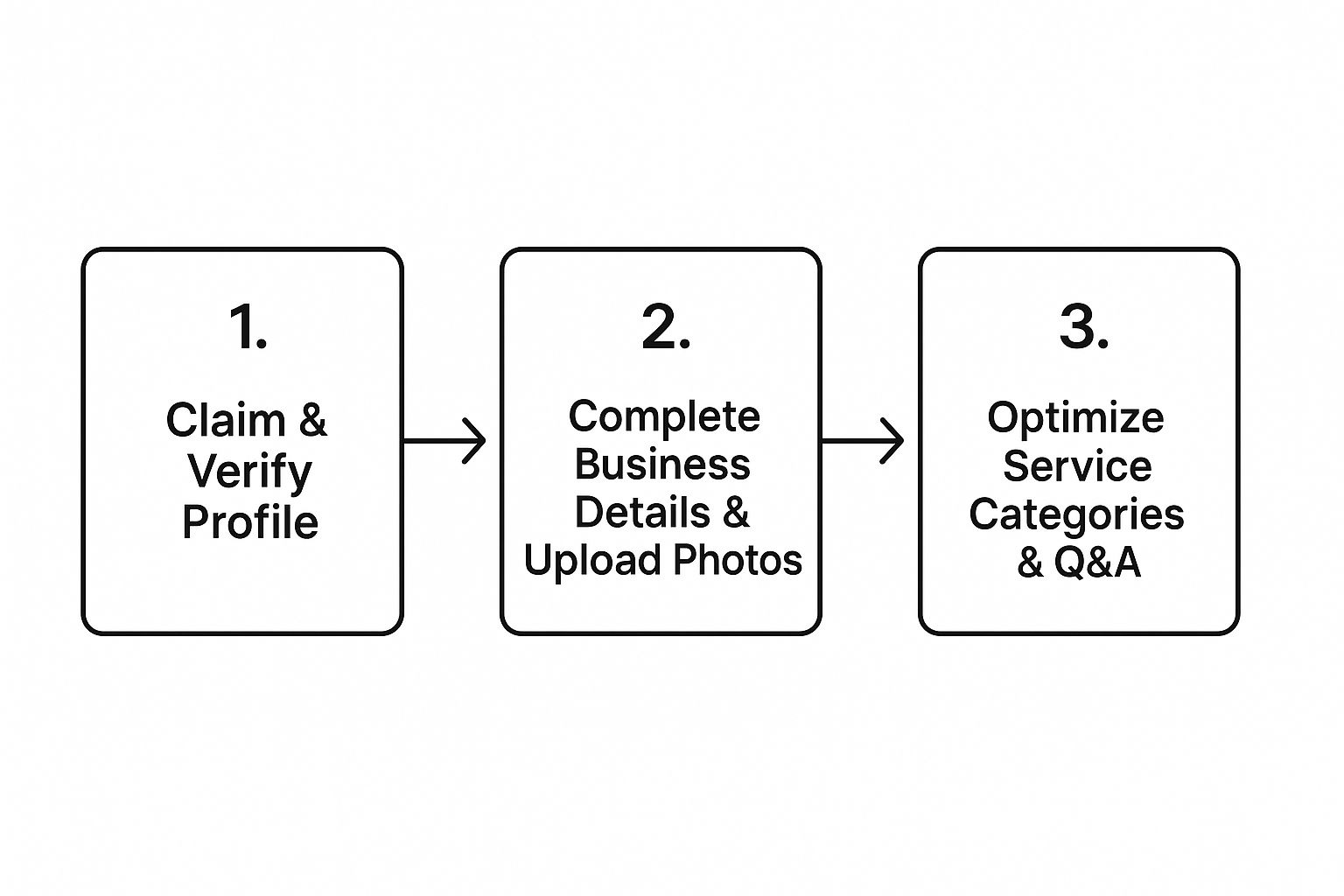
This quick visual lays out the path from claiming your profile all the way to fine-tuning it for the best results.
Don’t Skip a Single Field
Once you’re verified, your mission is simple: fill out everything. And I mean everything. A complete profile doesn’t just look better to a human eye; Google’s algorithm loves it, too. Detailed listings often outrank lazy competitors who’ve cut corners.
Start with the essentials and be obsessive about accuracy:
- Business Name, Address, Phone (NAP): Make sure this information is 100% consistent everywhere it appears online. A tiny difference like “St.” vs. “Street” can create confusion for search engines and hurt your visibility.
- Hours of Operation: Keep your hours updated, especially around holidays or special events. Nothing frustrates a potential customer faster than showing up to a closed door when Google said you were open.
- Website Link: Point this directly to your homepage or another relevant, high-value page on your site.
Next up is your business description. This is your chance to tell your story and sprinkle in keywords your customers are actually searching for. A bakery in Denver shouldn’t just say, “We sell bread.” Go for something like, “Denver’s favorite artisan sourdough bakery, specializing in organic, locally-sourced ingredients and custom celebration cakes.” See the difference? It’s descriptive, compelling, and packed with valuable search terms.
Pro Tip: Think of your GBP as a mini-website that lives directly on Google. The more accurate and helpful info you pack into it, the more Google will reward you with visibility.
Make Your Profile Pop with Visuals and Categories
Photos are huge. A profile with plenty of high-quality images gets way more clicks and calls—it’s not even close. Upload sharp, professional photos of your storefront, your products, your team in action, and even happy customers (just be sure to get their permission first!). Visuals offer real proof of the quality you deliver.
Choosing the right business categories is another one of those small details that makes a massive difference. Pick a primary category that perfectly describes your main offering, then add secondary categories for everything else you do. For example, a plumber’s primary category would be “Plumber,” but they should also add “Water Heater Installation & Repair” and “Drain Cleaning Service” to show up in those more specific searches. Mastering these details is a huge part of learning how to improve your Google Business ranking and pull in the right kind of customers.
Finally, don’t forget to use the Q&A feature. You can actually seed this section yourself by adding common questions and answering them. It’s a great way to control the narrative, handle customer objections before they even arise, and show off your expertise.
Proven Methods to Ask for Google Reviews

Now that your Google Business Profile is polished and ready, it’s time to get down to the real work: actually getting reviews. Just waiting for feedback to roll in is a surefire way to end up with a stale, empty profile. The businesses that dominate local search are the ones that build a proactive system for asking.
The secret? Make it absurdly easy for your customers. People are busy, and even the smallest bit of friction can stop them from following through. Your job is to remove every single obstacle between their happy experience and them sharing it online.
Create Your Unique Google Review Link
First things first, you need your magic link. This isn’t just a link to your profile; it’s a special URL that takes customers directly to the “Leave a Review” pop-up, often with the five-star rating pre-selected. It turns a clunky, multi-step process into a single click.
You can grab this link right from your Google Business Profile dashboard. Once you have it, save it somewhere you can access it in seconds. This link is the cornerstone of nearly every strategy we’re about to cover.
Perfect the Art of Timing
When you ask for a review is just as critical as how you ask. You want to make your request at the absolute peak of customer happiness, right after you’ve delivered a fantastic result or a memorable experience. Their positive feelings are at their strongest, and the details are fresh in their minds.
Think about these golden opportunities:
- At the point of sale: A retail customer has just found the perfect item.
- Upon project completion: You’ve just finished a final walkthrough with a thrilled homeowner.
- Right after a compliment: A client emails you to say “thank you.” That’s your cue!
Don’t let the moment go cold. Waiting a week, or even a few days, lets that initial excitement fade. Make your ask a natural part of wrapping up a great interaction.
Digital Request Methods That Work
Personalized digital requests are fantastic because they’re scalable and incredibly effective. The key is to avoid sounding like a robot. Whether you use email or SMS, your message needs to feel genuine and appreciative.
For email, try a clear subject line like, “A quick question about your visit.” In the message, thank them for their business, mention the specific service they received, and then pop the question. Always include a big, obvious button that links directly to your Google review URL.
SMS is all about speed and high open rates. Keep it short and sweet. Something like, “Hi [Customer Name], thanks for choosing us today! We’d be grateful if you could share your experience on Google: [Your Review Link]” works like a charm. For a deeper dive, check out our guide on the best ways for asking for a review to really dial in your messaging.
Creative Offline Strategies
Don’t sleep on the power of the real world. Integrating your review request into physical materials can capture customers who might otherwise miss a digital prompt.
- QR Codes: Put a QR code linking to your review page everywhere—receipts, business cards, flyers, or a small sign at your counter. It’s the perfect bridge from a physical experience to a digital action.
- Business Cards: Design a simple card specifically for asking for reviews. Hand it to happy customers with a personal thank you.
- The In-Person Ask: A friendly, face-to-face request is often the most effective method. Train your team to say, “We’re so glad you had a great experience! If you have a second, a review on Google would mean the world to us.”
Choosing the right method often depends on your specific business and how you interact with customers. Here’s a quick breakdown of the most common approaches.
Comparison of Review Request Methods
| Method | Effectiveness | Effort Level | Best For |
|---|---|---|---|
| In-Person Ask | Very High | Low | Service-based businesses, retail, restaurants—anywhere with face-to-face interaction. |
| Email Request | High | Medium | Businesses that collect customer emails, like e-commerce, B2B services, or appointment-based models. |
| SMS/Text Request | Very High | Medium | Any business with customer phone numbers; great for quick, post-service follow-ups. |
| QR Codes | High | Low | Physical locations like cafes, clinics, and shops. Excellent on receipts, menus, or table tents. |
| Review Handouts | Medium | Low | Contractors, real estate agents, or anyone who can leave a physical item with a client. |
Ultimately, a mix-and-match approach is usually best. Test different methods to see what resonates most with your customers.
No matter which methods you choose, consistency is everything. Fresh reviews build trust and relevance. A recent study revealed that 73% of consumers only care about reviews written in the last month. Not only that, but reviews directly influence about 10% of local SEO rankings. Keeping a steady stream of new feedback isn’t a one-time task—it’s an essential, ongoing part of managing your online reputation.
Responding to Both Positive and Negative Reviews
Getting Google reviews is a huge win, but your work isn’t done once the stars and comments start rolling in. How you respond to that feedback—both the glowing and the critical—is where you really build an unshakeable reputation. Potential customers aren’t just reading your reviews; they’re watching closely to see how you handle them.
Engaging with feedback shows you’re an active, attentive business owner who genuinely values what customers have to say. It turns a static rating into a real conversation. This is your chance to reinforce positive experiences and, more importantly, publicly show your commitment to customer service when things don’t go perfectly. Every single response is a marketing opportunity.
Crafting the Perfect Reply to Positive Reviews
Responding to a 5-star review seems easy, but a generic “Thanks!” is a huge missed opportunity. A thoughtful, personalized reply can turn a happy customer into a loyal advocate for your brand. You want them to feel genuinely seen and appreciated for taking a few minutes out of their day.
The key is to vary your responses so you don’t sound like a bot. Mention a specific detail from their review to prove you actually read it. For instance, if a customer at your coffee shop raves about your “amazing lavender latte,” your reply could be:
“We’re so glad you enjoyed the lavender latte! It’s one of our favorites, too. Hope to see you again soon!”
That small touch makes the entire interaction feel human and memorable.
A Framework for Handling Negative Reviews
Let’s be real—a negative review can feel like a punch to the gut. But how you react in that moment is what truly defines your business. Panicking or getting defensive is the absolute worst thing you can do.
Instead, try to see that negative feedback as a gift. It’s free intelligence on exactly where your business can improve. A prompt, professional, and empathetic response can often defuse a tense situation and sometimes even win back an unhappy customer. More importantly, it shows every other person reading that review that you take accountability and are dedicated to making things right. This is a critical skill, and our detailed guide on how to respond to reviews offers more templates and strategies.
Follow this simple framework for a powerful response:
- Acknowledge and Apologize: Start by thanking them for the feedback and offer a sincere apology for their experience. Don’t make excuses.
- Show Empathy: Use phrases like, “I can certainly understand how frustrating that must have been,” to validate their feelings.
- Take It Offline: Offer to resolve the issue directly. Provide a phone number or email and ask them to contact you so you can learn more and find a solution.
When you’re dealing with negative feedback, de-escalating the situation is everything. You can find some great tips for dealing with irate customers that can help turn a bad experience around.
Responding to a negative review isn’t about winning an argument; it’s about showing the public that you care about customer satisfaction more than your ego.
Spotting and Flagging Fake Reviews
Unfortunately, not all negative reviews are legitimate. Fake reviews from competitors or disgruntled ex-employees can unfairly tarnish your reputation. The trick is knowing how to spot them and what to do next. While 97% of review readers pay close attention to how businesses respond, a concerning 11% of Google reviews are suspected to be fake.
Keep an eye out for these red flags:
- Extremely vague complaints with no specifics.
- No record of the person ever being a customer.
- A sudden burst of negative reviews for you and positive ones for a direct competitor.
If you’re confident a review violates Google’s policies, you can flag it for removal directly from your Google Business Profile. While you wait for Google to review it, post a calm, professional public response. Something like, “We don’t have a record of your visit, but we take this seriously. Please contact us directly so we can address your concerns.”
This shows other readers you’re proactive, even when faced with what might be a fraudulent attack.
Using Your Reviews as a Marketing Asset
Getting reviews is just the first step. The real magic happens when you start using them. Too many businesses let their glowing reviews just sit there on their Google profile, collecting dust. That’s a massive missed opportunity.
Think about it: every positive review is a powerful piece of social proof, a marketing goldmine waiting to be tapped. This isn’t just feedback; it’s authentic, believable content that’s far more persuasive than anything you could write yourself. It’s time to put those reviews to work across all your marketing channels.
Make Your Website a Conversion Machine
Your website is your home base, and it should be bristling with proof that you’re the real deal. Don’t bury your best feedback on a forgotten “Testimonials” page. Instead, you need to weave it directly into the pages where potential customers are making decisions.
Start by putting a rotating carousel of your top 5-star reviews right on your homepage. It’s one of the first things a visitor will see, immediately building trust and showing them they’re in the right place. That credibility, established in the first few seconds, can make all the difference.
You can also get much more targeted:
- Service Pages: Got a review that raves about your “fast and friendly plumbing repair”? Put that quote directly on your plumbing services page. It provides specific, relevant proof right where it matters most.
- Checkout Process: For an e-commerce store, something as simple as a banner reading “1,500+ 5-star reviews!” near the “Add to Cart” button can be the little push a hesitant buyer needs to click.
Turn Feedback into Engaging Social Media Content
Social media is all about authentic, human connection. What’s more authentic than a happy customer? Letting your customers do the talking for you feels less like an ad and more like a trusted recommendation.
It’s easy to do. Pull the most impactful quote from a great review and create a simple, eye-catching graphic for Instagram or Facebook. Use your brand colors, maybe a customer photo (with permission!), and let the review be the star.
For instance, a local bakery could take a review saying, “The best sourdough in the city, hands down!” and pair it with a gorgeous photo of their bread. It’s simple, it’s effective, and it’s entirely built on genuine customer love.
“Your best marketing assets are the words of your happy customers. Amplify their voices, and they’ll build your reputation for you.”
This strategy does two things: it validates the awesome experience for the person who left the review, and it shows your entire audience that you’re consistently delivering. It’s a win-win.
Amplify Trust in Sales and Communications
Don’t stop at your website and social profiles. Your reviews can add a serious dose of credibility to your direct communications with leads and customers.
Think about where else you can inject a little social proof:
- Email Newsletters: Add a “Review of the Month” section to remind your subscribers why they signed up in the first place.
- Sales Proposals: When you send a proposal to a new lead, why not embed a couple of testimonials that directly address their potential concerns or highlight the exact service they’re interested in?
- Print Materials: Even old-school flyers and brochures get a boost from a powerful quote pulled from a 5-star review.
When you start weaving customer feedback into every corner of your marketing, you build a consistent narrative of quality and trust. You’re no longer just telling people you’re great—you’re letting your biggest fans show them.
Your Top Google Review Questions, Answered
If you’re a business owner, you’ve probably had a few head-scratching moments when it comes to Google reviews. The rules can feel a bit murky, and it’s easy to wonder if you’re doing things right. Let’s cut through the confusion and tackle some of the most common questions I hear all the time.
Can I Offer Discounts or Freebies for Reviews?
This is a big one, and the answer is a hard no. It can be tempting to offer a little something—a discount, a gift card, a free coffee—to encourage customers to leave a review. But this is a direct violation of Google’s policies.
Think about it from Google’s perspective: they want their platform to be a source of genuine, unbiased feedback. When money or free stuff enters the picture, that authenticity goes out the window. If you get caught, Google could delete the incentivized reviews or, in serious cases, wipe your entire review slate clean. It’s just not worth the risk. The best (and safest) path is to earn those reviews by delivering a fantastic experience.
Why Hasn’t a Customer’s Review Shown Up Yet?
So, a happy customer tells you they’ve left a glowing review, but you can’t find it anywhere. What gives?
Most of the time, reviews pop up almost instantly. But sometimes, there’s a lag. It’s not unusual for a review to take 24-48 hours to appear. This typically happens when Google’s automated filters flag it for a quick manual check-up. Maybe the review included a link, had some weird formatting, or came from a brand-new Google account with no history. If it still hasn’t appeared after a few days, it was likely removed by Google’s system for a policy violation. Unfortunately, there’s nothing you can do on your end to speed this up.
What’s the Right Way to Handle a Fake Negative Review?
There’s nothing more infuriating than seeing a one-star review from someone you’ve never done business with. It feels completely unfair. The good news is, you don’t have to just sit there and take it.
Your first step is to flag it. Find the review on your profile, click the three-dot menu next to the reviewer’s name, and hit “Report review.” You’ll be asked to explain why it violates Google’s policies (e.g., it’s spam, a conflict of interest, etc.).
While you wait for Google’s team to investigate, you absolutely must respond publicly. Don’t get into a fight. Stay professional.
A calm, measured response shows potential customers you’re a reasonable business owner, even when faced with a bogus attack. You’re not just responding to the fake reviewer; you’re speaking to every future customer who reads it.
Try something like this:
“Hi [Reviewer’s Name], thanks for the feedback. We’ve looked through our recent appointments and can’t find any record of a customer with your name. We take all feedback seriously and would love to address your concerns. Please give us a call at [your phone number] so we can sort this out.”
This approach politely casts doubt on their claim without being aggressive and shows everyone else you’re on top of things.
Do I Really Need to Respond to Every Single Review?
In a perfect world, yes. But we’re all busy, so let’s be realistic and prioritize.
- Negative Reviews: These are your top priority. Responding to every single one is non-negotiable. This is your chance to do damage control, show you care, and potentially win back an unhappy customer.
- Positive Reviews: Responding to positive feedback is a fantastic way to build loyalty. If you’re slammed, at least try to reply to the most detailed 5-star reviews or those that give a shout-out to a specific team member.
When you do respond, make it personal. Ditch the copy-and-pasted “Thanks for your review!” Mention something specific they said in their comment. It shows a real person is reading and appreciating their time, turning a happy customer into a vocal advocate for your brand.
Ready to take control of your online reputation and turn happy customers into your best marketing asset? Reviews To The Top simplifies the entire process, from requesting feedback to monitoring and responding in one easy-to-use platform. Stop waiting for reviews and start building your 5-star reputation today!


