
Google Maps marketing is the process of optimizing your business's online presence to attract local customers searching for your products or services. A well-managed Google Business Profile (GBP) is your best tool for turning "near me" searches into conversions like calls, messages, and bookings. For local and multi-location operators, mastering this channel is critical for driving measurable revenue from high-intent customers.
Key Facts
- Main Goal: Appear in the Google "Map Pack" or "Local 3-Pack" for relevant local searches.
- Ranking Factors: Google's algorithm prioritizes businesses based on three core pillars: Proximity, Relevance, and Prominence.
- Conversion Impact: A complete GBP gets up to 5x more engagement (calls, website clicks, direction requests) than an incomplete one.
- Top Metric: Customer reviews are a primary driver of "Prominence," directly influencing your ranking. Aim for a 4.5+ star rating and respond to 100% of reviews within 24 hours.
- Acronyms: GBP stands for Google Business Profile, the free tool that manages your appearance on Google Maps and Search.
Why Google Maps Is a Critical Local Marketing Tool
Think of Google Maps as your new digital storefront. When someone in [City] needs an "emergency plumber near me" or is searching for the "best med spa in [Neighborhood]," their journey almost always begins with a map. Getting your business featured in those top results—the coveted "Map Pack" or "Local 3-Pack"—is how you win the battle for those ready-to-buy customers.
Understanding Google's Ranking Factors: Proximity, Relevance, Prominence
Google's local search algorithm might seem like a black box, but it really hinges on three core concepts: Proximity, Relevance, and Prominence. Once you grasp how these work together, you'll have the keys to improving your visibility.
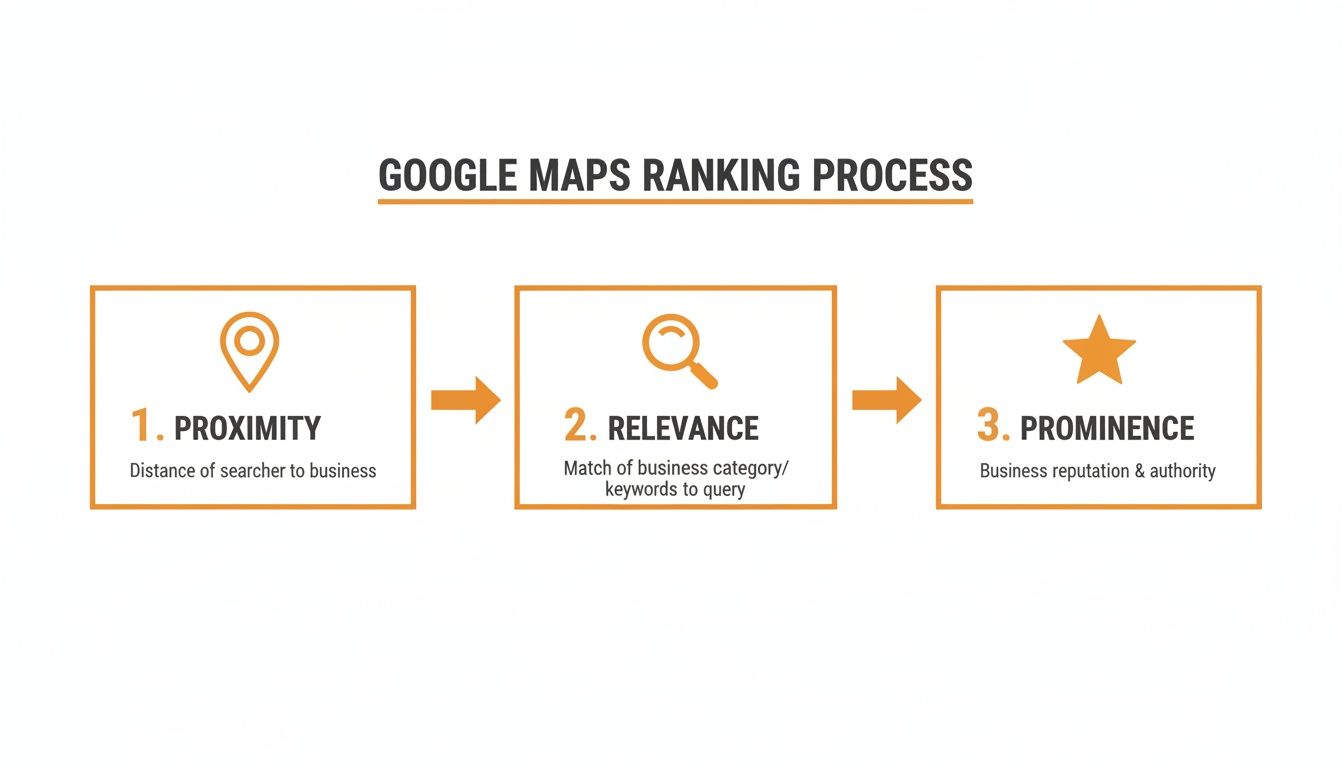
- Proximity: How physically close is your business to the person searching? You can't change your address, but you can ensure it's pinpoint accurate in your profile and that your defined service areas are correct.
- Relevance: Does your business profile match the searcher's query? This is controlled by choosing hyper-specific business categories (e.g., "Pediatric Dentist" not just "Dentist") and listing every single service you offer.
- Prominence: How well-known and trusted is your business in the local market? Google measures this through your review count, star rating, response rate, and the consistency of your business information across the web.
Real-World Example: An auto repair shop in [City] with 150 glowing reviews and a detailed profile will almost always outrank a competitor who is slightly closer but only has 10 reviews and a bare-bones profile. Prominence and relevance often trump pure proximity.
The numbers don't lie. Research shows a staggering 86% of consumers use Google Maps to find local businesses. This behavior leads directly to new customers and is a cornerstone of any effective strategy for Google Maps and marketing. For a deeper dive into how local businesses can build a winning online strategy, this guide to digital marketing for local businesses is a great resource.
How to Fully Optimize Your Google Business Profile
Your Google Business Profile (GBP) is your command center for local search. A fully optimized profile signals to Google that you're an active, credible business, making it more likely to show you for relevant "near me" searches. Follow this step-by-step process.
Step 1: Nail Your Core Business Information
Accuracy is non-negotiable. Your Name, Address, and Phone Number (NAP) must be 100% identical everywhere online, starting with your website. Any inconsistencies ("St." vs. "Street") can confuse Google and harm your ranking.
Next, choose the most specific primary category to describe your main service. An HVAC company should choose "Heating contractor" or "Air conditioning repair service," not just "Contractor." Then, add secondary categories for everything else you do.
For instance, a senior living community would lock in "Assisted Living Facility" as its primary category. But they shouldn't stop there. Adding "Memory Care Facility" and "Retirement Community" as secondary categories helps them show up for a much wider net of relevant searches.
Step 2: Add Conversion-Focused Details
Once your foundation is solid, add details that turn searchers into customers.
- Booking Links: Add direct links for your most important conversions. A local med spa could have a "Book a Consultation" link, while a roofer should have a "Request a Free Estimate" button.
- Enable Messaging: Turn this on to allow customers to message you directly from your profile. You must reply within 24 hours to maintain good standing.
- Detailed Services & Products: Don't just list "Dental Services." Break it down. List "Dental Implants," "Teeth Whitening," and "Invisalign" as individual services with descriptions.
- Attributes: Select all relevant attributes like "Wheelchair accessible entrance," "Online appointments," or "Women-led" to connect with users looking for exactly what you offer.
GBP Optimization Checklist
Run through this checklist to ensure your profile is complete and competitive.
- [ ] Core Info: Is your Name, Address, and Phone (NAP) 100% accurate and consistent?
- [ ] Categories: Is your primary category specific? Are all other services added as secondary categories?
- [ ] Hours: Are your standard hours and any special holiday hours up to date?
- [ ] Photos: Do you have at least 10 high-quality, recent photos of your exterior, interior, team, and work?
- [ ] Services/Products: Are all your offerings listed out with helpful descriptions?
- [ ] Q&A: Have you pre-populated your Q&A section by asking and answering your top 3-5 customer questions?
- [ ] Attributes: Did you select every single attribute that applies to your business?
By methodically checking these boxes, you give Google a rich dataset that proves your relevance and helps you connect with more local customers. Proper optimization is the first step to improving your reputation management online.
Templates & Scripts: Building a Review Strategy That Ranks

When it comes to Google Maps, customer reviews are the engine for "prominence." A steady stream of positive reviews proves to Google and potential customers that your business is not only active but also highly valued. Automating the "ask" is the key to consistency.
Review Request Scripts (Veterinary Clinic Example)
SMS Request Script
Hi [Pet Owner Name], this is [Staff Name] from [Vet Clinic Name]. It was a pleasure seeing [Pet Name] today! We'd be so grateful if you could share your experience with a quick Google review. It helps other pet owners in [City] find us! [Link to Google Review Page]
Email Request Script
Subject: How was your visit to [Vet Clinic Name]?
Hi [Pet Owner Name],
Thank you for trusting us with [Pet Name]'s care today. We hope you had a positive experience.
Would you mind taking 60 seconds to leave us a review on Google? Your feedback helps us improve and allows others in our community to learn about our services.
[Click Here to Leave a Review]
We look forward to seeing you and [Pet Name] again soon!
Warmly,
The Team at [Vet Clinic Name]
Review Response Templates
Responding to 100% of reviews within 24 hours is non-negotiable. It signals to Google and customers that you are engaged and value feedback.
Positive Review Response Template
Thank you so much, [Reviewer Name]! We're thrilled to hear you had a great experience with our team. We appreciate you taking the time to share your feedback and look forward to seeing you again.
Negative Review Response Template (HIPAA-Aware)
Hi [Reviewer Name], thank you for bringing this to our attention. We take all feedback seriously and are committed to providing the best possible patient experience. While we cannot discuss specific details here for privacy reasons, we have passed your comments to our Practice Manager, who will be reaching out to you directly.
7-Day Review Program Launch Checklist
- Day 1: Set up automated SMS and email review request software.
- Day 2: Train your front-desk team with a simple script to mention reviews to happy customers at checkout.
- Day 3: Assign one person to "own" review responses with a goal of replying within 24 hours.
- Day 4: Launch the automation! Send the first batch of review requests to recent customers.
- Day 5: Check for new reviews and respond to every single one.
- Day 6: Seed your GBP Q&A section with 3-5 common questions and answer them.
- Day 7: Review the week's results: How many requests were sent? How many new reviews received? Adjust as needed.
Measuring Your Google Maps Marketing Performance
You can’t improve what you don’t measure. Tracking performance shows how optimizing your profile turns searches into revenue through calls, bookings, and new customers.
Key Performance Indicators (KPIs) and Targets
| Metric | What to Track | Recommended Target |
|---|---|---|
| GBP Views | Total views on Search and Maps from GBP Insights. | Aim for 15-20% month-over-month growth for new or recently optimized profiles. |
| Star Rating | Your average Google star rating. | Maintain a 4.5+ star rating to build trust. |
| Review Volume | The number of new reviews per month. | Target 10+ new reviews per location, per month. |
| Review Recency | The freshness of your latest reviews. | Aim for at least 1 new review per location, per week. |
| Response Time | How quickly you reply to new reviews. | Respond to 100% of reviews within 24 hours. |
| GBP Calls | Calls initiated from your profile's "Call" button. | Track volume and listen to call recordings to gauge lead quality. |
| Lead-to-Sale Conversion | Percentage of GBP leads that become customers. | Aim for 25-40% conversion from qualified calls/messages. |
How to Track Conversions from GBP
Your GBP Insights dashboard shows clicks and calls, but it doesn't tell you if those actions led to a sale. To connect the dots, you need to tag your website links with UTM parameters. A Urchin Tracking Module (UTM) is a code snippet added to a URL that tells analytics tools where traffic came from.
Use Google's free Campaign URL Builder to create tagged links:
- For your main website link: Set
utm_source=google,utm_medium=organic, andutm_campaign=gbp_profile. - For your booking link: Use the same source and medium, but set
utm_campaign=gbp_booking_button.
Now, in Google Analytics, you can isolate traffic from your GBP and see exactly how many appointments or form fills it generated. This allows you to calculate a true Return on Investment (ROI) for your Google Maps marketing efforts.
Frequently Asked Questions (FAQ)
1. How do I manage Google Business Profiles for multiple locations?
Use the Google Business Profile Manager to group locations. For daily tasks like responding to reviews and posting updates across dozens or hundreds of locations, a specialized reputation management platform is essential for efficiency and consistency.
2. How long does it take to see results from optimizing my profile?
You can see initial results from basic optimizations (like correcting your NAP) within 30-90 days. However, achieving top rankings in a competitive market requires consistent effort in building reviews and prominence over 6-12 months.
3. Do negative reviews hurt my Google Maps ranking?
Not necessarily. A pattern of unanswered negative reviews is far more damaging than the negative reviews themselves. A prompt, professional response shows Google and potential customers that you are engaged and take feedback seriously, which can be a net positive.
4. What are Google Posts and how should I use them?
Google Posts are free mini-ads on your profile that last for seven days. Use them weekly to highlight promotions, events, or new services. Always include a high-quality image and a clear call-to-action (CTA) button like "Book Now" or "Learn More."
5. How much should I budget for Google Maps Ads?
You can start with as little as $10–$20 per day for a single location. The right budget depends on your industry's competitiveness. Start with a small test budget for 30 days, measure your cost per lead (call or direction request), and scale up if the ROI is positive.
Turning your Google Maps presence into a predictable source of revenue requires strategy and consistent execution. Our team provides the tools and month-to-month support to manage your reputation management, build your review volume, and optimize your Google Business Profile across all your locations. To see how we can drive more calls and bookings for your business, book a strategy call.


