
If your store feels busy online but thin on calls, form fills, walk-ins, or service bookings, the issue usually is not effort. It is disconnected execution. Digital marketing for automotive dealers works when local visibility, website conversion, paid media, reviews, and CRM tracking all run as one system, not as separate vendor tasks.
For a single rooftop in [City] or a multi-location group across [City] and [Another City], the practical goal is simple. Show up when buyers search, earn trust before they click, make the next action obvious, and track every lead source through to sale or service RO.
Your Digital Marketing Roadmap Introduction
Monday starts with a familiar problem. The ad report says traffic is up, your vendor says impressions are strong, and the sales desk still asks why showroom ups and qualified leads feel flat. In most stores, the gap is not awareness. It is execution between the click, the call, the lead record, the appointment, and the sold unit.
Digital now takes a large share of dealer ad spend, and shoppers compare multiple sites before they decide where to contact or visit, as noted in Demand Local’s automotive digital marketing statistics roundup. Review response also affects trust, and first-party data plus automation can improve conversion and return when the setup is disciplined. The takeaway for operators is straightforward. More channels do not fix a weak process. Better governance does.
This is an operating issue before it is a marketing issue.
Single-point dealers usually feel it as wasted spend. Multi-location groups feel it as inconsistency. One store answers leads in five minutes, another in two hours. One rooftop tags campaigns correctly, another dumps everything into “website lead.” One service department replies to reviews daily, another lets a month pass. The result is the same. You cannot measure ROI cleanly, and you cannot scale what you cannot trust.
Google local visibility still rests on three practical factors:
- Proximity is how close the shopper is to your dealership or service lane.
- Relevance is how well your profile, inventory pages, and service pages match the search.
- Prominence is how credible and active your business appears through reviews, listings accuracy, and brand demand.
These factors explain why searches like “used trucks near me,” “oil change near me,” or “Honda dealer in [Neighborhood]” are not won by ad spend alone. They are won by accurate profiles, complete listings, service-specific pages, fast review response, and clean attribution inside the CRM.
For a broader strategic reference, this complete guide to digital marketing for automotive dealers is a useful companion read. If your priority is improving local visibility across maps, listings, and reputation, this guide to online marketing for local businesses is worth bookmarking.
Google Business Profile checklist
Use this before increasing ad spend.
- Primary categories set correctly. Choose the main dealership category and the right supporting service categories.
- Hours kept current. Include sales, service, parts, and holiday updates.
- Services listed clearly. Add financing, trade-ins, oil changes, brakes, tires, inspections, and other revenue lines you want found.
- Photos kept fresh. Use exterior, interior, team, service drive, waiting area, and current inventory images.
- FAQs written for real searches. Answer financing, appointment, trade-in, and service timing questions.
- Links tagged with UTMs. Website, appointment, and offer links should be traceable in reporting.
- Review monitoring active. This engagement matters: consumers favor businesses that respond to reviews.
Tip: Dealers often blame ranking swings on Google. In practice, stale profile management, weak review follow-up, and bad campaign tagging cause more lost opportunity than algorithm changes.
The Foundation Local Search and Listings Mastery
A shopper searches “used trucks near me” on Saturday morning. Your store has the right inventory, competitive pricing, and open appointments. If your local presence is weak, you do not make the shortlist.
Local search sets the floor for both sales and fixed ops. Automotive marketers note that 34% of car shoppers start with Google search (M16 Marketing). This trend impacts both showroom and service, because many high-intent searches carry local intent even when the customer does not type a city name.
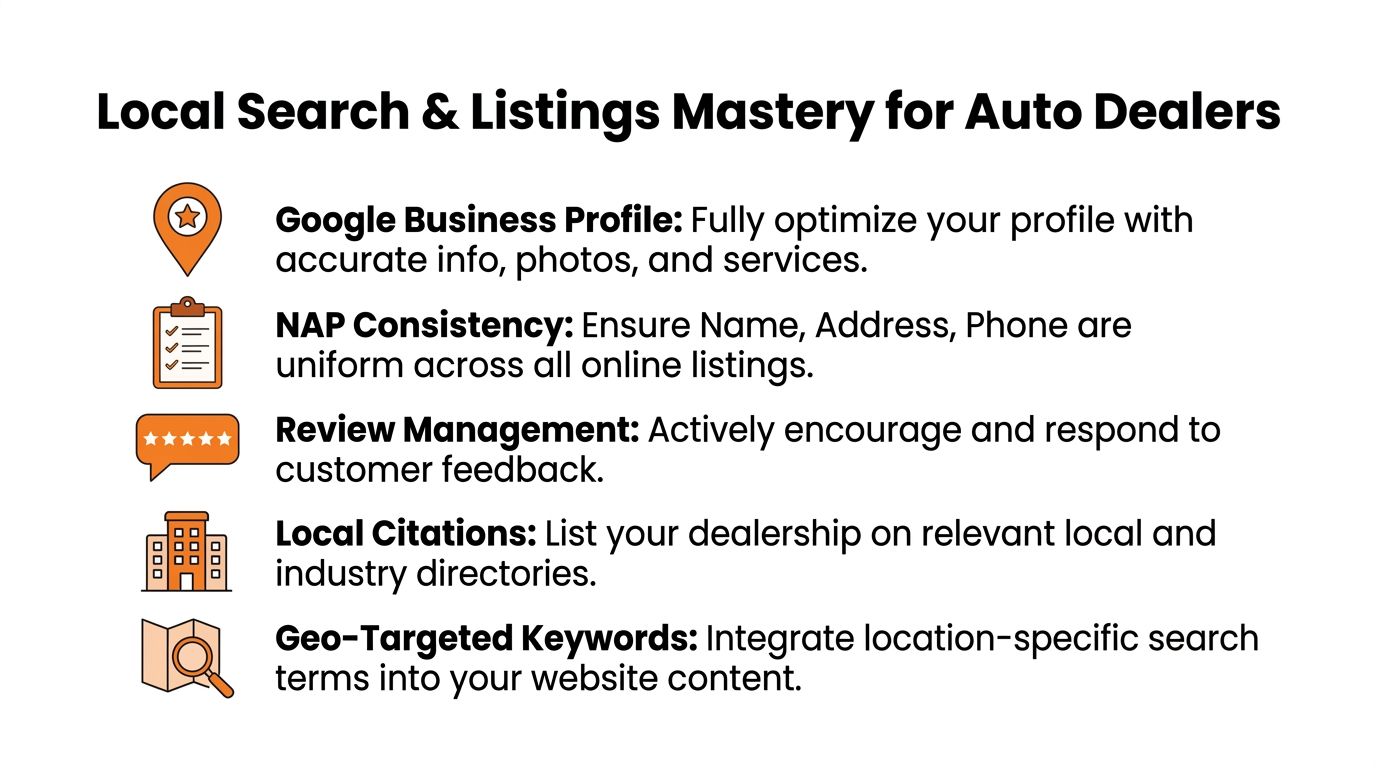
What strong local search setup looks like
Google evaluates local visibility through proximity, relevance, and prominence. Dealers need a plan for the two they can influence and realistic expectations about the one they cannot.
Proximity depends on where the shopper is. A farther rooftop can lose that comparison even with a better website and stronger offers.
Relevance comes from tight alignment between the search and the page or profile Google serves. Your Google Business Profile, model and inventory pages, and service pages should match the phrases buyers and service customers use, including “used SUV in [City],” “oil change near me,” and “brake service in [City].”
Prominence is where operating discipline shows up. Reviews, accurate listings, branded search activity, local links, and regular profile updates all shape trust. Single-point dealers can usually clean this up quickly. Multi-location groups need standards, ownership, and a review cycle, or one bad rooftop drags down reporting and brand consistency.
Listings work that dealers skip too often
Claiming Google is the start, not the system.
A store’s name, address, and phone number need to match across Google, Apple, Bing, major directories, and data sources that feed local search platforms. One outdated service number or old tracking line can break attribution, send calls to the wrong team, and create a poor customer experience before anyone visits the site.
Use this as an operating checklist:
- Standardize location naming. Decide how each rooftop appears online and keep that format everywhere.
- Audit every phone number. Sales, service, and parts numbers should match published listings and route correctly.
- Keep hours aligned. Mismatched holiday or service hours create avoidable complaints and missed appointments.
- Support department-level intent. If fixed ops carries margin, build listings and pages that reflect service categories, amenities, and appointment paths.
- Add local context on site. Use [City], [Neighborhood], nearby roads, and service areas naturally on location and department pages.
If you are cleaning up your Maps footprint, this guide to local listings on Google is a useful operational reference.
Near me searches need matching page types
Dealers lose qualified traffic when every local click goes to the homepage. The better approach is simple. Match the page to the intent, then measure whether that page produces calls, form fills, directions requests, and booked appointments.
| Search intent | Better destination |
|---|---|
| “Ford dealer near me” | Location page with inventory, hours, directions, financing |
| “oil change near me” | Service page for oil changes in [City] |
| “used trucks in [City]” | Filtered inventory page or category page |
| “brake repair [Neighborhood]” | Brake service page with booking CTA |
At this point, local SEO stops being a visibility task and becomes an operations task. The profile, the landing page, the phone routing, and the CRM source tagging need to agree. If they do not, you may still get traffic, but you will struggle to tie that traffic to appointments and sold units.
Fueling Growth with a Disciplined Review Program
Reviews are not a nice extra. They are operating infrastructure.
A strong review program improves trust before the click, supports local visibility, and gives the sales and service teams a better close rate because the customer arrives with less doubt. The hard part is not asking once. The hard part is running the same process every day, across every advisor, salesperson, and location.
What works and what breaks
The best review programs in dealerships share a few habits.
They ask at the right moment. Service asks right after a smooth pickup. Sales asks after delivery when the customer is happy and the paperwork stress is over.
They remove decision fatigue. One short link. One direct request. No paragraph about “if you have a moment.”
They also respond consistently. That matters because consumers favor businesses that engage with reviews, as noted earlier.
What does not work:
- Asking only in person and hoping the customer remembers later
- Sending the same generic request to every buyer and service guest
- Ignoring neutral and negative reviews
- Letting frontline staff freestyle replies with no template or escalation rule
Review request templates you can use today
If you want better compliance, keep scripts short.
SMS review request for service
Hi [First Name], thanks for trusting [Dealership Name] with your vehicle today. If we took good care of you, would you leave a quick Google review about your visit? Your feedback helps other drivers in [City] find us: [Review Link]
Email review request for sales
Subject: Thank you from [Dealership Name]
Hi [First Name],
Thank you again for choosing [Dealership Name] for your recent vehicle purchase. We appreciate the opportunity to earn your business.
If your experience with our team went well, would you share a quick review here? [Review Link]
Your feedback helps other car shoppers in [City] find a dealership they can trust.
Thank you,
[Salesperson Name]
[Dealership Name]
If your team needs a cleaner process, this article on how to ask for reviews without sounding pushy is useful training material.
Review response templates for positive and negative feedback
Responses should sound human, but stores need rails.
Positive review response template
Thank you, [First Name]. We appreciate you choosing [Dealership Name] and taking the time to share your experience. We are glad our team could help with [service visit / vehicle purchase]. If you need anything else, we are here for you.
Negative review response template
Hi [First Name], thank you for the feedback. We are sorry your experience did not meet expectations. We take concerns like this seriously and want to look into what happened. Please contact [Manager Name] at [Phone] so we can review the details and work toward a resolution.
On-site SEO details that support review-driven traffic
Review programs do more than strengthen the profile. They also improve the traffic that lands on your site, especially when your pages are ready to convert local trust into action.
For VDPs, focus on these elements:
- Unique vehicle descriptions. Do not rely only on feed text.
- Clear CTAs. “Check availability,” “Value your trade,” and “Schedule test drive” need to appear without hunting.
- Visible trust signals. Ratings, recent customer language, and store credibility should be near action points.
- Mobile-first layout. Many shoppers reach the page on a phone and will not pinch-zoom through clutter.
For service pages, the basics are different:
- Dedicated pages by service type. Oil changes, tires, brakes, battery, transmission, and alignment deserve their own pages.
- Location language. Mention [City] and [Neighborhood] naturally.
- Operational clarity. State what the service includes, how to book, and what happens next.
- Fast path to contact. Tap-to-call and schedule links should be obvious.
A 7 day launch checklist for a review program
This should feel manageable, not like a vendor rollout.
Day 1
Choose who owns the program. Usually that is one sales manager and one fixed ops manager.
Day 2
Create your SMS and email templates. Approve one positive response template and one negative response template.
Day 3
Build the review link workflow. Test it on mobile and desktop.
Day 4
Train the front line. Show exactly when to ask and what to say.
Day 5
Set your response SLA. Decide who answers, who escalates, and how quickly.
Day 6
Check your website trust points. Add review signals to key sales and service pages where appropriate.
Day 7
Launch, monitor, and coach. Fix friction immediately instead of waiting for a monthly meeting.
Dealers do not usually fail at reviews because customers refuse. They fail because nobody owns the process every day.
Optimizing Your Digital Showroom for On-Site SEO
Most dealer websites have enough content to rank for something. Fewer have the structure to convert that traffic.
Your site should act like a digital showroom for buyers and a service advisor for fixed ops. That means every key page needs one job, one audience, and one obvious next step.
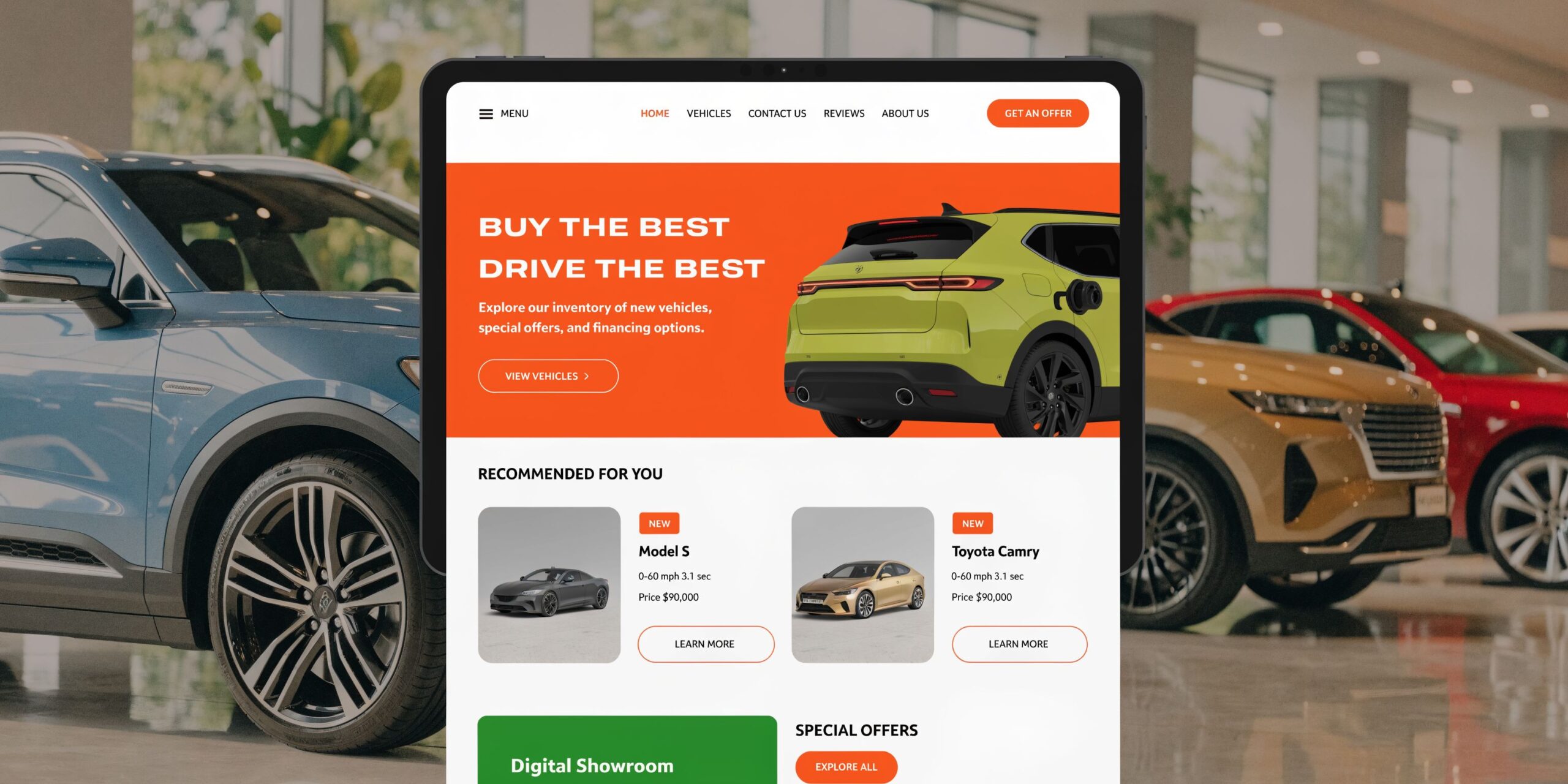
The pages that deserve the most attention
Homepages matter less than most dealers think. The money pages usually sit deeper.
Location pages should carry the local load. They need current hours, departments, service areas, directions, inventory access, financing context, and staff trust signals.
Inventory category pages work best when they align with real search behavior. “Used SUVs in [City]” is far stronger than a vague inventory hub with no local language.
Service pages should mirror fixed-ops demand. “Brake service in [City]” and “oil change near [Neighborhood]” usually convert better than one broad “service department” page.
Copy rules that help, not hurt
Dealer sites often lose conversion because the copy is generic, bloated, or written only for search engines.
Use plain language. Write for the shopper who wants three answers fast:
- Is this relevant to what I need?
- Can I trust this store?
- What do I do next?
That means fewer slogans and more operational detail. Explain availability checks, trade-in steps, online financing starts, service booking, pickup expectations, and warranty or inspection context where relevant.
If your team is revising website copy, this guide on how to write for website content is a good standard to follow.
The technical basics still matter
Speed, mobile usability, clean page titles, internal links, and usable forms are not glamorous. They still decide whether your traffic turns into leads.
A cluttered VDP with too many widgets can bury the CTA. A service page with weak mobile usability can waste high-intent traffic from local searches. A form that asks for too much too soon can crush completion rates.
This walkthrough is worth watching if your current website feels more like a brochure than a selling tool.
Driving Qualified Traffic with Paid Advertising
Monday starts with a familiar problem. New leads came in over the weekend, but the spend report shows money went to broad campaigns, mixed-intent keywords, and clicks that never had a real chance to turn into showroom traffic or repair orders. Paid media breaks down fast when budget, inventory, operations, and follow-up are not working from the same plan.
Paid advertising should do one job well. Send the right shopper to the right offer at the right store, then make that traffic measurable all the way to sale or RO. For single-point dealers, that means tighter control over budget and lead quality. For multi-location groups, it means standard campaign structure, location-level budgets, shared rules, and reporting that shows which store is turning spend into gross.

Why first-party data beats broad targeting
Your best paid audiences usually come from your own records and shopper behavior, not rented audience segments. Build campaigns from CRM activity, website visits, service history, lease maturity, and known ownership signals. As noted earlier, first-party audiences tend to convert better because they reflect real dealership relationships and real shopping behavior.
Useful audience groups include:
- Recent VDP viewers who did not submit a lead
- Past service customers due for routine maintenance
- Lease-end customers approaching decision windows
- Shoppers tied to specific body styles or brands
- Owners of vehicles that match your trade-in priorities
Message match matters. A shopper who spent time on half-ton trucks should see truck inventory, payment context, and trade-in language. A service customer due for tires should not get a generic “schedule service” ad if the store wants higher-value repair work this month.
Call handling matters here too. If paid campaigns generate phone leads, connect ad tracking with your store systems so the sales or service team can see source quality and response gaps. A practical setup starts with VoIP CRM integration for dealership call tracking and follow-up and expands from there based on store process.
The paid media structure that usually performs better
Use paid media in layers, but give each layer a specific purpose and a clear budget rule.
Search captures active demand. It belongs on high-intent model terms, dealer-name searches, used car searches, service keywords, and urgent local needs.
Retargeting keeps your store in front of shoppers who viewed inventory, finance pages, or service offers and left without acting. That usually works best with short windows, specific inventory, and clear offers.
Social can support both sales and service, but only when the audience and creative are tightly aligned. Broad awareness campaigns often look busy in platform reports and weak in the CRM.
Video helps when it answers real buying questions. Adtaxi reports that online video influences automotive purchase decisions and that immersive vehicle video can increase buyer confidence. For dealers, that supports using walkarounds, model comparisons, recon explanations, and service advisor videos to improve conversion, not just reach.
A simple budget split often works better than a “be everywhere” plan. Put more money behind campaigns tied to current margin, aging inventory, fixed ops capacity, and models your store can deliver well. Cut budget from ad groups that generate cheap clicks but poor appointments, poor show rates, or low close rates.
Reputation-driven ads deserve more attention
Strong review activity should shape paid campaigns, not sit off to the side as a separate project. Use the language customers repeat in reviews. Mention fast paperwork if buyers mention it. Mention transparent service updates if that is what fixed ops customers praise. Then send traffic to pages that back up the claim with visible proof.
Trust becomes a key differentiator when nearby stores offer similar inventory, similar pricing logic, and similar OEM offers. In those cases, ad copy, landing page proof, and response speed often decide who gets the lead.
Measurement has to stay attached to that process. If campaign data stops at clicks and form fills, the store cannot tell which audience, offer, or location is producing revenue. Teams reviewing workflow options can use this overview of CRM integrations to map how calls, forms, and source data should flow into the CRM.
Connecting the Dots with CRM Lead Routing and Measurement
A shopper clicks a paid search ad for a used Silverado, calls the store, gets transferred twice, then submits a form on the VDP that lands in a general inbox. The ad platform reports a lead. The CRM logs a customer. The sales desk sees no reliable source. That is how dealers lose money while the dashboard still looks fine.
The store usually has the right tools already. The failure point is handoff discipline, source tracking, and ownership from first click to sale or repair order.
Build a clean attribution path
Start with UTMs. Every trackable link from Google Business Profile, paid campaigns, email, and seasonal promos needs a naming standard your team will follow. Keep it simple enough that a manager can audit it in five minutes.
Use three required fields:
- Source such as google, meta, email
- Medium such as cpc, organic, referral
- Campaign such as used-trucks-city or service-brakes-city
Then make sure those values survive the next handoff. Analytics should capture them. Call tracking should pass source and department. The CRM should preserve original source fields instead of overwriting them when the customer calls back, books service, or gets worked by a second employee.
A basic operating view looks like this:
| Touchpoint | What to tag or capture |
|---|---|
| Google Business Profile website link | UTM source, medium, campaign |
| Paid search ad | Campaign, ad group intent, landing page |
| Form fill | Lead source, location, page type |
| Phone call | Call source and routed department |
| CRM record | Original source preserved through sale or RO |
If you are reviewing platform options or workflows, this overview of CRM integrations gives a helpful baseline. If your bigger issue is tying inbound calls to the right salesperson, BDC queue, or service advisor, review this guide to VOIP CRM integration for lead routing and call attribution.
Route leads by intent, not convenience
Too many stores still send every digital lead to one bucket and hope the team sorts it out. That creates delays, bad first responses, and weak accountability.
Route based on what the customer asked for.
- VDP sales lead goes to the assigned sales rep or BDC sales queue
- Credit or trade lead goes to the team trained to handle financing and appraisal follow-up
- Service request goes to fixed ops, with advisor or scheduler ownership
- After-hours lead gets a next-morning owner before the store closes
- High-intent inbound call should reach a live person or a monitored overflow path
The trade-off is real. Tight routing improves speed and relevance, but only if staffing and schedules support it. A small single-point store may need one shared queue with strict SLAs. A larger group can split by rooftop, department, and lead type. Either way, every lead needs an owner, a response clock, and an escalation rule when nobody acts.
Measure the handoff, not just the lead
Clicks and form fills do not tell you whether marketing is producing gross. Managers need to see where the process breaks.
Track a short weekly scorecard:
- Leads by source and location
- Phone calls by source and department
- Average first-response time
- Lead-to-appointment rate
- Appointment-to-show rate
- Lead-to-sale conversion
- Service booking completion
- Sold units or ROs tied back to original source
- Cost per sale or cost per RO by major channel
One number alone can mislead. Paid search may look expensive on cost per lead but outperform on show rate and front-end gross. Organic service traffic may produce fewer form fills but stronger RO quality. Good measurement makes those trade-offs visible, which is what lets an owner shift budget, staffing, and process with confidence.
A report earns its place only when someone changes something because of it.
Governance at Scale for Multi-Location Dealerships
Single-store execution problems become group-level risk fast.
A multi-location operator has to balance local autonomy with brand control. Too much centralization and local teams move slowly. Too little and every rooftop sounds different, responds differently, and publishes different information.
That matters because 92% of buyers are influenced by reviews, and structured programs can lift local discoverability by 30-50% for multi-location dealerships that centralize requests and responses more effectively (C-4 Analytics).
A governance model that is strict where it should be
Centralize the rules. Localize the execution.
The group should own:
- Brand voice guidelines
- Approved review response templates
- Escalation rules for legal, pricing, or customer care issues
- Naming conventions for locations
- Required profile fields and listing standards
- Reporting definitions across all rooftops
Local managers should own:
- On-the-ground photos
- Store-specific updates
- Day-to-day customer context
- Escalation handoff when a review or lead needs local resolution
Practical response SLAs and permissions
Every group needs simple permissions.
Do not let every employee publish profile edits or public responses without guidance. Set role-based access. One person may request edits, another may approve, and a regional leader may audit.
Use response SLAs that fit your operation:
- Positive reviews answered the same day when possible
- Negative reviews escalated immediately
- Listings changes reviewed before publishing
- Service interruptions reflected on profiles quickly
Q and A for multi-location operators
How do we keep replies consistent without sounding robotic?
Use approved templates with flexible lines for names, department context, and issue type. The template creates guardrails. The manager adds the human detail.
Should each store have separate review requests?
Yes. The customer should land on the exact location profile they visited.
Who should own listings accuracy?
One central owner should enforce standards. Each store should verify operational details like hours, departments, and temporary changes.
How often should regional teams audit profiles?
Regularly enough to catch drift before it affects customers. The exact cadence depends on store count, staff turnover, and how often operational details change.
Your Digital Marketing Questions Answered
What should a dealership fix first
A common dealership scenario looks like this. The store is spending on paid search, inventory ads, and social campaigns, but basic customer signals are broken. Hours are wrong, the Google Business Profile is missing updates, reviews go unanswered, and leads hit the CRM without a clear owner.
Fix that first.
Local visibility and process discipline should come before expansion spend. If the foundation is weak, paid media does not create efficient growth. It covers preventable leaks.
Is SEO or paid advertising more important
The better question is which problem you need to solve first.
SEO helps dealers capture demand that already exists. Paid advertising helps dealers control volume, timing, and model or service-line focus. Single-point stores and large groups usually need both, but they should not fund both with the same expectations. SEO is a compounding channel. Paid media is an operating lever.
Use SEO to improve organic visibility, model relevance, and local trust. Use paid campaigns when you need to move specific inventory, support fixed ops, or fill gaps by market and rooftop.
How many websites should a shopper expect to visit before choosing
Shoppers compare stores. They check inventory, pricing, reviews, photos, and convenience across multiple sites before they submit a lead or show up.
That makes trust signals expensive to ignore. A weak VDP, thin location page, missing payment information, or outdated review profile can lose the shopper before your team ever gets a chance to respond.
Does mobile really matter that much for dealers
Yes. For many dealers, mobile is the first visit, the second visit, and the conversion path.
If your VDPs load slowly, service pages bury the appointment action, or forms are frustrating on a phone, high-intent traffic drops out. Check the mobile path yourself. Search your store, tap into the profile, visit key pages, submit a lead, and call the dealership. Friction shows up fast when an owner or GM runs the test personally.
Should dealers invest in marketing automation
Usually yes, after lead ownership, routing rules, and response standards are clear. Dealers that adopt automation are 2X more likely to achieve higher ROI (Adtaxi).
The trade-off is simple. Automation can improve speed and consistency, or it can scale bad process. Use it for follow-up timing, lead assignment, reminders, and segmented messaging. Do not use it as a substitute for clear accountability inside the CRM.
What should we measure from Google Business Profile to sale
Measure the full path from click to outcome.
Use UTMs on profile links. Track calls, form fills, chats, and appointment starts by source. Keep the original source attached to the lead inside the CRM. Then review sold units, showroom appointments, and service ROs against the channel that started the customer journey.
The goal is to know what drives calls, messages, bookings, tours, and deliveries, not just to create more dashboards.
What is the biggest mistake multi-location groups make
They standardize branding but not operating rules.
Scale requires one measurement model, one source-of-truth process for listings and review workflows, clear permissions, and local accountability at each rooftop. Without that structure, corporate sees reports, stores improvise, and performance varies by whoever happens to be paying attention that week.
If you want help turning reviews, listings, and response workflows into measurable local growth, Reviews To The Top offers month-to-month support for single-location and multi-location operators. The focus is practical execution: stronger local visibility, faster review response, cleaner profile management, and clearer reporting on the calls, messages, bookings, and visits your locations generate.


