
Birdeye Inc is an all-in-one platform that helps local and multi-location businesses manage their online reputation, listings, and customer messages from a single dashboard. For busy operators, it solves the critical problem of converting online searches into paying customers by making your business more visible and trustworthy on sites like Google. This directly leads to more calls, messages, and bookings.
Key Facts
- Unified Platform: Consolidates online reviews, business listings, and customer messaging (SMS, webchat, social) into one inbox.
- Review Generation: Automates sending review requests via SMS and email to increase the volume and recency of customer feedback.
- Local SEO Focus: Designed to improve rankings on Google Maps and in local search by ensuring accurate business information and building online prominence.
- AI-Powered: Uses artificial intelligence (AI) to draft review responses, analyze customer feedback, and prepare your business for AI-driven search (AIO).
- Wide Adoption: Used by over 200,000 businesses, from single-location shops to large multi-location enterprises.
- Defines Acronyms: SEO (Search Engine Optimization), AIO (Artificial Intelligence Optimization), NAP (Name, Address, Phone Number), PHI (Protected Health Information), UTM (Urchin Tracking Module).
Step-by-Step: How to Use Birdeye Inc to Get More Customers
Think of Birdeye Inc as your command center for winning local business. The platform's features are designed to work together to attract, convert, and retain customers in your community. Here’s how you can put its core tools to work.

Step 1: Generate More Reviews Automatically
The foundation of a strong online presence is a steady stream of recent, positive reviews. Birdeye Inc automates this process.
- Connect Your System: Integrate Birdeye with your POS or scheduling software.
- Set Up Triggers: Create a rule to automatically send a review request via SMS or email after a service is completed (e.g., 2 hours after a dental appointment).
- Direct Customers: The link in the message takes the customer directly to your Google Business Profile or another review site to leave feedback. This simple workflow dramatically increases your review volume.
Step 2: Correct Your Business Listings Everywhere
Inaccurate business information costs you customers. If a potential client can't find your correct phone number, they'll call a competitor.
- Enter Your Details: Input your correct Name, Address, and Phone number (NAP), plus hours and services, into the Birdeye dashboard.
- Sync Across the Web: Birdeye pushes this information out to 50+ directories and map services, correcting any errors.
- Boost Local SEO: This consistency builds trust with Google, making your business more likely to appear in "near me" searches in your [City].
Step 3: Manage All Customer Conversations in One Place
Customers now reach out via webchat, text, and social media. Juggling these channels is inefficient.
- Connect Your Channels: Link your website chat, business text number, and social media accounts to Birdeye’s unified inbox.
- Respond Faster: All incoming messages appear in one stream, allowing your team to respond in minutes, not hours.
- Convert More Leads: A fast response is critical. Replying to a new lead in under 5 minutes significantly increases the chance of conversion.
Step 4: Optimize for Google’s Ranking Factors
Google’s local search algorithm prioritizes businesses based on three main factors. Birdeye Inc is built to help you master all of them.
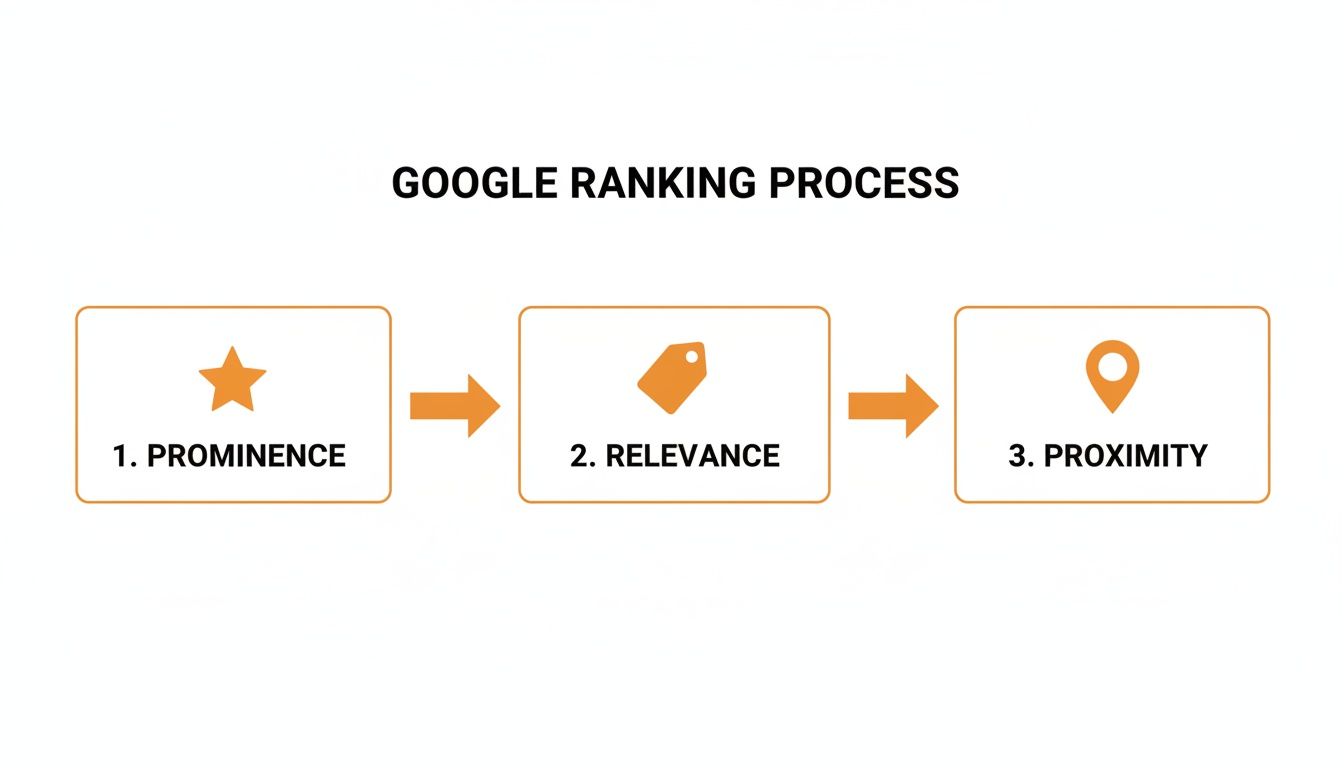
- Proximity: How close is your business to the searcher? Birdeye’s Listings tool ensures your address is accurate everywhere, confirming your location for "near me" searches.
- Relevance: Does your business offer what the searcher wants? The detailed service info in your listings and keywords from customer reviews signal relevance to Google.
- Prominence: How well-known and trusted is your business? The high volume of recent, positive reviews generated through Birdeye is the most powerful signal for prominence.
By systematically improving these areas, you can climb the rankings and win more visibility than your local competitors. We can help you optimize your Google Business Profile to ensure you are capturing this local traffic.
Templates & Scripts for Your Review Program
A successful reputation management program runs on proven processes. Use these templates and this checklist to launch a system that gets results from day one.
SMS & Email Review Request Scripts
The best requests are polite, timely, and simple.
SMS Review Request Script (Veterinary Clinic Example)
Hi [Pet Owner Name], thanks for trusting [Clinic Name] with [Pet's Name] today. We'd love to hear how we did! Would you mind leaving us a quick review? [Link to Google Reviews]
Email Review Request Template (Auto Repair Example)
Subject: How was your service at [Shop Name]?
Hi [Customer Name],
Thank you for choosing [Shop Name] for your recent auto service. Our team is dedicated to providing top-notch service in [City], and your feedback helps us achieve that.
If you have a moment, we would greatly appreciate it if you could share your experience on Google.
[Link to Leave a Review]
Thanks again for your business!
The Team at [Shop Name]
Review Response Templates
Responding quickly to all reviews shows potential customers that you are engaged and care about feedback.
Positive Review Response Template
Hi [Reviewer Name], thank you so much for the 5-star review! We’re thrilled to hear you had a great experience with our team at our [Neighborhood] location. We look forward to seeing you again soon!
Negative Review Response Template (HIPAA-Aware for Medical/Dental)
Hi [Reviewer Name], thank you for your feedback. We are committed to providing an excellent patient experience and take your comments seriously. To protect your privacy and discuss this matter, please contact our Practice Manager, [Manager Name], at [Phone Number].
7-Day Review Program Launch Checklist
| Day | Action Item | Goal |
|---|---|---|
| 1 | Finalize Account Setup | Connect your Google Business Profile and other key review sites to your Birdeye dashboard. |
| 2 | Customize Your Templates | Adapt the review request and response scripts to match your brand's voice and industry. |
| 3 | Train Your Team | Show your front-line staff how to use Birdeye to send requests and flag negative feedback for a manager. |
| 4 | Import Past Customers | Upload a list of recent customers (with their permission) to kickstart your first review request campaign. |
| 5 | Send Your First Campaign | Launch your initial batch of SMS and email review requests to the imported customer list. |
| 6 | Monitor & Respond | Start monitoring incoming reviews and use your templates to respond to every single one within 24 hours. |
| 7 | Review Initial Results | Check your dashboard for new reviews, an updated star rating, and any customer feedback that needs action. |
This disciplined approach is how businesses turn a tool like Birdeye Inc into a predictable growth engine.
How to Measure Success & ROI
An investment in a platform like Birdeye is only worthwhile if it delivers a positive return on investment (ROI). Success isn't just "more reviews"; it's more revenue. Here’s how to track it.
Key Performance Indicators (KPIs) and Targets
Focus on these specific, measurable metrics to prove the value of your efforts.
- Review Volume: Target 10+ new reviews per month per location.
- Star Rating: Maintain an average rating of 4.5 stars or higher.
- Response Time: Respond to 100% of reviews within 24 hours.
- GBP Views & Calls: Track month-over-month growth in Google Business Profile views, clicks-to-call, and direction requests.
- Lead-to-Sale Conversion: Measure the percentage of leads from GBP and your website that become paying customers.
How to Track Conversions from GBP
To draw a direct line from a Google search to a sale, use Urchin Tracking Modules (UTMs). A UTM is a small code snippet added to your website URL that tells Google Analytics where your traffic came from.
- Generate a UTM Link: Use a free tool to create a tagged URL for your website (e.g.,
yourwebsite.com?utm_source=google&utm_medium=organic&utm_campaign=gmb). - Add it to Your GBP: In your Google Business Profile settings, replace your standard website link with this new UTM-tagged URL.
- Track in Analytics: In Google Analytics, you can now filter for this specific campaign to see how many website visitors, leads, and sales originated directly from your Google profile.
This setup allows you to say, "Our work with Birdeye Inc and our GBP generated X leads and $Y in revenue this month." You can discover more about their journey and industry recognition here.
Frequently Asked Questions (FAQs)
1. What is Birdeye Inc?
Birdeye Inc is a customer experience platform that helps local businesses manage online reviews, business listings, and customer messaging in one place. It is designed to help businesses get found online and convert searches into customers.
2. How does Birdeye help with local SEO?
Birdeye improves local SEO by (a) ensuring your business name, address, and phone number (NAP) are accurate across 50+ online directories, and (b) automating review requests to increase the quantity and recency of reviews. Both are key ranking factors for Google's local algorithm.
3. Is Birdeye worth the cost for a small business?
For most small businesses, the value depends on ROI. If the platform helps generate even one or two new customers a month (e.g., a new HVAC installation or a dental patient), it often pays for itself. You can track this by monitoring increases in calls and website leads from your Google Business Profile.
4. Can Birdeye remove negative reviews?
No. Birdeye cannot delete legitimate negative reviews from sites like Google, Yelp, or Facebook. Its purpose is to help you respond professionally and to generate a large volume of positive reviews to improve your overall rating and minimize the impact of negative ones.
5. How is customer data handled, especially for healthcare?
Birdeye is built to be HIPAA-compliant. For healthcare verticals like dental and med spas, it offers workflows and response templates that prevent the sharing of Protected Health Information (PHI), ensuring patient privacy is maintained while managing feedback.
6. What is the difference between Birdeye and a marketing agency?
Birdeye is the software tool. A marketing agency provides the strategy and hands-on service to use that tool effectively. An agency helps you set up campaigns, write templates, track ROI, and adapt your strategy to meet business goals.
7. How does Birdeye prepare my business for AI search (AIO)?
AI assistants like ChatGPT rely on structured data and social proof to make recommendations. By generating a large, consistent library of customer reviews, Birdeye creates the data an AI needs to confidently recommend your business for searches like "best vet in [City] for anxious dogs." You can read more about how Birdeye helps businesses adapt to AI.
Ready to turn your online reputation into your strongest customer acquisition channel? We provide the hands-on strategy and month-to-month support to make it happen. Book a strategy call with our team to get started.


