
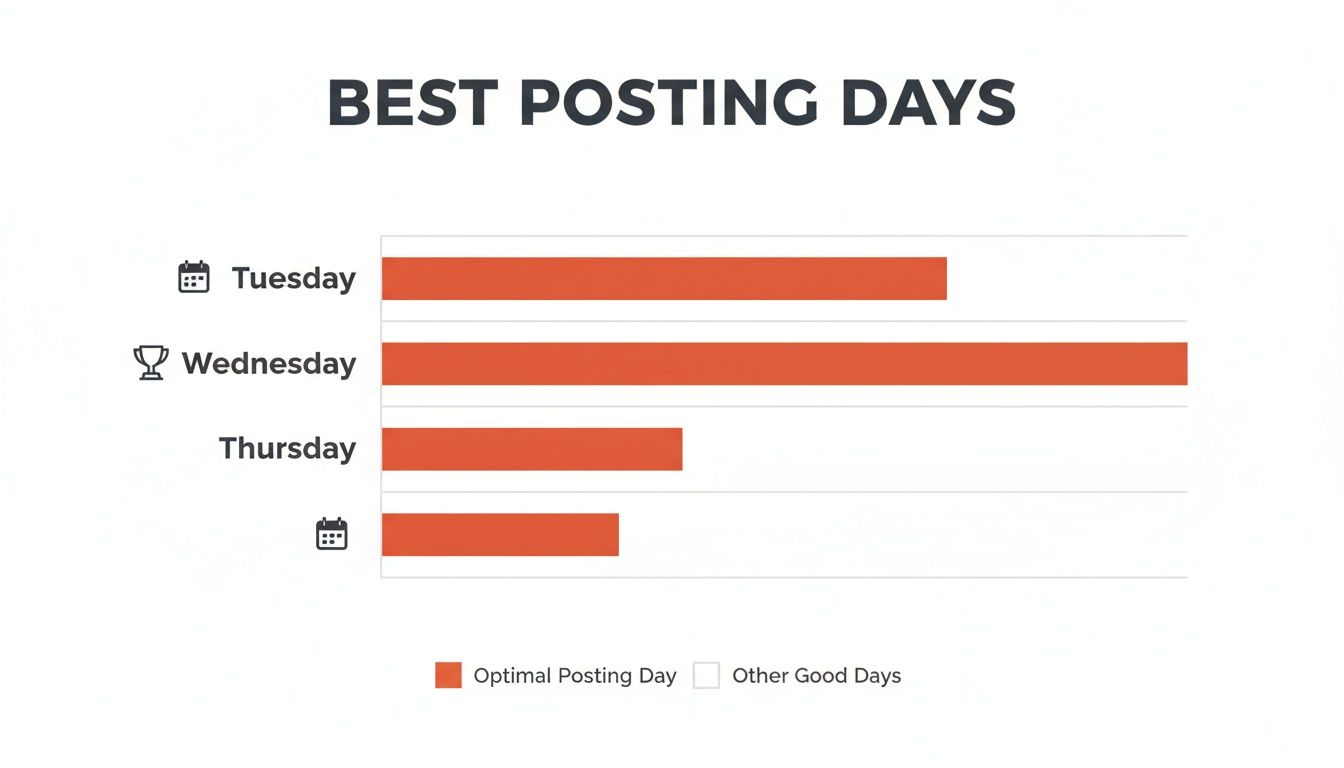
The best day for social media posts for local businesses is generally midweek—specifically Tuesday, Wednesday, or Thursday, between 10 AM and 1 PM. Posting during these peak hours gets your content in front of more local customers, which directly leads to more calls, messages, and bookings for your business. It's a simple, effective way to turn social media efforts into real-world conversions.
Brief Summary: Why Post Timing Is a Local Conversion Machine
For a dental office in [City] or an HVAC company covering the entire metro area, social media isn't just about getting likes. It's a direct line to new customers. Posting a last-minute appointment opening at the right time puts it in front of people who are actively scrolling and ready to make a move. This guide will show you how to find your optimal posting schedule, turn visibility into leads, and measure what truly matters for your business.
Key Facts Box: Social Media Posting Essentials
- Midweek is Prime Time: Across the board, engagement on most platforms consistently hits its peak on Tuesdays, Wednesdays, and Thursdays. This is your golden window for big announcements and can't-miss promotions.
- Platform Habits Differ: The best time to post on LinkedIn (think business hours) is a world away from the best time for TikTok (usually evenings). A one-size-fits-all schedule just won't cut it.
- Your Audience is Unique: A local med spa’s clients might be scrolling Instagram on their lunch break, while an HVAC company’s customers are more likely to be on Facebook after dinner. Your own audience's behavior always trumps generic advice.
- Testing Beats Guessing: General data gives you a solid starting point, but the only way to truly find your sweet spot is to test different days and times and see what the numbers tell you.
Knowing when your local audience is online is the first step. For example, understanding the optimal times to post Facebook Reels can be a total game-changer for driving local business. This shifts your social media from a chore you have to do into a reliable lead-generation tool.
Step-by-Step Guide to Finding Your Best Posting Times
Generic advice on the best day for social media posts is a decent starting point, but your customers in [City] have different daily rhythms. This guide will walk you through moving past broad recommendations to pinpoint the exact times your specific audience is online and ready to take action. Think of this as a practical playbook for turning raw data into real appointments and sales.
Step 1: Dig Into Your Platform Analytics
Your social media accounts are a goldmine of audience data. This information is your ground truth, showing you exactly when your current followers are most active.
- Facebook: Head to "Meta Business Suite," then find "Insights." The "Audience" tab will show you clear graphs of the days and times your followers are online.
- Instagram: From your professional account, tap "Professional Dashboard" and go to "Account Insights." Under "Total Followers," scroll to the "Most Active Times" chart for a daily and hourly breakdown.
- Google Business Profile (GBP): In your GBP dashboard, the "Performance" section reveals when people view your profile. This is a powerful indicator of when local customers in [Neighborhood] are actively searching for services like yours.
Look for the obvious peaks. For example, a veterinary clinic in [City] might notice a spike on Facebook between 12 PM and 2 PM on weekdays—right when people are scrolling during their lunch break.
Step 2: Define Your Conversion Goals
What do you really want people to do when they see your post? Your goal isn't just to post when people are scrolling; it's to post when they are most likely to take a specific, valuable action.
- Phone Calls: An HVAC company in [Neighborhood] is hunting for emergency repair calls. Their goal is immediate action, so posting during peak "uh-oh" hours (like frigid mornings or right after work) is the smart move.
- Form Fills or Bookings: A med spa wants potential clients to book consultations. Their sweet spot might be in the evenings, when people have more downtime to browse services and fill out a detailed form.
- Foot Traffic: A local auto shop needs customers in the door. Posting a "today only" oil change special first thing in the morning could drive same-day visits.
Step 3: A/B Test Your Posting Schedule
Now it's time to put your assumptions to the test. A/B testing, or split testing, is a straightforward way to compare two different posting times to see which one works better.
Here’s a simple 30-day framework:
- Create Two Schedules: Based on your analytics and goals, map out Schedule A and Schedule B. For instance, Schedule A could be Tuesdays at 10 AM and Thursdays at 2 PM. Schedule B might be Wednesdays at 7 PM and Fridays at 11 AM.
- Alternate Consistently: For the first two weeks, post similar types of content only using Schedule A. For the next two weeks, switch to posting similar content only using Schedule B.
- Track the Right Metrics: At the end of the 30 days, compare the results. Did Schedule A drive more phone calls? Did Schedule B result in more website clicks and bookings? The data will give you a clear winner.
Step 4: Refine and Automate Your Calendar
With your A/B test results in hand, you can build a content calendar that you know works. Use a simple spreadsheet or a dedicated social media scheduling tool to plan your posts a week or two out. Customer habits can shift, so plan on revisiting your analytics every quarter to make sure your schedule is still hitting the mark.
Templates & Scripts to Turn Views into Actions
Figuring out the best day for social media posts is a huge step. But turning that visibility into results, like a glowing new review, comes down to having the right message. For busy operators, having a set of proven templates is a game-changer.
Scripts to Get More Reviews
The golden window to ask for a review is within 24 hours of a fantastic customer experience. Strike while the memory is fresh and positive.
SMS Review Request Template (Dental Practice Example)
Hi [Customer Name], this is [Your Name] from [Practice Name]. We loved seeing you today! Would you mind taking 30 seconds to share your experience with our [City] community? It helps us a lot. [Link to Google Review Page]
Email Review Request Template (Senior Living Example)
Subject: A quick question about your tour
Hi [Family Member Name],
Thank you for visiting [Community Name] today. We enjoyed showing you our community and hope we answered all your questions.
If you have a moment, we would appreciate it if you could share your thoughts about your tour. Your feedback helps other families in [Neighborhood] navigate their own senior living journey.
[Link to Google Review Page]
Sincerely,
The Team at [Community Name]
Templates for Responding to Reviews
You must respond to all reviews, both good and bad, ideally within 24-48 hours. It shows potential customers that you're engaged and trustworthy.
Positive Review Response Template
Hi [Customer Name], thank you so much for the kind words! We’re thrilled to hear you had a great experience with [Mention a specific detail, e.g., 'your cleaning' or 'our team']. We look forward to seeing you again soon at our [City] location!
Negative Review Response Template
Hi [Customer Name], thank you for bringing this to our attention. We are sorry to hear that your experience did not meet your expectations. Providing excellent service is our top priority, and we would appreciate the opportunity to learn more. Please call us at [Phone Number] or email [Email Address] so we can make things right.
A solid review management strategy is non-negotiable for building trust. To dive deeper, check out our resources on reputation management.
Your 7-Day Review Program Launch Checklist
A short, focused sprint can do wonders for your review count. Use this one-week checklist to kickstart a review generation program.
- Day 1: Set Your Foundation. Get your Google Business Profile claimed and completely filled out. Ensure your business name, address, phone number (NAP), and hours are 100% accurate online.
- Day 2: Prepare Your Team. Hold a brief meeting on why reviews are critical. Practice how to ask for feedback after a service so it feels natural.
- Day 3: Create Your Links. Generate direct review links for Google and Facebook. Use a link shortener like Bitly to create clean, SMS-friendly links.
- Day 4: Implement the Ask. Start sending review requests via SMS or email to all satisfied customers within 24 hours of their visit.
- Day 5: Assign a Response Owner. Pick one person to monitor for new reviews daily and use your templates to respond within 24-48 hours.
- Day 6: Promote Positive Feedback. Share a screenshot of a great review to your social media channels. It's fantastic, authentic content.
- Day 7: Review and Refine. Look at your progress. Did new reviews come in? Make small tweaks and keep the momentum going.
How to Measure the Success of Your Social Media Schedule
So, you’ve dialed in your posting times. Now you must prove that your social media schedule is actually ringing the phone. We need to connect the dots between your posts and your profits by focusing on Key Performance Indicators (KPIs) that show a direct link to business growth.
What to Track and Why It Matters
A winning social media schedule generates leads. Setting clear targets shows you exactly where your marketing efforts are making an impact. Here are the KPIs that matter, with practical targets.
| Metric | What It Measures | Recommended Target | How to Track |
|---|---|---|---|
| GBP Views & Calls | Direct interest and action from local searchers. | 15% increase quarter-over-quarter. | Google Business Profile Insights dashboard. |
| Review Volume & Recency | How many new reviews you get and how recent they are. | 5-10 new reviews per location/month. | Your review platform or GBP. |
| Response Time | How quickly you reply to reviews and messages. | Under 24 hours. | Your review platform or native social apps. |
| Star Rating | Your average rating across key sites like Google. | Maintain 4.5+ stars. | Your review platform or native social apps. |
| Lead-to-Sale Conversion | How many social media leads become paying customers. | Improve by 10% each quarter. | Your Customer Relationship Management (CRM) system or manual tracking. |
Tracking Conversions with UTM Parameters
How do you actually connect a specific Facebook post to an appointment booked on your website? The answer is UTM parameters.
UTMs (Urchin Tracking Modules) are small bits of text you add to the end of a URL. When someone clicks that tagged link, it sends a signal back to your Google Analytics account, telling you precisely where that person came from.
Let’s look at a real-world example. Imagine a dental practice in [City] promoting a teeth-whitening special in a Google Post. Their link might look like this:
https://yourdentalpractice.com/whitening-special?utm_source=google&utm_medium=social&utm_campaign=whitening-promo
- utm_source=google: Tells you the click came from Google.
- utm_medium=social: Specifies it was from a social media post.
- utm_campaign=whitening-promo: Pinpoints the exact marketing push it came from.
By using these custom links in your posts, you can log into Google Analytics and see exactly how many website visits, form submissions, and booked appointments came from each post. This gives you undeniable proof of what’s working, so you can stop wasting time and double down on the content that drives real business. For more strategies like this, learn how to optimize your Google Business Profile.
Frequently Asked Questions (FAQs)
Figuring out the "when" of social media can feel like trying to hit a moving target. Here are straight-shooting answers to the questions we hear most often from local business owners.
1. Does the best day to post really change by industry?
Yes, absolutely. While the middle of the week is a safe bet, every industry has its own rhythm. A restaurant in [City] will get more action on a Friday afternoon as people make weekend plans. An HVAC company will likely see more engagement on a Monday morning, after people have spent a weekend with a broken AC unit. Start with general advice, but layer your own industry's customer behavior on top.
2. How often should I be posting?
Consistency beats frequency every time. For most local businesses, aiming for 3-5 genuinely good posts per week on your main platform (like Facebook) is a great target. For Google Business Profile, one solid post a week is enough. The goal is to show up regularly during your audience's peak times, not to flood their feed.
3. What is Google’s proximity–relevance–prominence model?
This is Google's formula for ranking local businesses in search results like the "Map Pack."
- Proximity: How close your business is to the person searching.
- Relevance: How well your profile matches what someone is looking for (e.g., "emergency dentist near me").
- Prominence: How well-known your business is, based on factors like your online review count, your star rating, and how active you are on your Google Business Profile. Regular posting directly boosts your prominence.
4. What is a quick checklist for optimizing my Google Business Profile?
- Complete Every Section: Fill out your profile to 100%, including all services and attributes.
- Upload High-Quality Photos: Add at least 10-15 great photos and add new ones quarterly.
- Use Google Posts Weekly: Share updates or offers at least once a week.
- Answer All Reviews—Fast: Reply to every review within 24-48 hours.
- Enable Messaging: Let customers contact you directly from your profile.
- Build Out Your Q&A: Proactively add and answer your most common questions.
5. Is it better to post during work hours or after?
This comes down to your audience's daily routine. For a platform like LinkedIn, posting during the workday (9 AM to 5 PM) makes sense. But for platforms like Facebook or TikTok, you'll often see engagement climb after people have clocked out. For example, data shows the best time to post on TikTok EST is often in the evening. Test both to see what works for you.
6. What's more important: the day or the time?
They are a team—you need both. Think of the day of the week as choosing the right highway and the time of day as merging into the fastest-moving lane. Picking a high-traffic day like Wednesday is a great move, but if you post at 3 AM, you're still not going to get very far.
7. How long until I figure out my perfect posting time?
Plan to run a structured test for at least 30 days. This gives you enough time to gather meaningful data instead of just reacting to a random good day. After that initial month, you should have a clear picture of what days and times are driving calls, clicks, and bookings from your audience in [Neighborhood].
Ready to stop guessing and start seeing real results from your social media and online reviews? We offer month-to-month support to help your business get found and chosen by more local customers. Book a strategy call to see how we can build a plan that works for you.


