
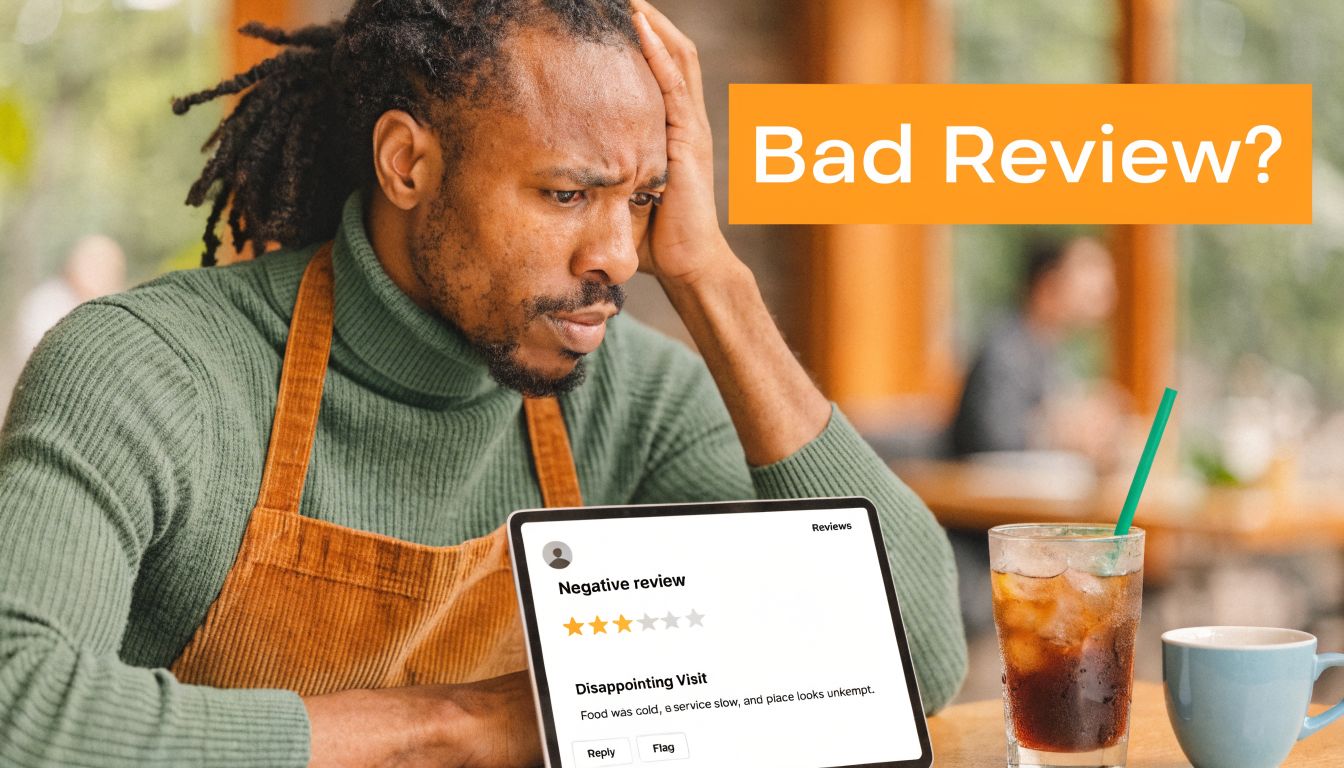
A bad review lands overnight. Your hours are wrong on Google for one location. A manager replies too late, or worse, replies in the wrong tone. That’s when reputation management services stop feeling like a nice-to-have and start looking like an operations system that protects conversions.
For local and multi-location businesses, reputation work affects whether people call, message, book, or keep scrolling. If a prospect searches for “dentist near me” in [City] or “AC repair near me” in [Neighborhood], your reviews, listings, and response habits shape whether you win that lead.
Table of Contents
- What Are Reputation Management Services and Why They Matter
- The Core Components of a Modern Reputation Program
- How Reputation Directly Impacts Local Search and Sales
- Implementing Your Reputation Management Program
- Measuring Success and Calculating ROI
- How to Choose the Right Reputation Vendor
- Your Google Business Profile Optimization Checklist
- Frequently Asked Questions
- Can I delete a bad review from Google
- How many new reviews do I need to see an impact
- Is it okay to offer incentives for reviews
- What is the difference between reputation management and social media management
- How does AIO relate to my reviews
- How quickly should I respond to a new review
- Should every location use the same review request message
What Are Reputation Management Services and Why They Matter
At 8:15 a.m., a location manager sees a new one-star review, the holiday hours are still wrong on Google, and yesterday’s happy customers were never asked for feedback. By noon, the team has lost a few easy chances to turn searchers into calls. That is the work reputation management services are built to control.
Reputation management services cover the ongoing operating tasks behind local trust: monitoring reviews, requesting new feedback, responding publicly, and keeping business information accurate across search and directory platforms. For a single location, that prevents lead leakage from stale profiles and unanswered complaints. For a multi-location brand, it adds the controls operators need: shared response standards, escalation paths, location-level reporting, and a process that does not depend on each manager making it up as they go.
SEO means Search Engine Optimization. It is the work that helps your business appear when people search on Google. AIO means Artificial Intelligence Optimization. It refers to making sure your business facts, services, and customer language show up correctly in AI-driven search and answer tools.
Manual reputation work breaks down fast once you have multiple locations, service areas, or agents. Analysts at London Research found that many businesses still lacked software to monitor complaints on third-party sites, and many described their approach as basic or non-existent, according to London Research on online reputation management. In practice, the pattern is familiar: requests go out inconsistently, negative reviews sit too long, and no one can tie reputation activity back to leads or booked revenue.
Practical rule: If reviews, listings, and response ownership live in different inboxes, conversions from reputation usually have no owner.
Key Facts
- Reputation management services are an operating function. They combine review generation, response workflows, profile accuracy, and reporting that leadership can use.
- Multi-location scale changes the job. The challenge is not getting one location to ask for reviews. The challenge is getting 20, 50, or 200 locations to follow the same process with local accountability.
- Search visibility and buyer trust reinforce each other. Fresh reviews, complete profiles, and timely responses reduce friction at the point of decision.
- AI visibility depends on clean inputs. Consistent business facts, service details, and recent customer language help AI systems represent your brand correctly.
- The output is pipeline, not vanity. Stronger reputation operations support more calls, form fills, bookings, tours, and store visits.
The first gain is usually operational. Teams fix hours, tighten response times, clean up listing errors, and ask for feedback at the right moment. Then the lead metrics start to move. That sequence matters, especially for operators who need a repeatable system with governance, not another dashboard.
For a plain-language overview of the business case, this guide on the benefits of reputation management is a useful reference. If you run field teams, agents, or distributed locations, the same discipline shows up in adjacent sales workflows. The Saleswise platform for agent success illustrates the same operating principle: structured follow-up produces more consistent revenue than ad hoc effort.
The Core Components of a Modern Reputation Program
A real program isn’t one feature. It’s a stack of recurring tasks, approvals, and data flowing between platforms. If a vendor only talks about “getting more reviews,” you’re hearing one slice of the job.
What the service actually includes
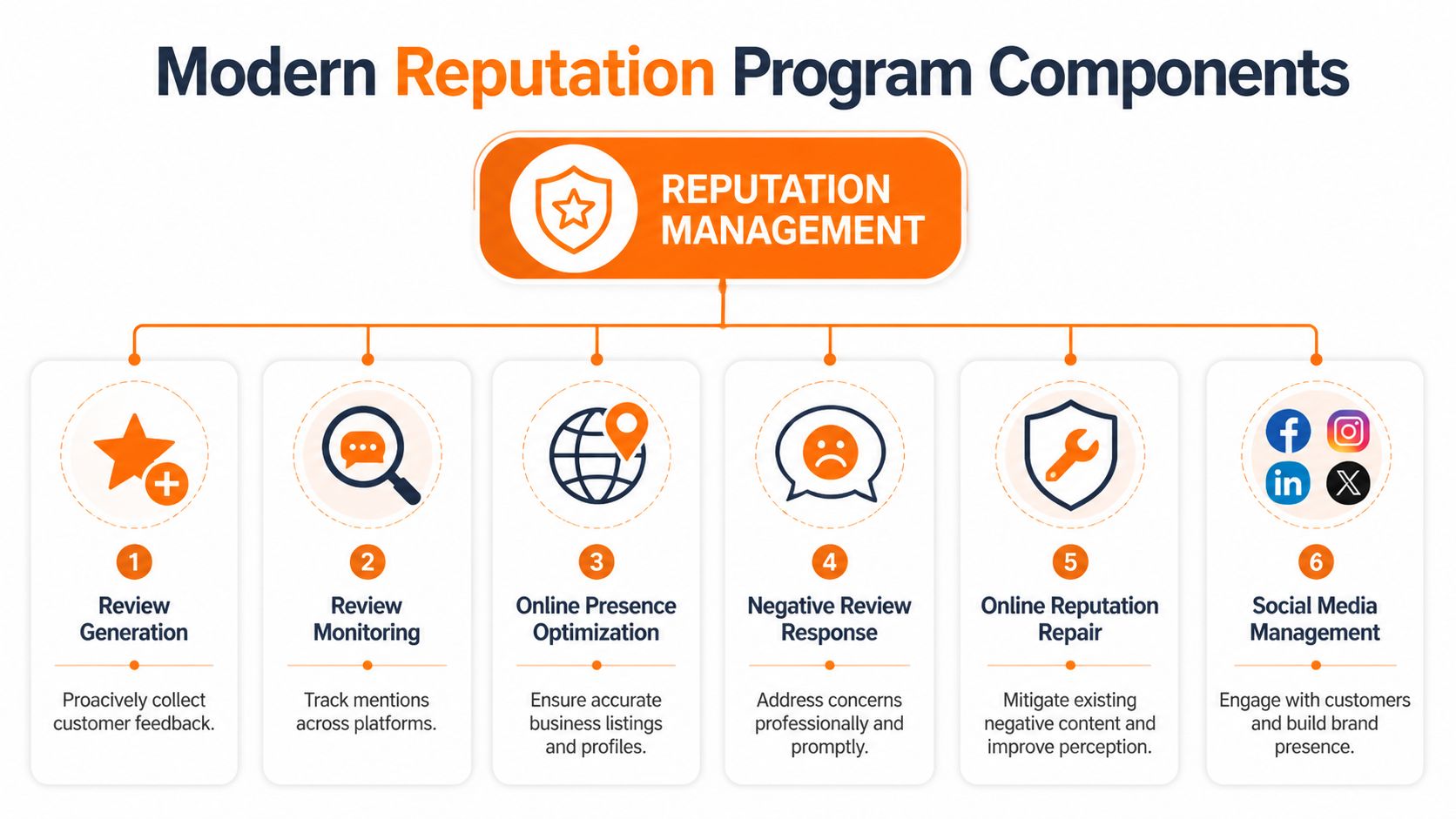
Most local businesses need six working parts:
Review generation
Ask at the right moment, through the right channel, after a completed visit, service call, delivery, tour, or appointment. Good programs use trigger points instead of random asks.Review monitoring
Watch Google, Facebook, Yelp, vertical sites, and industry-specific platforms. Restaurants may care about TripAdvisor. Senior living teams may track niche directories. Vets and dental groups often need location-level visibility.Online presence optimization
Keep NAP accurate. NAP means Name, Address, Phone. Add services, categories, hours, attributes, photos, and FAQs. Accuracy reduces friction for buyers and confusion for search engines.Negative review response
Reply publicly, stay calm, acknowledge the issue, and move the resolution offline when needed. In healthcare, avoid Protected Health Information. In housing, keep language Fair Housing neutral.Reputation repair
This doesn’t mean hiding legitimate criticism. It means fixing root causes, correcting listings, tightening follow-up, and creating a steady flow of authentic new reviews so one bad experience doesn’t define the entire profile.Social and mention management
Review sites aren’t the whole internet. Comments, tagged posts, and local community chatter often surface service failures before reviews do.
A disciplined workflow can take real effort. Effective reputation management often involves 15-20 specific monthly tasks per location, from profile audits to review replies, according to USCWS on reputation operations. The same source notes that this kind of system can improve local SEO signals and keep response service levels under a day when AI-supported workflows are used.
The difference between a weak program and a strong one is simple. A weak program asks for reviews. A strong program controls timing, routing, response rules, and reporting.
Why operators need a system, not a widget
Single-location owners can sometimes brute-force this. The owner checks reviews at night, the front desk sends a few text messages, and someone updates holiday hours when they remember. That approach falls apart when you add more locations, more staff, more categories, or regulated responses.
A usable operating model usually includes:
- Central ownership: One person or team owns the workflow, templates, escalation rules, and reporting.
- Location permissions: Managers can act locally without changing brand-wide settings.
- Response templates: Staff start from approved language, then personalize.
- Escalation paths: Billing complaint, safety concern, discrimination allegation, and clinical complaint should not go to the same queue.
- Dashboard visibility: Leadership sees trends by region, location, and category.
A med spa group in [City] may need one brand voice but different service prompts by location. An HVAC franchise may need one response framework for maintenance calls and another for emergency service. A dental group may want common HIPAA-aware review responses but local office managers to own outreach.
That’s why software alone isn’t enough. Operators also need process design. Some teams use broad customer experience tools, some use listing platforms, and some use hands-on partners. If you’re comparing options, this overview of reputation management software helps separate platform features from service execution.
For teams building authority through content as well as reviews, broader brand visibility still matters. This piece on how to unlock B2B growth insights is useful because it shows how trust compounds when messaging, proof, and discoverability work together.
How Reputation Directly Impacts Local Search and Sales
Local search isn’t abstract. A prospect has a need, types a query, scans a handful of listings, and decides who feels safest to contact. Reviews often decide that moment.
How Google decides who shows up locally
Google commonly frames local visibility around proximity, relevance, and prominence.
- Proximity is how close the business is to the searcher or the area named in the query.
- Relevance is how well your profile matches what the searcher wants.
- Prominence is how established and trusted your business appears online.
Reputation work affects all three.
A business can’t manufacture proximity. If someone searches “urgent care near me” in [Neighborhood], the map won’t favor a clinic across town just because it has prettier branding. But operators can improve relevance and prominence by tightening profiles and generating fresh, specific customer language.
How reviews turn visibility into revenue
Take an HVAC contractor in [City]. A customer searches “AC repair near me” during a heat wave. Two companies appear nearby. One has recent reviews that mention “same-day repair,” “respectful tech,” and “clear pricing.” Its profile also lists emergency service, service areas, and updated hours. The other has sparse service details, old reviews, and an unanswered complaint about no-shows.
The first company has done three things right:
- It matched the search intent. Service details and categories support relevance.
- It reduced buyer anxiety. Recent review content answers the prospect’s unstated questions.
- It looked active. Responses signal that someone is paying attention.
That’s also why missing reviews matter operationally. Sometimes businesses think they have a reputation problem when they have a visibility or moderation issue. If you’ve noticed disappearing feedback, Growth 4 Trades explains lost reviews in a practical way that helps separate policy issues from system failures.
Here’s the plain-language sales connection:
| Buyer question | What they look at | What your system should do |
|---|---|---|
| Are you real and nearby? | Map listing, address, hours, phone | Keep listings accurate across platforms |
| Can you solve my exact problem? | Categories, services, review keywords | Add service detail and request specific feedback |
| Can I trust you? | Star rating, recent reviews, owner replies | Generate steady review volume and answer fast |
| Will contacting you be easy? | GBP buttons, website, booking flow | Track clicks, calls, and form paths |
A good reputation program also supports AIO. Large language models pull from structured business facts, review language, site content, and public web signals. If your business profiles are inconsistent, your FAQs are thin, and your recent reviews don’t describe services clearly, AI tools have less useful material to work with.
That doesn’t mean you “optimize for AI” by stuffing keywords. It means you publish clearer business facts and collect authentic customer language. If you want the SEO side explained in more detail, this article on whether Google reviews help SEO covers the mechanics without overselling them.
A review isn’t just social proof. It’s search language written by customers in the words future customers already use.
Implementing Your Reputation Management Program
Monday morning, the corporate team sees three locations with fresh one-star reviews, six with no new reviews in two weeks, and one office still sending customers to the wrong link. The problem is not motivation. It is operating discipline. A reputation program works when each location follows the same request, response, and escalation process, and headquarters can see compliance without chasing managers by email.
Start with one location or one region if your current process is uneven. Build the workflow, test it under real conditions, then roll it out to the rest of the group. That reduces rework, keeps training tight, and gives you a baseline for lead impact before you scale.
Your 7 day launch checklist
Day 1. Audit your current footprint
Document every active profile by location. Check Google Business Profile, Apple Maps, Bing, Facebook, Yelp, and any category-specific directories. Confirm NAP, hours, primary category, secondary categories, website link, booking link, and photos. Put the results in a shared sheet that central marketing and local managers can both access.
Day 2. Define ownership
Assign three roles. One person requests reviews. One person responds publicly. One person approves escalations for legal, compliance, or service recovery issues. In multi-location groups, local teams should handle day-to-day actions, while central oversight sets policy, audits quality, and steps in when a pattern shows up across locations.
Day 3. Build your request triggers
Tie requests to operational events, not guesswork. Good triggers include completed service, closed invoice, checkout, delivery confirmation, or a post-visit satisfaction check. If timing is off, response rates drop fast. Ask too early and the customer has not felt the result yet. Ask too late and the visit is no longer top of mind.
Day 4. Write your templates
Create one SMS, one email, one positive reply, and one negative reply template. Keep them short enough for staff to use without editing half the message. Give location managers room to personalize names, service context, and next steps, but keep compliance language locked down where needed.
Day 5. Set response rules
Define what gets a same-day reply, what goes to a manager, and what moves offline. A practical rule set is simple. Positive reviews get a public thank-you. Service complaints get a public acknowledgment and an offline path. Safety, discrimination, billing disputes, and privacy-sensitive reviews go to a named escalation owner.
Day 6. Launch on one channel
Start with the channel that maps cleanly to your operating system, usually SMS or email tied to completed service records. Do not launch SMS, email, QR codes, front-desk asks, and follow-up calls at the same time. If compliance drops, you need to know which step failed.
Day 7. Review results and adjust
Look at deliverability, click-throughs, staff usage, and review completion by location. Then inspect the workflow itself. Were requests sent at the right moment? Did managers answer negative reviews fast enough? Did any location skip the process once the day got busy?
If your team needs language that sounds natural, use this guide on how to ask for reviews without sounding pushy. The useful part is not the wording alone. It is choosing phrasing staff will use consistently.
SMS and email review request scripts
For a med spa, keep the message warm, brief, and privacy-aware.
SMS review request script
Hi [First Name], thanks for visiting [Business Name] today. If you’d like to share feedback about your experience, you can leave a quick review here: [Link]
We appreciate it.
Email review request script
Subject: Quick favor after your visit to [Business Name]
Hi [First Name],
Thank you for coming in today. We hope you had a smooth experience with our team at [Location Name].
If you’re open to it, we’d appreciate a quick review about your visit. Your feedback helps other local clients in [City] find a provider they can trust.
[Leave a Review]
Thank you again,
[Business Name]
Keep healthcare requests general. Don’t mention treatment details, diagnoses, or anything that could reveal private health information.
A short walkthrough can help your team see how the workflow fits together in practice:
Review response templates
Positive review response template
Thank you, [First Name]. We appreciate you taking the time to share your experience with our team at [Location Name]. We’re glad we could help, and we look forward to serving you again.
Negative review response template
Thank you for your feedback. We’re sorry to hear that your experience didn’t meet expectations. We take concerns like this seriously and would like the chance to learn more. Please contact us at [Phone] or [Email] so our team can follow up directly.
For healthcare, avoid confirming someone is a patient. For senior living or housing-related businesses, keep replies neutral and avoid language that suggests preference for any protected class.
What to expect week by week
The first month is less about stars and more about getting the machine to run.
- Week 1: Fix profile errors, launch requests, train staff, and confirm each location can send the right link from the right system.
- Week 2: Review response quality, tighten escalation rules, and spot which managers are following the process versus skipping it.
- Week 3: Compare locations. One office will usually lag on request volume, response speed, or link usage. Find the blockage and fix it at the process level.
- Week 4: Add reporting that connects review activity to calls, bookings, tours, or form fills so reputation work is measured as pipeline input, not just brand maintenance.
That last step matters for multi-location operators. A scalable program needs governance and revenue visibility. Headquarters should be able to see which locations are producing fresh review content, which ones are responding within policy, and whether stronger review flow lines up with more local leads.
One option in the market is Reviews To The Top, which combines Birdeye’s platform with managed workflows for requests, monitoring, replies, listings, and location-level governance. That setup can fit operators who want central control over execution instead of relying on each location manager to run the program alone.
Consistency wins here. The best review engine is the one your team can run every week, at every location, with clear ownership and a visible connection to leads and sales.
Measuring Success and Calculating ROI
A reputation program earns budget when it shows up in pipeline, booked jobs, tours, and closed revenue by location. Star rating still matters, but operators who stop there usually miss the point. The central question is whether a stronger review flow increases local conversion activity, and whether headquarters can see that effect clearly enough to scale it.
The cleanest way to measure that is with one scorecard per location, reviewed monthly and trended quarterly.
What to measure every month
Track a short list of operating and sales metrics that managers can influence.
- Review volume: Are locations generating a steady weekly cadence of new reviews?
- Review recency: Do the first few visible reviews reflect the current customer experience?
- Response time: Are public reviews answered within policy and within a useful timeframe?
- Star rating: Does the profile clear the trust threshold for your category?
- Google Business Profile actions: Are calls, website visits, direction requests, bookings, or message activity increasing?
- Lead-to-sale conversion: Are leads tied to local search turning into appointments, estimates, tours, or revenue?
Generally, these are practical management targets:
| KPI | Recommended target |
|---|---|
| Review volume | Steady weekly flow by location |
| Review recency | Most visible reviews should be recent |
| Response time | Under 24 hours |
| Star rating | Aim for 4.5+ if your category supports it |
| GBP calls and bookings | Track month over month by location |
| Lead-to-sale conversion | Compare GBP leads with other channels |
These are thresholds, not promises. If one branch falls short, the fix is usually operational. Requests are being sent too late, staff are skipping the process, response ownership is unclear, or a bad link is cutting off review volume.
One bad review rarely changes the business. A weak system does.
How to connect GBP activity to leads and sales
Attribution does not need to be perfect to be useful. It needs to be consistent enough that you can compare locations and make decisions.
Start with the basics:
- Add UTM parameters to each Google Business Profile website link.
- Use separate tagged links for the main site, appointment page, and key service pages when applicable.
- Check analytics for sessions, form fills, booking starts, and other conversion events from those links.
- Match that traffic with call tracking, CRM source fields, or front-desk logs.
- Review results by location, then compare high-performing and low-performing branches.
A multi-location operator should also separate brand-level reporting from location-level reporting. Brand totals can hide execution problems. One office may have strong review volume and rising calls, while another has stale reviews, slow responses, and flat lead flow. The first location is giving you a model. The second needs intervention.
Teams that want execution and reporting under one process usually look for online reputation management services for multi-location businesses that bundle request workflows, response management, listings oversight, and location-level reporting. That setup makes ROI easier to defend because the operational inputs and sales outputs sit in the same system.
Common Reputation Management Service Pricing Models
Cost only matters in context. A lower monthly fee can become expensive fast if your team still has to write replies, clean up listings, chase managers, and build reports by hand.
| Pricing Model | Typical Cost (Per Month/Location) | Best For | Common Features |
|---|---|---|---|
| Per-location flat fee | $500-$2,500/month | Single-location operators or small groups | Review requests, monitoring, responses, listing checks, reporting |
| Tiered packages | Varies by package scope | Growing multi-location brands | Different support levels, more platforms, workflow automation, dashboards |
| Custom enterprise | Custom pricing | Franchises and larger regional operators | Permissions, governance, regional reporting, custom integrations, approval flows |
That $500-$2,500/month range appears regularly in vendor guidance. The better question is what labor the vendor removes from your internal team. If the service only provides software, your location managers still carry the work. If the service includes response handling, escalation rules, reporting, and governance, the fee is easier to justify because it replaces manual effort and gives leadership a clearer line from reputation activity to leads and sales.
How to Choose the Right Reputation Vendor
A multi-location brand usually finds the weak point in its reputation program after rollout, not during the sales demo. One region sends review requests consistently. Another ignores them. Corporate wants approval on sensitive replies. Store managers want less work. Six weeks later, reporting is incomplete, response times are slipping, and nobody can say whether the platform is producing leads or just collecting stars.
Vendor selection should prevent that mess. The right partner gives you software, operating rules, and clear ownership at the location, regional, and corporate levels.

Questions to ask before you sign
Start with the workflow, not the feature list. A polished dashboard means very little if your team still has to chase managers, review every draft manually, and export reports into spreadsheets.
Ask questions that expose how the vendor will perform in real operations:
- Industry fit: Have they worked in your category, such as dental, HVAC, vet, auto, med spa, or senior living?
- Platform coverage: Do they manage only Google, or also Facebook, Yelp, TripAdvisor, and niche review sites that affect buying decisions in your market?
- Response process: Who writes responses? Internal staff, AI with review, or a managed team following your brand rules?
- Listings operations: Do they fix profile issues, or only send alerts and leave cleanup to your staff?
- Escalation model: What happens when a review mentions safety, billing disputes, discrimination, or clinical concerns?
- Permissions and governance: Can corporate set templates, approval thresholds, and role-based access by region or location?
- Reporting: Can they show trends by location, response times, unresolved issues, and downstream lead activity?
- Contract terms: How quickly can you exit if adoption stalls or service quality drops?
The strongest vendors answer these without hand-waving. They can show the exact path from customer visit to review request, from new review to response, and from reputation lift to lead volume. That matters more for multi-location operators than flashy AI claims.
If you’re comparing managed options, this page on online reputation management services gives a practical picture of what a hands-on service model should include.
What good vendor evaluation looks like in practice
I usually advise operators to score vendors across four areas: adoption, control, labor reduction, and revenue visibility.
Adoption means location teams will use it. If the request flow depends on extra clicks, separate logins, or manual follow-up, compliance drops fast.
Control means leadership can set rules without becoming a bottleneck. Corporate should be able to define templates, escalation paths, and approval requirements for high-risk reviews, while local teams still handle day-to-day activity.
Labor reduction is straightforward. If your managers still have to write every response, audit listings, and compile reports, you bought a tool, not an operating system.
Revenue visibility is where many vendors fall short. The better ones help you connect review generation, response coverage, and profile engagement to booked calls, form fills, or store visits by location.
Red flags that usually create more work
Some vendors create extra labor under the cover of automation. That problem shows up after onboarding, when your team realizes the platform needs constant supervision.
Avoid vendors that:
- Guarantee review removal: No legitimate provider can promise removal of valid customer feedback.
- Hide the workflow: If you cannot review response logs, approvals, or activity history, you lose accountability fast.
- Rely on generic AI replies: Fast responses help, but copy-paste language across dozens of locations weakens trust and creates compliance risk.
- Ignore governance: Multi-location brands need role controls, escalation rules, and audit trails.
- Push suppression over improvement: More review volume helps only if the business also fixes service issues causing negative feedback.
- Lock you in early: Long contracts often mask weak service, poor onboarding, or low adoption.
A simple test helps. Ask the vendor to walk through one negative review from start to finish. Who sees it first? Who drafts the reply? Who approves it? How is it tagged? When does regional leadership get involved? If they cannot show that process clearly, the account will become harder to manage once you scale.
If a vendor cannot explain who writes responses, who approves escalations, and how they measure location-level results, you are not buying a system with accountability.
The best choice usually reduces front-line workload, gives leadership oversight without slowing the field, and makes it easier to tie reputation activity to leads and sales by location.
Your Google Business Profile Optimization Checklist
Google Business Profile is the base layer of local reputation work. If it’s incomplete, every review and response has less impact.
Use this short checklist for each location:
- Verify every location and remove duplicates where possible.
- Confirm NAP accuracy across Google, Apple Maps, Bing, and major directories.
- Choose the right primary and secondary categories for your actual services.
- Complete every profile field you can, including services, attributes, hours, and business description.
- Upload fresh photos that match the location and customer experience.
- Add booking, menu, or service links where relevant.
- Turn on messaging only if someone will monitor it.
- Seed common Q&A topics with clear, factual answers.
- Use tagged links so you can track website visits and bookings from GBP.
- Review profiles monthly for accuracy after staff, service, or holiday changes.
A disciplined profile plus a disciplined review engine does more than protect your brand. It makes you easier to choose. If you want help turning that into a working process with month-to-month support, you can contact us for a demo.
Frequently Asked Questions
Can I delete a bad review from Google
Usually, no. You can report reviews that violate platform policies, but legitimate negative reviews generally stay up. The better move is to respond professionally and generate more authentic recent feedback.
How many new reviews do I need to see an impact
There isn’t one universal number. What matters is steady volume, recency, and relevance by location. A consistent weekly flow usually beats occasional bursts.
Is it okay to offer incentives for reviews
Be careful. Incentivized reviews can create policy and trust issues. A safer approach is to ask all eligible customers for honest feedback without tying it to rewards.
What is the difference between reputation management and social media management
Social media management focuses on publishing content and engaging on social platforms. Reputation management is broader. It includes reviews, listings accuracy, responses, monitoring, and search visibility.
How does AIO relate to my reviews
AI tools look for consistent business facts and useful public language about your brand. Reviews help because customers naturally describe services, quality, timing, and outcomes in the words future buyers use.
How quickly should I respond to a new review
As fast as your team can do it well. A sub-24-hour standard is a strong operating target because it shows the business is active and attentive.
Should every location use the same review request message
No. Keep the brand voice consistent, but tailor the timing and wording to the buyer journey. An auto shop, veterinary clinic, and senior living community shouldn’t all ask in exactly the same way.
If you want a cleaner system for reviews, listings, responses, and location-level reporting, Reviews To The Top can help you put one in place. The focus is practical execution, not hype, with month-to-month support for local and multi-location businesses that want more calls, bookings, and visibility from real customer feedback.


