
A lot of local businesses don’t have a lead problem. They have a follow-up problem. Lead nurturing automation is the system that answers new inquiries quickly, keeps the conversation moving with useful follow-ups, and routes high-intent prospects to your team before they drift to a competitor. That matters because in the local market, missed follow-up means missed calls, missed texts, missed tours, and empty slots on the schedule.
Your Next Booking Might Be Slipping Away
A homeowner submits an HVAC estimate request at 12:17 p.m. while comparing three companies. A parent searching "dentist near me" taps your Google Business Profile, reads two recent reviews, calls, and hangs up after sitting in a queue. A med spa lead sends a message at 9:40 p.m., gets no reply, and books with the practice that texted back before bed.
That lost booking usually looks small in the moment. It is one missed call, one cold form fill, one message left for tomorrow. Over a month, it turns into empty appointment slots, lower close rates, and weaker local search signals because fewer prospects become happy customers who leave reviews and engage with your business profile.
Lead nurturing automation closes that gap. For local businesses, it connects the first inquiry to the next useful action. That might be an instant text after a form submission, a missed-call text-back for after-hours leads, a CRM task for the front desk, or a request for review after the job is done. Used well, it saves staff time and protects the leads you already paid to generate.
The strongest setups are usually simple. Fast first response. Clear routing. A direct path to book. Then a handoff to a person when intent is high. If you're working on follow-up for incoming leads, this is the system that keeps prospects from stalling out between inquiry and appointment.
Key Facts
A roundup of lead nurturing data from WellnessLiving points to a consistent pattern: businesses that automate lead management often see stronger revenue performance, more qualified leads, better response rates from nurturing emails, and fewer leads dying from neglect. It also notes that many marketers rate lead nurturing as one of the highest-value uses of automation software.
Practical rule: If a new lead can sit unnoticed for an hour during business hours, the process needs work.
What local operators usually get wrong
Local businesses rarely lose leads because they sent too few emails. They lose them because the follow-up path breaks at the exact moment intent is highest.
What fails:
- One-size-fits-all follow-up: An emergency AC repair lead gets the same sequence as a seasonal tune-up request.
- No clear booking action: The message asks the lead to "let us know" instead of giving them a live booking link, click-to-call option, or simple text reply.
- No alert for high-intent activity: A prospect clicks pricing twice, replies to a text, or returns to the booking page, and nobody on the team sees it.
- No connection to local visibility: Review requests, Google Business Profile interactions, and lead follow-up run in separate systems, so the business misses the link between better response handling and better prominence in local search.
What works is narrower and more practical. A fast first touch. Basic segmentation by service and urgency. A simple booking path. A prompt for staff when the lead shows buying intent. Then, after the visit or job, a review request that turns good service into stronger Google signals for the next person searching nearby.
What Lead Nurturing Automation Means for Your Local Business
A few terms get thrown around so often that they stop being useful. Here’s the plain-English version.
A lead is anyone who raises a hand. They filled out a form, called from your Google Business Profile, asked for pricing, requested directions, or replied to a text. Nurturing is what happens next. You stay in touch in a way that helps them choose you when they’re ready. Automation means the follow-up happens based on rules, not memory. A CRM is your customer relationship management system. It keeps the contact record, message history, notes, and status in one place.
For a local business, a CRM should feel less like enterprise software and more like a reliable front desk memory. It should know who called, what service they wanted, which location they contacted, and whether someone followed up. If it doesn’t, you end up paying for leads twice. Once to get them, then again when you try to recover the ones nobody answered.
Why this matters in local search
Lead nurturing automation is usually treated like a sales topic. For local businesses, it’s also a visibility topic.
Google’s local model is often framed as proximity, relevance, and prominence:
- Proximity: How close the searcher is to your business or service area.
- Relevance: How well your profile and website match what the person searched.
- Prominence: How established and trusted your business appears online, including reviews and profile activity.
You can’t automate proximity. You can improve relevance and prominence.
That’s where the local version of lead nurturing gets interesting. When a business consistently asks for reviews, responds to them, keeps services updated, and follows up after inquiries, it creates more fresh signals around the business. Prospects searching for “dentist near me” or “AC repair in [City]” don’t just compare websites. They compare review recency, response quality, service details, and whether the business looks active and trustworthy.
The software side matters too. Teams using tools built for customer communication management can keep texts, web chats, review responses, and lead records connected, which makes both follow-up and reporting cleaner.
A short Google Business Profile checklist
If your Google Business Profile is weak, automation won’t save it. Fix the foundation first.
- Primary category first: Choose the category that matches your main service, not the broadest label.
- Services completed: Add real services and service descriptions for the location.
- Accurate hours: Keep regular hours and holiday hours current.
- Local phone number: Use a number your team answers consistently.
- Booking or appointment link: Send prospects directly to the right action.
- Fresh photos: Add recent location, team, and work photos.
- Review responses: Answer both positive and negative reviews promptly.
- Location details: Make sure address, service area, and attributes are complete.
What automation actually changes
Automation doesn’t replace trust. It protects trust from getting dropped between shifts, locations, and inboxes.
80% of marketing automation users see an increase in leads generated, and 56% of marketers rank targeted content as the most essential element of successful lead nurturing, according to Email Vendor Selection’s lead generation statistics. That tracks with what works in local markets too. The businesses that convert better usually send fewer, more relevant messages.
A plumbing lead who wants same-day help doesn’t need a newsletter. They need a fast answer, a clear next step, and a reason to trust your team.
A local example
A dental office in [City] shouldn’t run the same nurture flow for all inquiries. Someone asking about emergency care needs immediate routing and a call option. Someone asking about Invisalign or cosmetic work may need a short sequence with financing details, before-and-after policy-safe examples, and an easy consult request.
A multi-location vet group has another layer. The workflow has to know which clinic the lead came from, who handles that inbox, and whether the location is currently accepting new patients. That’s where basic automation beats manual heroics every time.
Building Your Automated Nurturing Workflows
The right workflow is boring in the best way. It captures the lead, responds fast, qualifies intent, and tells a human when to step in.
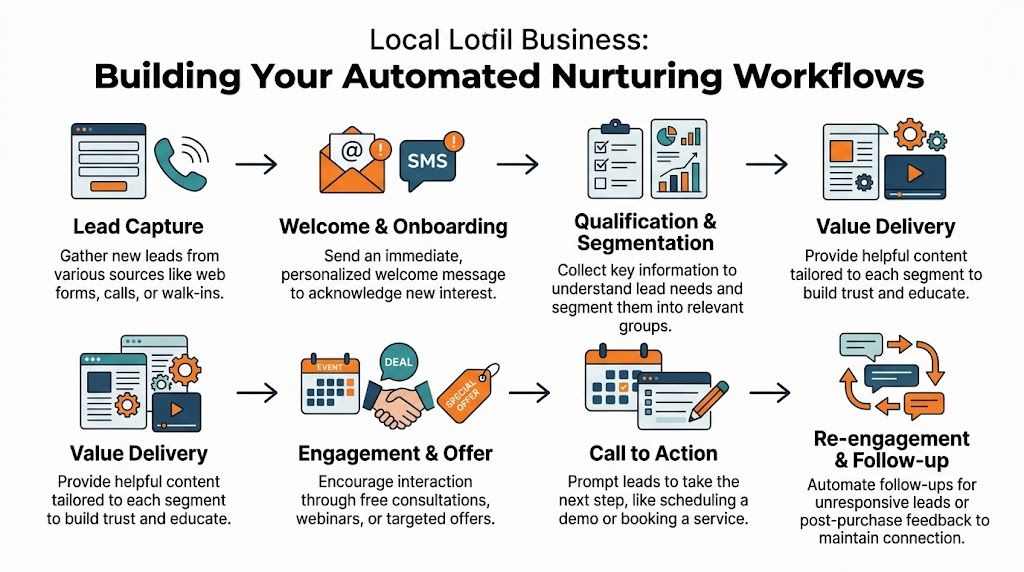
Most local businesses don’t need a giant automation map on day one. They need three or four tight workflows that cover the majority of inquiries. Start there.
Workflow one for new inbound leads
This is the core path for web forms, Google messages, call-back requests, and social inquiries.
Capture the source
Push every lead into one system with source details attached. At minimum, record location, service of interest, time of inquiry, and preferred contact method.
Send the immediate confirmation
The first message should confirm receipt and set expectation. For an HVAC company in [Neighborhood], that might be: “Thanks for reaching out about AC service. Our team is reviewing your request now. If this is urgent, reply URGENT and we’ll prioritize it.”
Route by need
Don’t treat every inquiry the same. Emergency repair, routine maintenance, financing question, and second opinion should trigger different next steps.
Create the human task
If the lead type needs live contact, assign it. Automation should create work, not hide work.
Follow up if there’s no reply
Send a short reminder through the original channel, then try a second channel if you have permission.
What fails here is over-writing. Local leads don’t want a nurture essay. They want evidence that someone is on it.
Workflow two for review-triggered nurturing
This is the missed opportunity most businesses ignore. A happy customer leaves a review. The business says thanks. Then nothing else happens.
The stronger play is to use review activity as a signal.
A positive review can trigger:
- A thank-you response
- A request to refer a friend or family member
- A prompt to book the next service
- A tag in the CRM for loyalty or upsell eligibility
A negative review can trigger:
- A public response
- An internal escalation task
- A private outreach step
- A pause on promotional messages until the issue is handled
For local SEO, this matters because reviews don’t just influence conversion. They influence how active and credible your business looks in Google’s local ecosystem. For operations, it matters because review conversations often surface booking intent, service recovery opportunities, and location-level issues you’d otherwise miss.
Field note: Review responses should sound like a real manager wrote them, even when software drafts the first version.
Workflow three for email and SMS sequences
Email is useful for education. SMS is useful for speed. Don’t force one channel to do the other job.
Use email when the lead needs:
- More detail about services
- Insurance or financing information
- Before-and-after expectations
- Location comparison for multi-site brands
Use SMS when the lead needs:
- Quick confirmation
- Scheduling reminders
- Short answers
- Easy reply prompts
A dental example in [City]:
- Day 0 email: consult received, what to expect, booking link
- Day 1 SMS: “Want help choosing a time? Reply with morning or afternoon.”
- Day 3 email: common questions about the service
- Day 5 task for staff: call if the lead viewed pricing or clicked booking but didn’t schedule
If you’re building email sequences, inbox placement matters as much as copy. A practical resource on that is Mailadept’s Email Deliverability Guide, especially if your nurture emails are getting sent but not seen.
A video walkthrough can help if your team needs to see a workflow in motion before building it:
Workflow four for lead scoring and handoff
Not every lead deserves the same urgency. That’s why lead scoring matters.
Lead scoring models assign points for demographics and behaviors, and leads reaching a threshold such as 70 to 80 points can trigger sales alerts, according to Salesforce’s guide to automated lead nurturing. A pricing page visit should score higher than an ebook download. In local service businesses, a “request appointment” page visit should usually score higher than a blog visit, and a direct reply should outweigh a passive open.
Here’s a simple way to use it:
| Signal | Meaning | Action |
|---|---|---|
| First inquiry only | Early interest | Keep in nurture flow |
| Replied to SMS | Active intent | Assign staff follow-up |
| Visited pricing or booking page | Comparison stage | Increase priority |
| Mentioned urgency or timeline | Near-term need | Escalate immediately |
| Returned after no response | Re-engaged | Restart shorter sequence |
The handoff matters more than the score itself. If a lead becomes qualified but nobody owns the next step, the score is decoration.
For multi-location operators, connect this to your phone and CRM stack so the right site gets the right lead without manual forwarding. That’s where VoIP and CRM integration becomes practical, not technical.
Practical Assets Your 7-Day Launch Plan
You don’t need a quarter-long rollout to get lead nurturing automation live. You need one useful workflow, message templates that sound human, and a week of focused setup.

SMS review request script
For an auto repair shop:
Hi [First Name], thanks for trusting [Business Name] with your vehicle today. If you have a minute, would you share your feedback here? [Review Link] Your review helps other drivers in [City] find a shop they can trust. Reply STOP to opt out.
If you’re sending review requests by text, make sure the consent and opt-in side is clean. A good starting point is reviewing SMS opt-in practices before launch.
Email review request script
For a med spa:
Subject: Quick favor after your visit to [Business Name]
Hi [First Name],
Thank you for visiting [Business Name]. We’re always working to improve the client experience, and your feedback helps.
If you’re open to it, please leave a review here: [Review Link]
We appreciate your time and your trust.
Best,
[Team Member Name]
[Business Name]
Keep healthcare and wellness examples privacy-aware. Don’t mention treatment details, outcomes, or any protected health information.
Positive review response template
For a dental or vet practice:
Thank you, [First Name], for your kind words. We’re glad you had a positive experience with our team at [Business Name] in [City]. We appreciate you taking the time to share your feedback and look forward to seeing you again.
Negative review response template
For a home service business:
Thank you for sharing your feedback. We’re sorry your experience didn’t meet expectations. We’d like the chance to make this right. Please contact us at [Phone] and ask for [Manager Name] so we can review what happened and follow up directly.
Don’t argue in public. Don’t copy and paste a defensive paragraph. A short, calm response is usually better than a detailed rebuttal.
Your 7-day launch checklist
Day 1
- Pick your starting workflow: Choose one lead source, usually website forms or Google Business Profile inquiries.
- Define ownership: Assign who answers, who books, and who handles escalations.
Day 2
- Set up contact fields: Capture source, location, service, and preferred contact method.
- Separate urgent from routine: Build tags or statuses your team can effectively use.
Day 3
- Write your first-response SMS: Keep it short and action-oriented.
- Write your first-response email: Confirm receipt and give one clear next step.
Day 4
- Build review request messages: One by SMS, one by email.
- Create review response templates: One positive, one negative.
Day 5
- Turn on routing rules: Make sure the right location or manager gets the lead.
- Add booking links: Remove extra clicks wherever possible.
Day 6
- Test every path: Submit a form, send a text, click the links, check notifications.
- Review message timing: Make sure nothing feels spammy or delayed.
Day 7
- Train the front line: Show staff what the alerts mean and when to take over.
- Launch small: Start with one location or one service before rolling out wider.
Measuring What Matters KPIs for Automated Nurturing
If you can’t trace a lead from profile view to booked appointment, your automation may still be working, but you won’t know where. Local operators need a simple scorecard that connects visibility, response, and conversion.
A common mistake is tracking only message activity. Opens and clicks are useful, but local businesses ultimately care about calls answered, forms converted, appointments booked, and whether the right locations are improving over time.
Key Performance Indicators for Lead Nurturing
| KPI | What it Measures | Recommended Target |
|---|---|---|
| Review volume | Whether you’re generating a steady flow of new customer feedback | Set a consistent monthly goal by location and capacity |
| Review recency | How fresh your latest reviews are | Avoid long gaps without new reviews |
| Review response time | How quickly your team replies to customer feedback | Same day when possible |
| Star rating | Overall customer sentiment at the location level | Maintain a strong, competitive rating for your category |
| GBP views and calls | How often people find and contact you through Google Business Profile | Trend upward month over month |
| Booking link clicks | Whether profile and nurture messages drive intent | Increase after message and profile updates |
| Lead-to-sale conversion | How many inquiries become booked jobs, appointments, or tours | Improve steadily by source and location |
| No-response rate | Leads that never receive a human follow-up | Push this as low as operationally possible |
How to track GBP to bookings with UTMs
Use UTM tags, which are small tracking parameters added to URLs, on the links in your Google Business Profile and nurture emails. That lets analytics tools tell you where the visit came from.
A simple setup looks like this in practice:
- Your Google Business Profile appointment link uses a tagged URL
- Your nurture email booking button uses a different tagged URL
- Your website analytics and CRM capture those source details
- Your booking form or call tracking tool ties that source to the final conversion
That’s how you answer real questions like:
- Are Google Business Profile clicks producing booked appointments?
- Do SMS follow-ups drive more callback requests than email?
- Which location converts better from “near me” traffic in [City]?
If you need the reporting side cleaned up, this guide on tracking website visitors and sources is a useful place to start.
Where optimization actually helps
Once the basics are reliable, AI can help refine timing and content. AI-driven dynamic optimization can lead to a 25% to 40% uplift in funnel progression, and these systems can swap subject lines if CTR falls below a 5% threshold, according to Foundry’s guide to automated lead nurturing.
That’s useful, but only after your routing and follow-up discipline are in place. AI won’t rescue a bad handoff, an unmonitored inbox, or a front desk that doesn’t know who owns the lead.
Good automation gets measured at the booking calendar, not just the email dashboard.
Common Pitfalls and Industry-Specific Strategies
The biggest mistake in lead nurturing automation is assuming more automation equals better nurturing. It doesn’t. Bad automation scales indifference.
The second mistake is treating local lead flow like software sales. A senior living inquiry, a same-day plumbing request, and an oil change reminder don’t need the same sequence, tone, or timeline. If your system applies one generic path to all of them, you’ll feel busy without becoming more effective.
Pitfalls that show up fast
- Over-automation: Every reply feels canned, and prospects stop responding.
- Dirty data: Wrong location, wrong service, wrong name. That breaks trust quickly.
- No qualification agreement: Marketing calls a lead qualified. Operations says it’s not.
- Weak escalation rules: A high-intent inquiry keeps sitting in the nurture sequence.
- Siloed reputation management: Reviews get answered, but the intent behind them never reaches sales or the front desk.
A good way to audit this is to inspect where inquiries stall, not just where they enter. Sensoriium’s breakdown of broken funnels is useful for spotting those leaks between first touch and conversion.
Industry playbooks that work better
Senior living
Senior living decisions take time and often involve multiple family members. Don’t run a hard-sell sequence. Use a slower cadence with helpful information, tour invitations, and clear staff follow-up after high-intent actions like repeat page visits or tour requests.
What works:
- One named contact
- Follow-up after brochure or tour activity
- Review responses that show empathy and operational attentiveness
What doesn’t:
- Daily reminders
- Generic pricing pushes
- Treating every inquiry as ready to tour immediately
Home services
For HVAC, plumbing, electrical, and similar “near me” searches, speed matters most. The sequence should confirm receipt immediately, ask one simple qualifying question, and route urgent jobs to a live person.
What works:
- Short SMS confirmation
- Emergency and non-emergency split
- Review-triggered callbacks when happy customers mention another issue or future need
What doesn’t:
- Long educational emails before contact
- Asking the customer to repeat information across channels
- Sending all service types to one queue
Automotive repair
Trust wins here. Prospects want clear communication, not marketing theater. Use reminders, maintenance education, and post-visit review requests to keep the relationship alive between visits.
What works:
- Service-specific follow-up
- Honest review responses
- Re-engagement for deferred work with a simple booking path
What doesn’t:
- Aggressive discount messaging after every appointment
- Ignoring negative reviews that mention communication problems
- Losing service history between visits
The overlooked advantage
The integration of lead nurturing with review management is a major underserved angle, and automating responses and escalations can turn positive feedback into nurtured inquiries, as discussed in Hermetic AI’s restaurant leadership article. That idea applies well beyond restaurants.
For a dental group, a positive review can feed a recall or referral workflow. For an HVAC company, a strong review response can drive a maintenance reminder later. For a multi-location retailer, review themes can tell you which locations need different messaging or faster manager follow-up.
If your reviews improve visibility but never enter your lead workflow, you’re leaving local intent on the table.
Frequently Asked Questions About Lead Nurturing Automation
Is lead nurturing automation only for big companies?
No. Single-location businesses often benefit faster because they usually rely on a small team and can’t afford dropped follow-up. A solo practice, one-location med spa, or local HVAC company can start with one intake form, one SMS confirmation, and one booking reminder sequence.
What’s the difference between marketing automation and lead nurturing?
Marketing automation is the broader category. It includes many automated tasks like email sends, list segmentation, reminders, and campaigns. Lead nurturing automation is the part focused on moving an interested prospect toward a booking, consultation, estimate, or tour through timely follow-up.
Can this work if most of our leads come from Google Business Profile and calls?
Yes. In local markets, that’s common. The system just needs to log the call source, trigger the right follow-up, and give your team a clean handoff. For “near me” search traffic, call handling and missed-call follow-up often matter as much as web forms.
How long does setup usually take?
A basic version can be launched quickly if you keep the scope tight. Start with one location, one lead source, one service line, and one handoff rule. Trying to automate every path before proving the first one works often leads to difficulties.
What should I automate first?
Start with:
- First response to new inquiries
- Missed-call text back, if appropriate for your business
- Basic lead routing by location or service
- Review requests after completed service
- Review response templates with escalation for negative feedback
Those pieces save time immediately and reduce lead leakage without adding much complexity.
Does SMS or email work better?
They do different jobs. SMS is better for speed and simple replies. Email is better when the lead needs details, education, or a longer explanation. For most local businesses, the best setup uses both, but only with clear permission and sensible timing.
How do I handle multiple services without making the system messy?
Use service-based tags and separate entry points where needed. An emergency plumbing inquiry shouldn’t enter the same sequence as a water heater quote, and a cosmetic dental consult shouldn’t look like an emergency appointment request. Keep the branches limited to meaningful differences, not every tiny variation.
What tools should be connected?
At minimum:
- Your form or lead capture tool
- Your CRM
- Your phone or call tracking system
- Your email and SMS platform
- Your booking or appointment system
- Your review management workflow
If those systems stay disconnected, staff will keep copying information by hand, and that’s where delays return.
How personal should automated messages be?
Personal enough to sound like your business, not so clever that they feel fake. Use the lead’s name, service type, and location when relevant. Keep the tone direct. If a situation is sensitive, especially in healthcare, automation should hand off to a person quickly and avoid any privacy-risk details.
Do we need AI to do this well?
No. You need clean workflows first. AI can help refine timing, generate draft responses, and support segmentation, but it can’t fix unclear ownership or weak service operations. Most local businesses get better results from simpler automation done consistently than from advanced automation done poorly.
Can this improve local SEO too?
Indirectly, yes. Better follow-up supports more reviews, faster review responses, fresher customer interactions, and cleaner Google Business Profile activity. That helps with relevance and prominence, which matter in local search alongside proximity.
If you want help building a lead nurturing system that also strengthens your reviews, listings, and Google Business Profile performance, Reviews To The Top offers month-to-month support for local and multi-location businesses. You can explore their reputation management, learn how to optimize your Google Business Profile, see category-specific strategies for dental and healthcare locations, or book a strategy call to map out the first workflow.


