
Effective services SEO gets your business found by customers who are ready to hire you right now. For a local or multi-location operator, this means turning "near me" searches into phone calls, messages, and booked appointments. Mastering this is the most direct way to drive conversions and grow your revenue.
Key Facts About Services SEO
- Main Goal: To rank in Google for service and location-based searches (e.g., "HVAC repair in [City]") to generate qualified leads.
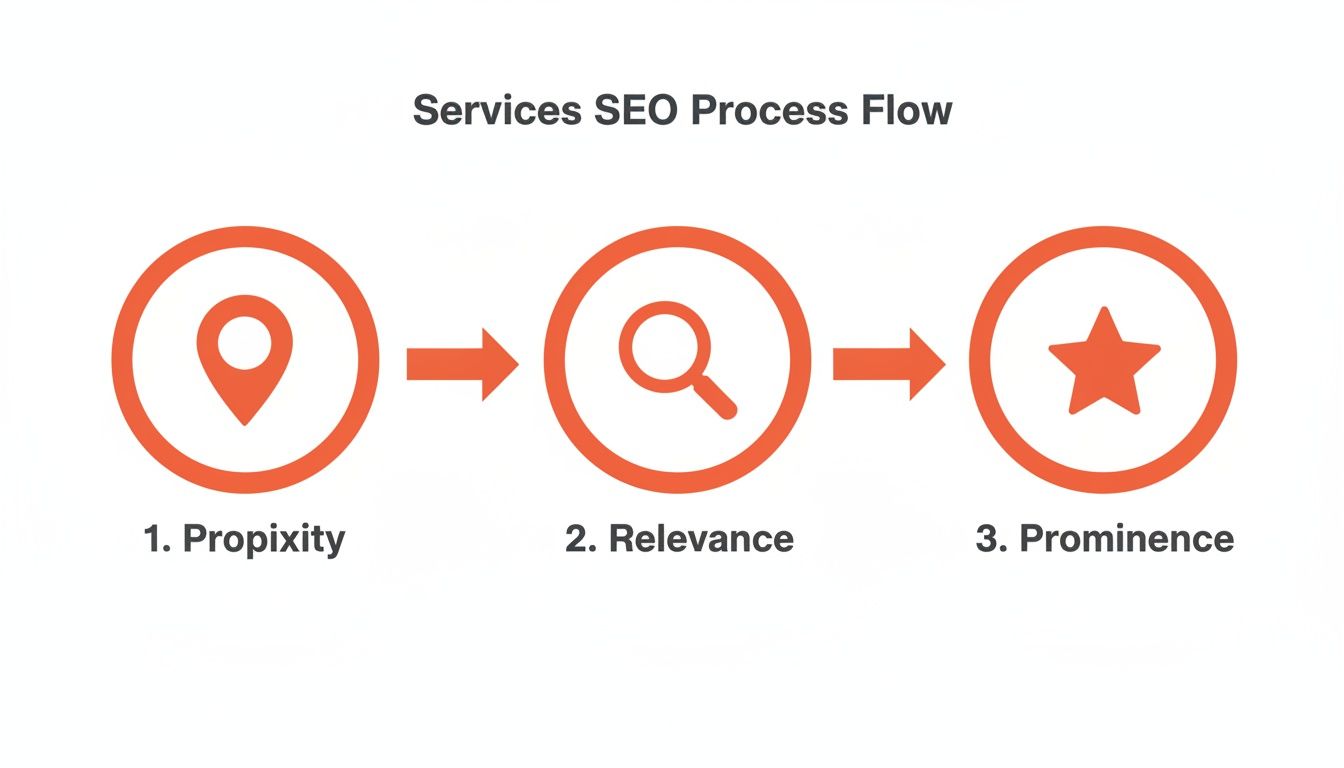
- Google's Model: Rankings are based on Proximity (how close you are), Relevance (how well you match the search), and Prominence (your reputation and authority).
- GBP is Crucial: Your Google Business Profile (GBP) is often the first impression a customer has. An optimized profile is non-negotiable.
- Reviews Matter: A steady flow of recent, positive reviews directly impacts your ranking and convinces customers to choose you.
- AIO is Next: Optimizing for AI search (Artificial Intelligence Optimization) relies on the same principles: structured data, clear answers, and strong reputation management.
- Measurement: Success isn't just traffic; it's tracking leads from your GBP and website to actual sales to prove ROI (Return on Investment).
Step 1: Optimize Your Digital Foundation (Website & GBP)
Your website and Google Business Profile are your digital storefronts. They must work together to clearly tell Google and potential customers who you are, what you do, and where you do it. This is how you win high-intent searches like "emergency plumber in [City]" or "best med spa near me."
Understanding Google’s Proximity, Relevance, and Prominence Model
Google uses three main factors to rank local businesses. Mastering them is the core of any services SEO strategy.
- Proximity: How close is your business to the person searching? You can't change your physical address, but you can clearly define your service areas in your Google Business Profile.
- Relevance: How well do your online profiles match the search query? This means using the right keywords on your service pages and having specific, accurate categories on your GBP. For example, if someone searches "Invisalign in [Neighborhood]," a dental site with a dedicated Invisalign page is more relevant than a generic "dental services" page.
- Prominence: How well-known and trusted is your business? Google measures this through the quantity and quality of your online reviews, mentions in local press, and listings in reputable online directories.
Quick-Win Checklist: Optimizing Your Google Business Profile
Your GBP is your most powerful tool for local SEO. Use this checklist to ensure it's set up to convert.
- Accurate NAP: Your Name, Address, and Phone number must be 100% consistent everywhere online.
- Primary & Secondary Categories: Be specific. A vet clinic's primary category should be "Veterinarian," with secondary ones like "Animal hospital" and "Emergency veterinarian service."
- Service Areas: List all cities, neighborhoods, and ZIP codes you serve.
- Services/Products: Add every service you offer. Link each one directly to the corresponding service page on your website.
- High-Quality Photos: Upload recent photos of your team, your work, and your location.
- Q&A Section: Proactively add and answer your own frequently asked questions.
For a comprehensive audit, our team can help you optimize your Google Business Profile and turn it into a lead-generation machine.
Step 2: Create a System for Customer Reviews
For any local business, online reviews are your digital reputation. They are a massive part of what Google calls "Prominence." A consistent stream of fresh, positive reviews sends a powerful signal that you are a trusted, active business, which directly boosts your visibility in services SEO searches and convinces customers to call you.
7-Day Launch Checklist for Your Review Program
Use this plan to build momentum and get your review generation process started.
- Day 1: Prepare Your Scripts. Finalize one SMS and one email review request template (see below).
- Day 2: Identify Happy Customers. List 10-15 recent clients who had a positive experience.
- Day 3: Send Your First Requests. Reach out to your list. Personalize the message slightly if you can.
- Day 4: Monitor for New Reviews. Check your Google Business Profile and other key sites like Yelp.
- Day 5: Respond Within 24 Hours. Use your templates to respond to every new review, positive or negative.
- Day 6: Review Early Results. Check how many requests were opened and how many reviews you received.
- Day 7: Automate the Process. Set up a system to automatically send review requests to all customers after their service is complete.
Step 3: Use These Templates & Scripts
Having tested and approved scripts is the secret to managing reviews quickly and consistently. Here are practical examples you can adapt for your business.
Review Request Scripts
- SMS Script (For a Med Spa): "Hi [Client Name], it’s [Your Name] from [Spa Name]. Thanks for coming in today! We'd be so grateful if you could share your experience with a quick review: [Link to Google Review Page]"
- Email Script (For an Auto Repair Shop):
- Subject: How did we do with your service?
- Body: "Hi [Client Name], Thanks for trusting [Shop Name] with your recent auto repair. Our goal is always 5-star service, and your feedback helps us improve. If you have 60 seconds, we'd love it if you could share your experience here: [Link to Google Review Page]. All the best, The [Shop Name] Team"
Review Response Templates
- Positive Review Response (5-Star): "Hi [Customer Name], thank you so much for the fantastic 5-star review! We're so glad you had a great experience with [mention something specific, e.g., 'your AC tune-up']. We truly appreciate your business here in [City] and look forward to helping you again!"
- Negative Review Response (1-3 Star): "Hi [Customer Name], thank you for sharing your feedback. I am very sorry to hear that your experience did not meet our standards. Providing excellent service is our top priority, and we clearly fell short. I would like the opportunity to understand what happened and make things right. Please call me directly at [Your Phone Number]. Sincerely, [Your Name], [Your Title]"
Smart reputation management is a non-negotiable part of any services SEO strategy. By systemizing this process, you build the social proof needed to win in crowded local markets.
Step 4: Measure What Matters (ROI)
If you can't measure your services SEO efforts, you can't prove their value. Tracking is what connects online activity to real-world bookings and paying customers. Your goal is to move from guessing to knowing, transforming SEO from an expense into a predictable revenue engine.
How to Track Performance from GBP to Sale
- Tag Your Links with UTMs: A UTM (Urchin Tracking Module) is a code snippet added to a URL to track its source. Use Google’s free Campaign URL Builder to create a unique link for your Google Business Profile website field.
- Source:
google - Medium:
organic - Campaign Name:
gbp
- Source:
- Analyze in Google Analytics: This special link allows Google Analytics to isolate traffic coming specifically from your GBP listing.
- Connect to Your CRM: By filtering for leads who arrived via the "gbp" campaign, you can track them through your sales process. This lets you calculate the exact lead-to-sale conversion rate from your GBP and prove the direct financial impact of your SEO efforts.
Recommended Performance Targets
Vague goals lead to vague results. Use these specific, measurable targets for your team or agency. These should apply to each individual location.
| Metric | Realistic Monthly Target (Per Location) |
|---|---|
| New Google Reviews | 10+ |
| Average Star Rating | 4.5+ stars |
| Review Response Time | Under 24 hours |
| GBP Views (Search + Maps) | 15% monthly growth |
| GBP Phone Calls | 10% monthly growth |
| Lead-to-Sale Conversion Rate | Over 20% (from tracked leads) |
Tracking these numbers is how you spot trends, identify what's working, and make smarter decisions about where to invest your marketing budget.
Frequently Asked Questions (FAQ)
1. What are SEO services?
SEO (Search Engine Optimization) services are a set of strategies used to help a business's website and online profiles rank higher in search engine results like Google. For service businesses, this focuses on local searches (e.g., "dentist near me") to attract customers in a specific geographic area who are ready to book a service. The goal is to increase visibility, calls, and leads.
2. How long does it take to see results from SEO?
You should see initial positive signals within 3 to 6 months. This includes more views on your Google Business Profile, an increase in phone calls, and higher rankings for specific, long-tail keywords (like "24-hour AC repair in [Neighborhood]"). Ranking for highly competitive terms can take 6 to 12 months or longer.
3. How do reviews impact my services SEO?
Reviews are a critical ranking factor. Google uses the quantity, quality, and recency of your reviews to determine your "Prominence." A steady stream of positive reviews signals that you are a trusted and active business, which boosts your rank in the local map pack and convinces potential customers to contact you.
4. What's the difference between on-page and off-page SEO?
- On-page SEO is what you control on your own website: your service pages, content, page titles, and site structure. It tells Google what you do and where you do it.
- Off-page SEO is your reputation across the web: your customer reviews, listings on directories like Apple Maps, and links from other websites. It proves to Google that you are a legitimate and authoritative business. You need both to succeed.
5. How does AI search (AIO) affect my business?
AI search, or AIO (Artificial Intelligence Optimization), is about positioning your business to be the direct answer when users ask questions to assistants like ChatGPT or Perplexity. The good news is that the fundamentals of good services SEO—structured website data, clear service descriptions, a robust FAQ section, and a strong review profile—are exactly what AI models need to recommend you.
6. What should I budget for local SEO?
For a single-location business in a moderately competitive market, a professional SEO budget typically starts between $1,500 and $3,000 per month. For multi-location businesses or those in highly competitive fields like legal or senior living, the budget can range from $4,000 to $10,000+ per month.
7. What is Google's proximity-relevance-prominence model?
This is the framework Google uses to rank local businesses.
- Proximity: How close you are to the searcher.
- Relevance: How well your services match what the person is looking for.
- Prominence: How well-known and trusted your business is, based on reviews and online mentions.
Mastering your local presence is the key to sustainable growth. If you’re ready to see how a clear services SEO strategy can drive more calls and customers, book a strategy call with us. We offer flexible, month-to-month support tailored to businesses like yours.


