
Effective local SEO reporting answers one simple question: "Is our online presence actually generating calls, bookings, and new customers?" It's a clear report that connects your efforts on Google Business Profile and other platforms to real business results. For a busy operator, this isn't about vanity metrics; it’s about knowing which actions directly increase revenue.
Key Facts
- Main Goal: To prove how local SEO efforts directly lead to conversions like phone calls, appointment bookings, and driving directions requests.
- Core Data Sources: Google Business Profile (GBP) Insights, Google Analytics 4 (GA4), and your own CRM or review management platform.
- Google's Ranking Factors: Local search rankings are driven by three main pillars: Proximity (how close you are), Relevance (how well you match the search), and Prominence (your online reputation and authority).
- Key Performance Indicators (KPIs): Focus on action-oriented metrics like GBP calls, website clicks, new review volume, and average star rating, not just website traffic.
- ROI Proof: Use UTM tracking links in your GBP to connect profile views directly to website conversions and revenue in Google Analytics.
1. Why Local SEO Reporting Matters
For any local business, from a med spa in [City] to an HVAC service in the [Neighborhood] area, online visibility is everything. If potential customers can't find you during a "near me" search, you don't exist. Great local SEO reporting cuts through the noise and focuses on what truly matters: turning that online visibility into paying customers.
A well-crafted report should answer your most pressing questions:
- How many phone calls came directly from our Google Business Profile this month?
- Are the keywords people use to find us leading to actual appointment requests?
- Did responding to all those five-star reviews lead to more service bookings?
The power of reporting is in drawing a straight line from your marketing actions to tangible business results. It’s the proof that shows responding to 8 reviews last week directly contributed to a 15% bump in phone calls. This insight lets you confidently invest in what’s working.
2. How to Create a Local SEO Report (Step-by-Step)
Building a powerful report isn't about dumping data into a spreadsheet; it’s about telling a story of business growth. It starts by tying your online efforts to real-world business objectives.
Step 1: Define Your Goals and KPIs
First, set clear, measurable goals. Are you a dental practice aiming to book 15 more new patient consultations this quarter? Or an auto shop focused on capturing more emergency repair calls from "near me" searches?
Once you know your destination, pick the right Key Performance Indicators (KPIs) to track your progress. Avoid vanity metrics. Instead, focus on KPIs that measure genuine customer action.
A local veterinary clinic's most important metrics would be:
- Phone Calls from GBP: A high-intent signal that someone needs help now.
- Website Clicks to "Book Appointment" Page: Tracks users actively moving toward conversion.
- Driving Directions Requests: A clear sign of a planned in-person visit.
- New Review Volume & Average Rating: Measures the consistency of your social proof, which is crucial for building trust and improving your Prominence.
Step 2: Understand Google's Ranking Model
To make sense of your KPIs, you must understand what Google values for local searches. The algorithm is built on three core pillars:
- Proximity: How physically close is your business to the person searching?
- Relevance: How well does your Google Business Profile (GBP) match the user's query? This is influenced by your business categories, services listed, and even keywords in your reviews.
- Prominence: How well-known and trusted is your business? Google measures this through your online review count, average star rating, the quality of links to your website, and your overall brand authority.
Your reporting should directly mirror these pillars.
Step 3: Integrate Your Data Sources
For most local businesses, your essential data lives in three places: your Google Business Profile, Google Analytics 4 (GA4), and your own CRM or reputation management software. The goal is to consolidate this data into a single, easy-to-understand dashboard.
This flowchart breaks down the simple but effective loop: gather the right data, uncover insights, and make smarter decisions that lead to growth.
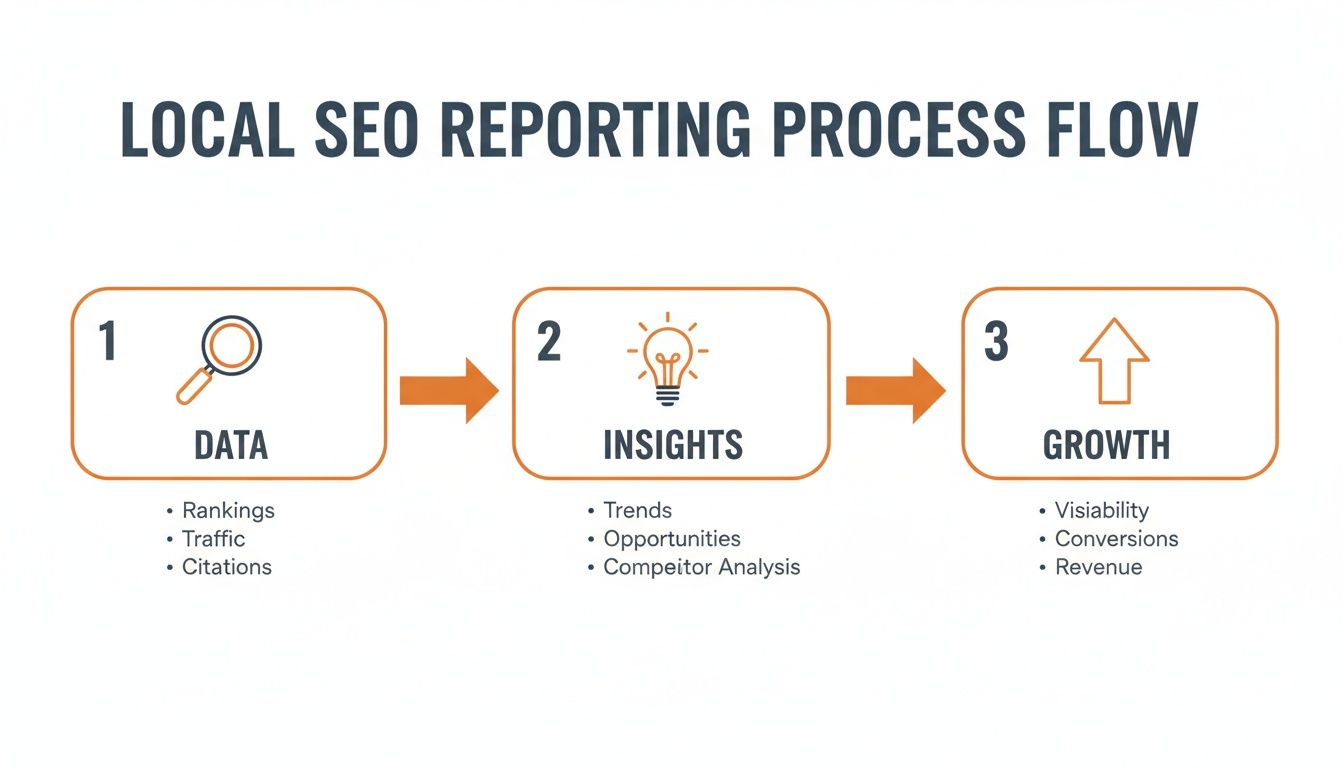
Step 4: Automate and Tailor Your Reports
When managing multiple locations, manual reporting is a bottleneck. Use a dashboard tool that can automate data collection and create tailored reports for different audiences.
- Executive Summary (Monthly): A high-level view for leadership focusing on brand-wide ROI, lead growth, and average star rating.
- Regional Performance View (Monthly): For regional managers to compare locations, spot top performers, and identify sites needing support.
- Location-Level Action Report (Weekly): A granular report for practice or store managers focused on immediate tasks like responding to new reviews.
3. Templates, Scripts & Checklists
Great local SEO reporting spots opportunities. These templates and checklists help you act on them immediately to improve your online reputation.
Scripts for Requesting Customer Reviews
The easiest way to get more reviews is to ask consistently and make it simple for the customer.
SMS Review Request Script (For a Med Spa)
"Hi [Patient Name], this is [Staff Name] from [Spa Name]. We hope you enjoyed your treatment today! If you have a moment, would you mind sharing your experience on Google? It really helps others discover our spa. [Link to Google Review Page]"
Email Review Request Script (For an HVAC Company)
Subject: How was your service from [Company Name]?
Hi [Customer Name],
Thank you for choosing [Company Name] for your recent HVAC service. Our team works hard to provide reliable and professional service, and your feedback is crucial.
Would you be willing to take a minute to leave us a review on Google? Your experience helps other homeowners in the [City] area find trusted service.
You can leave your review here: [Link to Google Review Page]
Thank you for your time and your business.
Sincerely,
The Team at [Company Name]
Review Response Templates
Responding to every review shows you’re listening.
Positive Review Response (5-Stars)
"Thank you so much, [Customer Name]! We're thrilled to hear you had a great experience with our technician and that your [mention specific service] was completed to your satisfaction. We look forward to serving you again at our [Neighborhood] location!"
Negative Review Response (1-2 Stars)
"[Customer Name], thank you for bringing this to our attention. We are very sorry to hear that your experience did not meet your expectations. We want to understand what happened. Please contact our manager, [Manager Name], directly at [phone number] or [email address] so we can make things right."
7-Day Review Program Launch Checklist
Use this simple plan to get your review engine running in one week.
| Day | Action Item | Goal |
|---|---|---|
| 1 | Set Goals & Pick a Tool | Decide on a KPI, like "increase new reviews by 20% this quarter." Choose a tool to automate requests. |
| 2 | Customize Your Scripts | Tweak the SMS and email templates to fit your brand voice and add your review links. |
| 3 | Train Your Team | Run a quick 15-minute meeting with front-desk staff. Explain the why and show them the how. |
| 4 | Configure Alerts | Set up your software to instantly notify the right person when a new review comes in. |
| 5 | Do a Test Run | Send a few test requests internally to ensure the process is smooth and links work. |
| 6 | Go Live! | Start sending review requests to all eligible customers today. |
| 7 | Review and Respond | Check for the first batch of new reviews. Use your response templates to reply promptly. |
Quick Checklist for Optimizing Your Google Business Profile
- Verify NAP: Ensure your Name, Address, and Phone number are 100% accurate for every location.
- Select Categories: Choose the most specific primary category (e.g., "Veterinarian" not "Pet Services") and add all relevant secondary categories.
- Write a Full Description: Use all 750 characters to highlight key services and the neighborhoods you serve.
- Upload Photos Weekly: Add recent, high-quality photos of your team, location, and work.
- Enable Messaging: Allow customers to contact you directly from your profile.
- Use Google Posts: Share weekly updates, promotions, and news to signal activity.
- Build Your Q&A: Proactively add and answer common questions about your services.
4. How to Measure Success & ROI
Your local SEO report must ultimately answer: "Was our investment worth it?" This means connecting your online efforts to your bottom line.
Setting Clear Targets
Vague goals lead to vague results. Set specific, measurable targets for your team.
- Review Volume & Recency: Generate at least 10 new reviews per location per month.
- Average Star Rating: Maintain a 4.5+ star rating across all platforms.
- Response Time: Respond to 95% of all new reviews within 24 hours.
- GBP Views/Calls: Increase calls from Google Business Profile by 15% quarter-over-quarter.
- Lead-to-Sale Conversion: Achieve a 5% conversion rate from website forms originating from your GBP.
Setting targets like these gives your local SEO reporting a clear purpose. You can learn more about how to optimize your Google Business Profile to hit these numbers.
Tracking Conversions with UTMs
Urchin Tracking Modules (UTMs) are snippets of code you add to a URL to track its source. This is the single best way to prove the value of your GBP.
Use Google's free Campaign URL Builder to create a unique URL for the website link in your Google Business Profile. For example, you can set the source to google, the medium to organic, and the campaign to gbp_main_listing.
Once that tagged link is on your profile, your GA4 reports will show you exactly how many people clicked from your profile and what they did on your site. You can track how many of those clicks turned into a phone call, a form submission, or a booking. This is how you connect your reputation management to tangible revenue, a critical capability for our partners in healthcare and home services.
5. Frequently Asked Questions (FAQ)
1. What is local SEO reporting?
Local Search Engine Optimization (SEO) reporting is the process of tracking and analyzing data to measure how well a business's online presence attracts local customers. It focuses on metrics from platforms like Google Business Profile to show how online visibility translates into real-world actions like calls, bookings, and store visits.
2. How often should I run local SEO reports?
A monthly reporting cadence is ideal for most businesses. It provides enough data to spot meaningful trends without getting lost in daily fluctuations. For location managers, a simple automated weekly report focusing on new reviews can be very effective for driving action.
3. What are the most important KPIs to track?
Focus on action-oriented KPIs. The most important are: phone calls from your Google Business Profile, driving directions requests, website clicks from your profile, new review volume, average star rating, and conversion rate from local search traffic on your website.
4. How do you prove ROI from "near me" searches?
The best method is to use UTM-tagged URLs in your Google Business Profile's website link. This allows you to track users from your profile into Google Analytics, where you can see how many of them complete a goal, such as submitting a form or making a purchase. This directly connects local search visibility to revenue.
5. My metrics are flat. What should I do?
If your report shows stagnant numbers, use it as a diagnostic tool. First, review your own activity: have you been consistently posting updates and responding to reviews? Second, analyze your competitors: have they recently ramped up their local SEO efforts? Stagnant metrics are often a sign to refresh your strategy, not abandon it.
If you’re ready to connect your local performance to real business outcomes with month-to-month support, book a strategy call with our team.


