
Local listings management ensures your business information—Name, Address, and Phone (NAP)—is accurate and consistent everywhere online. For busy operators, this isn't just an IT task; it's a direct driver of conversions. Consistent listings build trust with Google, making it more likely to show your business to customers searching "near me," which translates directly into more calls, messages, and bookings.
Key Facts
- What it is: The process of ensuring a business's Name, Address, Phone number (NAP), and hours are accurate and consistent across all online directories, apps, and maps.
- Why it matters: Inconsistent information erodes trust with search engines like Google, hurting your rank in local search results and the coveted Maps Pack.
- The Payoff: Accurate listings directly lead to more customer actions, including phone calls, website clicks, and requests for driving directions.
- Google's Model: Google ranks local businesses based on three main factors: Proximity (how close you are to the searcher), Relevance (how well your listing matches the search), and Prominence (how well-known your business is online).
- Top Platforms: Google Business Profile is the most critical platform, followed by Apple Maps, Bing Places, and Yelp.
Step-by-Step Guide: How to Manage Your Local Listings
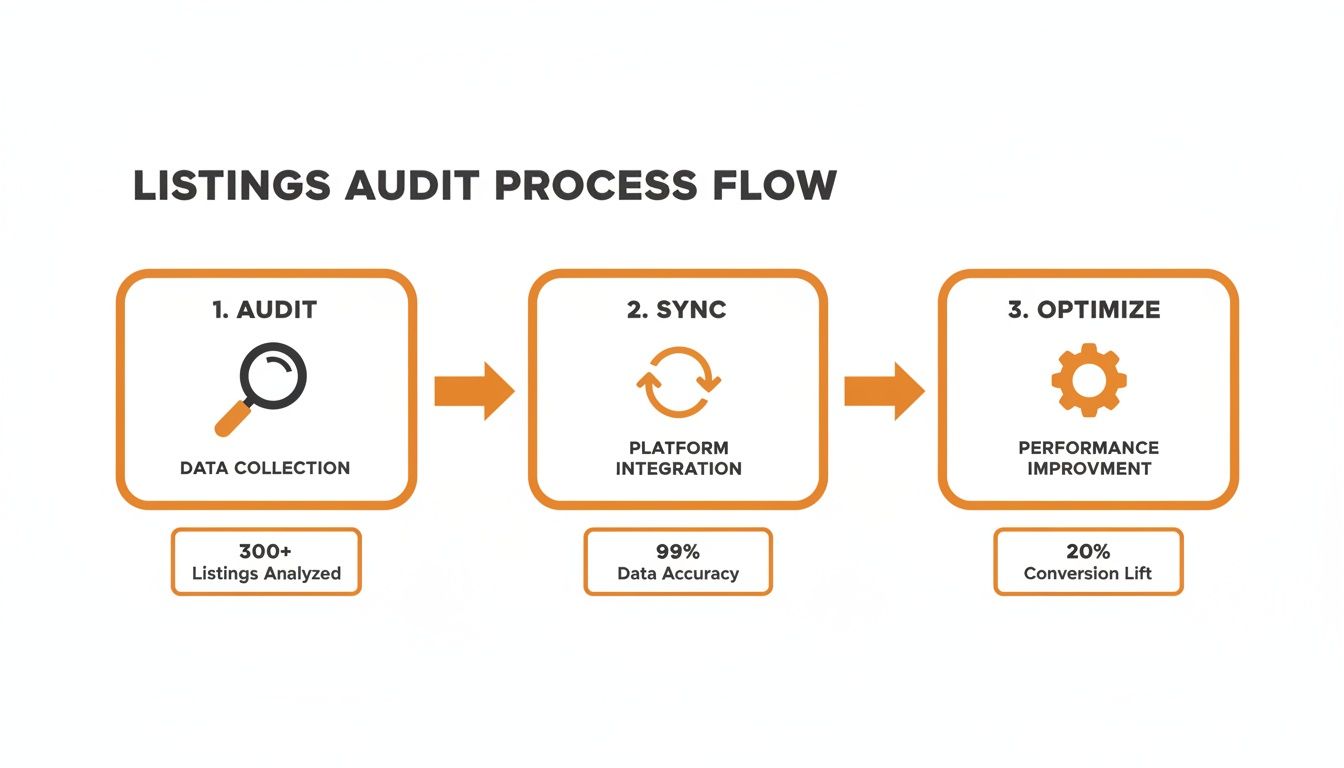
Taking control of your online presence is a methodical process of auditing, optimizing, and engaging. The goal is to create a single, authoritative source of truth for all your business data. You want to ensure that information is perfectly consistent everywhere a customer might find you, from the bustling [City] metro area to a quiet [Neighborhood] suburb.
Step 1: Audit and Optimize Your Google Business Profile
Your Google Business Profile (GBP) is your most valuable digital asset. For a multi-location business—like a dental service organization (DSO) or an HVAC franchise—every single location needs to be flawless. An unmanaged or inconsistent GBP isn't just a missed opportunity; it's a liability that's actively costing you business.
Before you can optimize, you need a deep-dive audit to reveal inconsistencies, unclaimed profiles, and hidden opportunities. Here's a practical checklist to guide you through the audit and optimization for each location:
- Claim & Verify Ownership: Ensure you have secure ownership of every profile. Unclaimed listings are an open invitation for unauthorized edits.
- Lock Down Your NAP: Your Name, Address, and Phone number must be 100% identical to what's on your website. Tiny details like "St." vs. "Street" or "Suite" vs. "#" matter.
- Select Your Primary Category: This is a powerful ranking factor. Choose the most specific category that describes your core business (e.g., "Orthodontist," not just "Dentist").
- Add Secondary Categories: Add 3-5 other relevant categories that cover your other services. An auto shop with a primary category of "Auto Repair Shop" should also add "Oil Change Station" and "Brake Shop."
- Upload High-Quality Photos: Aim for at least 10 recent, high-resolution photos showing your exterior, interior, team, and services. Add new photos quarterly to signal that your business is active.
- Turn on Messaging: This allows customers to contact you directly from your listing. Be prepared to respond within a few hours.
- Seed the Q&A Section: Proactively add and answer your most frequently asked questions. A senior living community, for instance, could answer questions about tour availability or pet policies.
Step 2: Expand to Other Key Directories
Once your Google profiles are buttoned up, apply the same detail to other high-value platforms. While Google is the giant, ignoring other players is a mistake. Focus on the platforms that drive the most results: Google, Apple Maps, Bing Places, and Yelp. They aren't just direct sources of leads; they're also powerful citation sources that build Google's trust in your business information.
Step 3: Use Google Posts to Stay Active
Think of Google Posts as free, hyper-local ads on your business profile. Use them to share weekly promotions, helpful tips, or highlight customer reviews. A consistent posting schedule keeps your profile looking fresh and tells Google your business is current and relevant.
This proactive approach is a core part of a broader strategy to fully optimize your Google Business Profile for maximum impact.
Templates & Checklists for Your Review Program
Active listings management includes generating a steady stream of reviews. This not only builds trust with customers but also significantly boosts your "prominence" in Google's eyes. These templates and checklists take the guesswork out of building a successful review program.
Compliant Review Request Scripts
Getting the language right is non-negotiable, especially in regulated industries like healthcare. For a med spa, for instance, you absolutely cannot mention specific treatments or any Protected Health Information (PHI).
SMS Request Script (Med Spa Example)
Hi [Client Name], this is [Staff Name] from [Med Spa Name]. We loved seeing you today! Would you mind sharing your experience with our team? It helps others in the [City] area find us. [Link to Google Review]
Email Request Script (Dental Practice Example)
Subject: How was your visit to [Dental Practice Name]?
Hi [Patient Name],
Thank you for choosing us for your dental care. We're always working to improve, and your feedback is incredibly valuable to our team.
Would you be willing to take 60 seconds to leave us a review on Google? Your experience helps prospective patients in [Neighborhood] feel confident in choosing our practice.
[Click Here to Leave Your Review]
We appreciate your time and look forward to seeing you at your next appointment.
Sincerely,
The Team at [Dental Practice Name]
Professional Review Response Templates
How you reply to reviews is just as important as asking for them. Your responses are public and send a powerful signal to potential customers about how you handle feedback.
Template for a Positive Review
Hi [Reviewer Name], thank you so much for taking the time to share your positive experience! We're thrilled to hear that our team at the [City] location took great care of you. We'll be sure to pass your kind words along. We look forward to seeing you again soon!
Template for a Negative Review
Hi [Reviewer Name], thank you for bringing this to our attention. We are sorry to hear that your experience did not meet your expectations. Providing excellent service is our top priority, and we would appreciate the opportunity to learn more. Please contact our practice manager, [Manager Name], at [Phone Number] or [Email Address] at your convenience.
Your 7-Day Review Program Launch Checklist
A structured launch is a smooth launch. This timeline helps you get organized and start seeing new reviews come in fast. For the bigger picture, our complete local SEO checklist shows how reviews fit into your overall strategy.
- Day 1: Setup & Goal Setting: Choose your review management software and set initial KPIs (e.g., 5-10 new reviews per location/month, 4.5-star average rating).
- Day 2: Customize Templates: Finalize and approve your SMS/email request scripts and your positive/negative response templates.
- Day 3: Train Your Team: Hold a quick meeting to walk through the new process and clarify who is responsible for sending requests and responding to reviews.
- Day 4: Integrate Systems: Connect your review software to your CRM or scheduling system to automate requests.
- Day 5: Send a Test Batch: Send requests to 5-10 recent, happy customers to test the workflow and check for technical glitches.
- Day 6: Respond to Initial Reviews: As test reviews come in, use your new templates to respond within 24 hours.
- Day 7: Full Launch: Activate the automated workflow for all eligible customers going forward and schedule a weekly check-in to monitor progress.
How to Measure the ROI of Your Local Listings

Managing listings is only worth it if you can see the payoff. By tracking key performance indicators (KPIs), you can connect your online presence to the calls, bookings, and appointments that grow your business.
The most direct way to prove value is by tracking how people move from a Google Business Profile to your website using UTM parameters. UTMs are small code snippets added to a URL that tell Google Analytics exactly where a visitor came from.
To set this up, use Google's Campaign URL Builder to create a tagged link for your website field in GBP. Use utm_source=google, utm_medium=organic, and utm_campaign=gbp_listing. This allows you to isolate traffic from your GBP and see exactly how many users completed a goal, like filling out a contact form. To dive deeper, learn how to measure marketing ROI effectively.
Key Metrics and Realistic Targets
Knowing what to track is half the battle. For any multi-location business, getting this data into a centralized dashboard lets you compare performance across regions and spot opportunities.
| Metric | What It Measures | Recommended Target |
|---|---|---|
| New Review Volume | The number of new reviews per location. | 5-10 new reviews per location, per month. |
| Average Star Rating | Your overall customer satisfaction score. | Maintain a 4.5-star rating or higher. |
| Review Response Time | How quickly your team replies to reviews. | Respond to all reviews within 24 hours. |
| GBP Views & Searches | How often your profile appears in search and maps. | Aim for 10-15% month-over-month growth in views. |
| Website Clicks (UTM) | The number of users clicking to your site from GBP. | Track this as a baseline and aim for steady growth. |
| Phone Calls from GBP | Direct calls initiated from your listing. | Track volume and tie it to appointment conversion rates. |
| Lead-to-Sale Conversion | The percentage of leads that become customers. | Establish a baseline and aim to improve it by 5% quarterly. |
These targets provide clear benchmarks for success and help justify your marketing spend. Strong reputation management is key to hitting these numbers.
If tracking all of this sounds like a full-time job, we can help. Our team provides month-to-month support and clear reports showing exactly how your listings are performing. To see how we can prove your ROI, book a strategy call with our experts.
Local Listings Management FAQ
Here are concise answers to the most common questions from busy local and multi-location operators.
1. What is local listings management?
Local listings management is the process of updating and maintaining accurate business information—Name, Address, Phone number (NAP), and hours—across online directories, apps, and mapping services. Its goal is to ensure consistency, which improves local search rankings and helps customers find you.
2. How often should I update my local listings?
You should review your core information quarterly and make updates the moment anything changes. This includes holiday hours, new services, or a change in phone number. Add fresh photos every 3-4 months to keep your profile active and engaging.
3. What is the difference between local listings management and local SEO?
Local listings management is a foundational component of local Search Engine Optimization (SEO). Listings management focuses specifically on data accuracy and consistency. Local SEO is a broader strategy that also includes on-page SEO for your website, review generation, local link building, and creating location-specific content. You cannot have good local SEO without solid listings management.
4. Can I manage listings for 20+ locations without software?
While technically possible, it is not practical. Manually managing 20+ locations across even 10 directories means tracking over 200 individual profiles, which is highly inefficient and prone to human error. A listings management platform is essential for maintaining accuracy and consistency at scale.
5. How long does it take to see results after fixing my listings?
You can expect to see initial results within 30 to 90 days. Changes made directly to your Google Business Profile can impact your visibility in a few days. It takes longer for that corrected data to sync across the entire ecosystem of other directories, with broader improvements appearing after 4-12 weeks.
6. What is the biggest mistake businesses make with their listings?
The single most damaging mistake is having inconsistent NAP information. Variations in your business name, address, or phone number across different websites create conflicting signals for Google, eroding its trust in your data and directly hurting your ability to rank in "near me" searches.
7. Why does Google care about Proximity, Relevance, and Prominence?
This is Google's three-part model for ranking local search results to give users the best answer:
- Proximity: How physically close your business is to the person searching.
- Relevance: How well your business category and services match what the person is looking for.
- Prominence: How well-known and trusted your business is, based on factors like online reviews, backlinks, and the consistency of your listing information across the web.
Juggling dozens of listings while trying to run a business is a tough act. At Reviews To The Top, we provide the platform and the hands-on expertise to ensure your online presence stays accurate and active, so you can focus on your customers. Our month-to-month support makes it simple to get started. See how we can help you turn local searches into sales.


